

424
Chapter 14 See the World in 3D
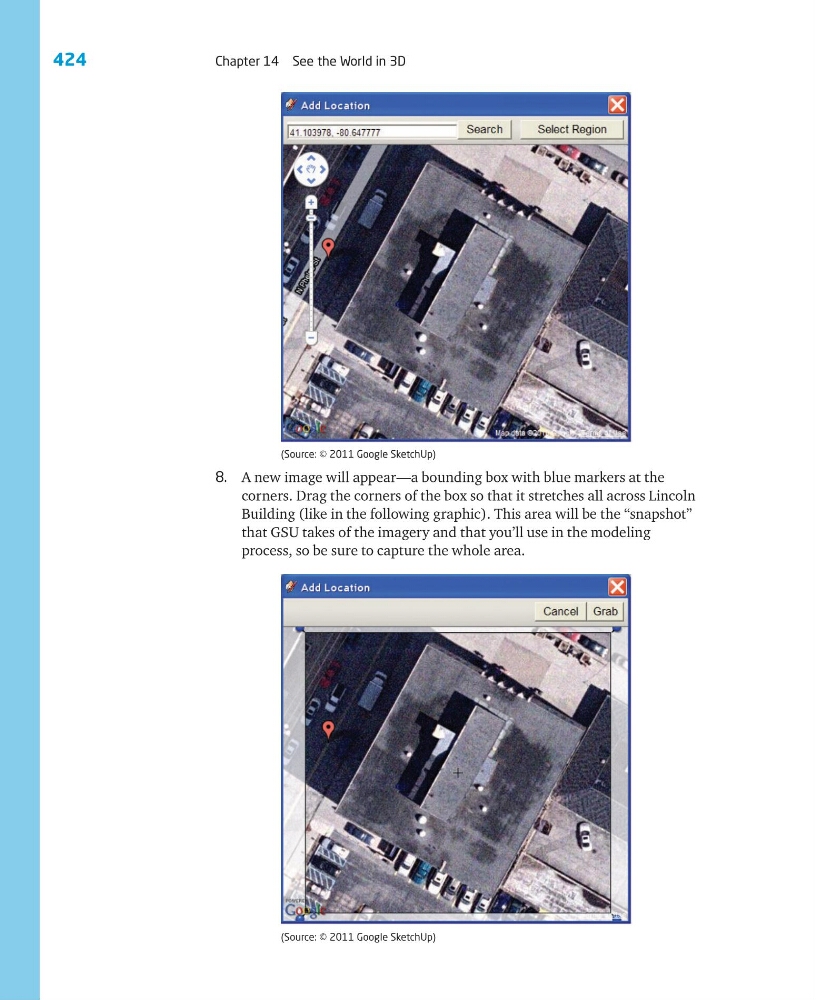
8. A new image will appear—a bounding box with blue markers at the
corners. Drag the corners of the box so that it stretches all across Lincoln
Building (like in the following graphic). This area will be the “snapshot”
that GSU takes of the imagery and that you’ll use in the modeling
process, so be sure to capture the whole area.
(Source: © 2011 Google SketchUp)
(Source: © 2011 Google SketchUp)
Chapter 14 See the World in 3D
8. A new image will appear—a bounding box with blue markers at the
corners. Drag the corners of the box so that it stretches all across Lincoln
Building (like in the following graphic). This area will be the “snapshot”
that GSU takes of the imagery and that you’ll use in the modeling
process, so be sure to capture the whole area.
(Source: © 2011 Google SketchUp)
(Source: © 2011 Google SketchUp)