

409
What Is 3D Modeling?
terrain modeling in order to design more realistic 3D visualizations (some
specific programs that do this are described later in this chapter).
Once the footprints and elevations are correctly set in place, it’s time to
start making those gray blocks look like what you’re trying to model. A block
consists of several faces, with each face representing one side of the object.
For example, an extruded rectangular block would have six faces—the top,
bottom, and four sides. Each face can be “painted” to give it a more realistic
appearance. This “painting” can take a variety of forms—simply changing the
color of the face (for instance, changing the appearance of a side of the house
to a yellow color) can add to its appearance.
More realistic appearances can be achieved by applying a texture to a
face. A texture is a graphic designed to simulate the appearance of materials
(like brick, wood, stone, glass, etc.) on a face. With textures, you don’t have to
draw individual bricks on the side of a building; just apply a red-brick texture
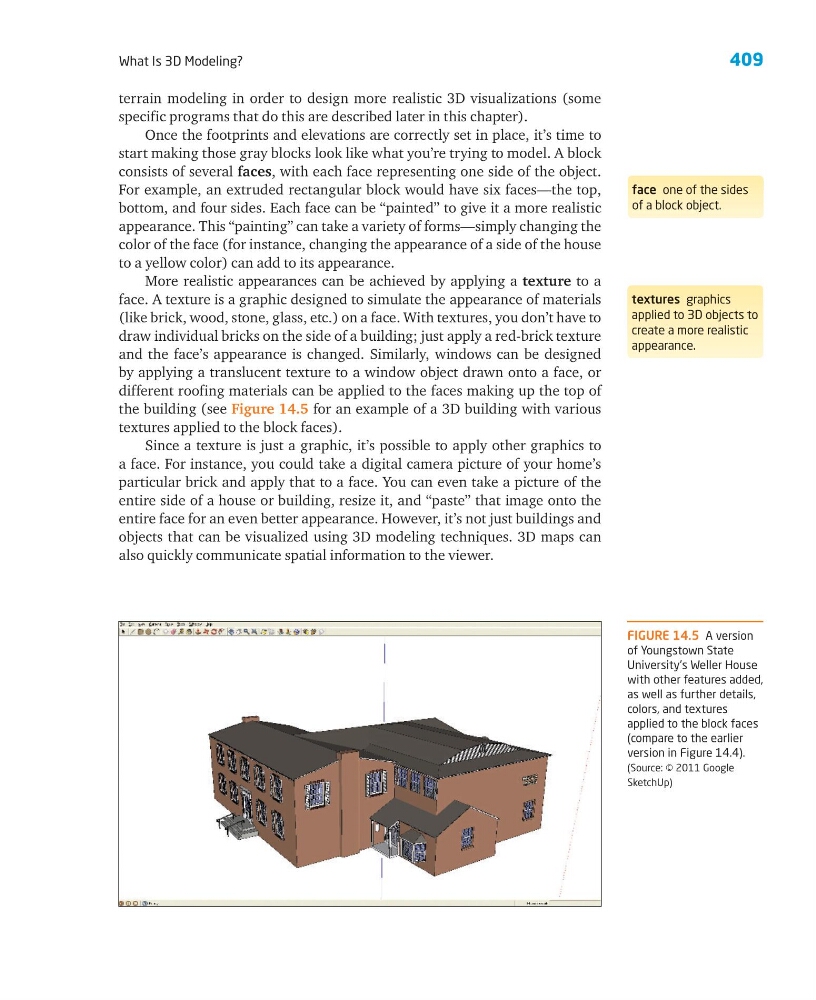
and the face’s appearance is changed. Similarly, windows can be designed
by applying a translucent texture to a window object drawn onto a face, or
different roofing materials can be applied to the faces making up the top of
the building (see Figure 14.5 for an example of a 3D building with various
textures applied to the block faces).
Since a texture is just a graphic, it’s possible to apply other graphics to
a face. For instance, you could take a digital camera picture of your home’s
particular brick and apply that to a face. You can even take a picture of the
entire side of a house or building, resize it, and “paste” that image onto the
entire face for an even better appearance. However, it’s not just buildings and
objects that can be visualized using 3D modeling techniques. 3D maps can
also quickly communicate spatial information to the viewer.
face one of the sides
of a block object.
textures graphics
applied to 3D objects to
create a more realistic
appearance.
FIGURE 14.5 A version
of Youngstown State
University’s Weller House
with other features added,
as well as further details,
colors, and textures
applied to the block faces
(compare to the earlier
version in Figure 14.4).
(Source: © 2011 Google
SketchUp)
What Is 3D Modeling?
terrain modeling in order to design more realistic 3D visualizations (some
specific programs that do this are described later in this chapter).
Once the footprints and elevations are correctly set in place, it’s time to
start making those gray blocks look like what you’re trying to model. A block
consists of several faces, with each face representing one side of the object.
For example, an extruded rectangular block would have six faces—the top,
bottom, and four sides. Each face can be “painted” to give it a more realistic
appearance. This “painting” can take a variety of forms—simply changing the
color of the face (for instance, changing the appearance of a side of the house
to a yellow color) can add to its appearance.
More realistic appearances can be achieved by applying a texture to a
face. A texture is a graphic designed to simulate the appearance of materials
(like brick, wood, stone, glass, etc.) on a face. With textures, you don’t have to
draw individual bricks on the side of a building; just apply a red-brick texture
and the face’s appearance is changed. Similarly, windows can be designed
by applying a translucent texture to a window object drawn onto a face, or
different roofing materials can be applied to the faces making up the top of
the building (see Figure 14.5 for an example of a 3D building with various
textures applied to the block faces).
Since a texture is just a graphic, it’s possible to apply other graphics to
a face. For instance, you could take a digital camera picture of your home’s
particular brick and apply that to a face. You can even take a picture of the
entire side of a house or building, resize it, and “paste” that image onto the
entire face for an even better appearance. However, it’s not just buildings and
objects that can be visualized using 3D modeling techniques. 3D maps can
also quickly communicate spatial information to the viewer.
face one of the sides
of a block object.
textures graphics
applied to 3D objects to
create a more realistic
appearance.
FIGURE 14.5 A version
of Youngstown State
University’s Weller House
with other features added,
as well as further details,
colors, and textures
applied to the block faces
(compare to the earlier
version in Figure 14.4).
(Source: © 2011 Google
SketchUp)