

344
Chapter 11 Images from Space
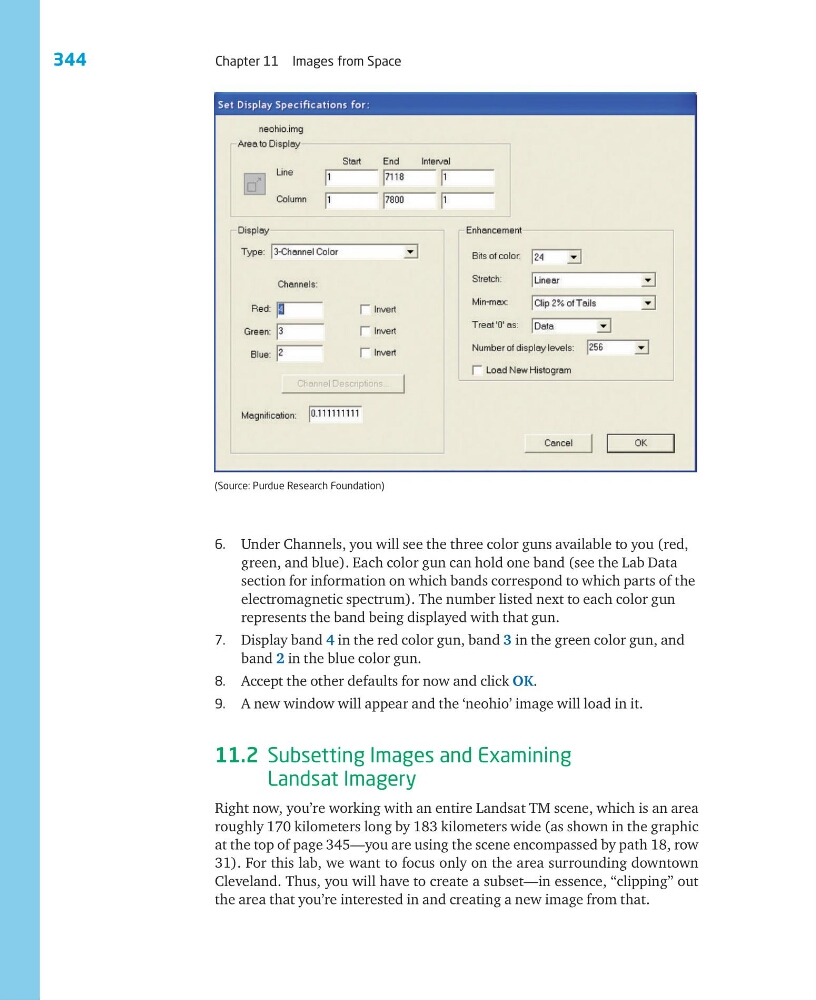
(Source: Purdue Research Foundation)
6. Under Channels, you will see the three color guns available to you (red,
green, and blue). Each color gun can hold one band (see the Lab Data
section for information on which bands correspond to which parts of the
electromagnetic spectrum). The number listed next to each color gun
represents the band being displayed with that gun.
7. Display band 4 in the red color gun, band 3 in the green color gun, and
band 2 in the blue color gun.
8. Accept the other defaults for now and click OK.
9. A new window will appear and the ‘neohio’ image will load in it.
11.2 Subsetting Images and Examining
Landsat Imagery
Right now, you’re working with an entire Landsat TM scene, which is an area
roughly 170 kilometers long by 183 kilometers wide (as shown in the graphic
at the top of page 345—you are using the scene encompassed by path 18, row
31). For this lab, we want to focus only on the area surrounding downtown
Cleveland. Thus, you will have to create a subset—in essence, “clipping” out
the area that you’re interested in and creating a new image from that.
Chapter 11 Images from Space
(Source: Purdue Research Foundation)
6. Under Channels, you will see the three color guns available to you (red,
green, and blue). Each color gun can hold one band (see the Lab Data
section for information on which bands correspond to which parts of the
electromagnetic spectrum). The number listed next to each color gun
represents the band being displayed with that gun.
7. Display band 4 in the red color gun, band 3 in the green color gun, and
band 2 in the blue color gun.
8. Accept the other defaults for now and click OK.
9. A new window will appear and the ‘neohio’ image will load in it.
11.2 Subsetting Images and Examining
Landsat Imagery
Right now, you’re working with an entire Landsat TM scene, which is an area
roughly 170 kilometers long by 183 kilometers wide (as shown in the graphic
at the top of page 345—you are using the scene encompassed by path 18, row
31). For this lab, we want to focus only on the area surrounding downtown
Cleveland. Thus, you will have to create a subset—in essence, “clipping” out
the area that you’re interested in and creating a new image from that.