

310
Chapter 10 How Remote Sensing Works
using this arrangement, a brown pixel can be seen on the screen, and after
inquiry, it’s discovered that the red gun (which has the near-infrared band)
has a value of 150, the green gun (which has the green band) has a value of
80, and the blue gun (which has the red band) has a value of 20. These values
correspond to the brightness values of their respective bands and are combined together to form that pixel color. If you change up the arrangement of
bands and guns, you may have different colors displayed on the screen, but
the actual brightness values will not have changed. Table 10.2 shows how the
display color will change depending on which band is being displayed with
which gun.
Note that while the pixel being displayed on the screen changed color
depending on what band was being displayed with a different gun, none of
the brightness values of that pixel were altered. Different band combinations
can reveal different information about objects in an image due to the varying
brightness values of the bands for those items.
Several different types of composites can be formed using the various
bands and guns. Whenever a composite has the red band displayed in the red
TABLE 10.2 Different combinations of brightness values for various bands
displayed with different color guns from different colors on
the screen
Red Value
Green Value
Blue Value
Color Formed
NIR Band (150)
Green Band (80)
Red Band (20)
Brown
Red Band (20)
Green Band (80)
NIR Band (150)
Deep Blue
Green Band (80)
NIR Band (150)
Red Band (20)
Green
Red Band (20)
NIR Band (150)
Green Band (80) Paler Green
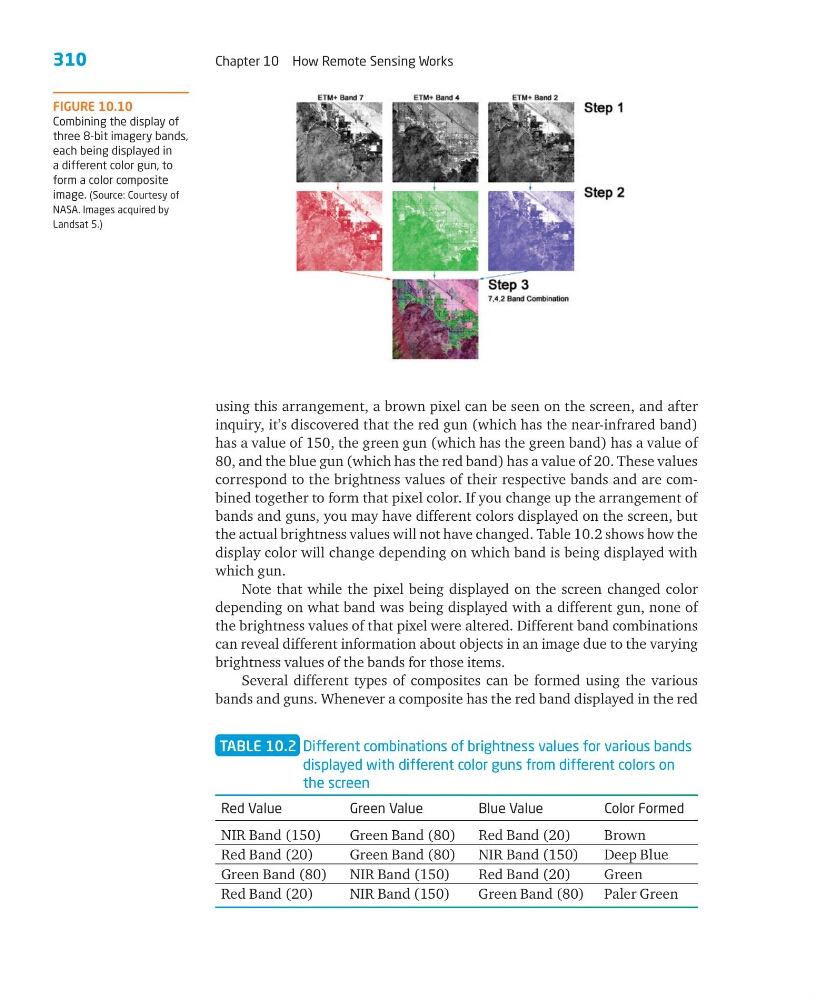
FIGURE 10.10
Combining the display of
three 8-bit imagery bands,
each being displayed in
a different color gun, to
form a color composite
image. (Source: Courtesy of
NASA. Images acquired by
Landsat 5.)
Chapter 10 How Remote Sensing Works
using this arrangement, a brown pixel can be seen on the screen, and after
inquiry, it’s discovered that the red gun (which has the near-infrared band)
has a value of 150, the green gun (which has the green band) has a value of
80, and the blue gun (which has the red band) has a value of 20. These values
correspond to the brightness values of their respective bands and are combined together to form that pixel color. If you change up the arrangement of
bands and guns, you may have different colors displayed on the screen, but
the actual brightness values will not have changed. Table 10.2 shows how the
display color will change depending on which band is being displayed with
which gun.
Note that while the pixel being displayed on the screen changed color
depending on what band was being displayed with a different gun, none of
the brightness values of that pixel were altered. Different band combinations
can reveal different information about objects in an image due to the varying
brightness values of the bands for those items.
Several different types of composites can be formed using the various
bands and guns. Whenever a composite has the red band displayed in the red
TABLE 10.2 Different combinations of brightness values for various bands
displayed with different color guns from different colors on
the screen
Red Value
Green Value
Blue Value
Color Formed
NIR Band (150)
Green Band (80)
Red Band (20)
Brown
Red Band (20)
Green Band (80)
NIR Band (150)
Deep Blue
Green Band (80)
NIR Band (150)
Red Band (20)
Green
Red Band (20)
NIR Band (150)
Green Band (80) Paler Green
FIGURE 10.10
Combining the display of
three 8-bit imagery bands,
each being displayed in
a different color gun, to
form a color composite
image. (Source: Courtesy of
NASA. Images acquired by
Landsat 5.)