

311
How Do You Display a Digital Remotely Sensed Image?
gun, the green band displayed in the green gun, and the blue band displayed
in the blue gun (the way natural colors would be shown), a true color composite is formed. A true color composite would look as if you would expect to
see a remotely sensed image as if you were looking down at the ground from
an airplane (that is, the trees would be green and the water would be blue).
Whenever the distribution of bands to guns deviates from this arrangement
(some other combination is used besides the true color one), a false color
composite is generated. For instance, all four of the combinations described
in Table 10.2 would result in false color composites as none of them display
the red band in the red gun, the green band in the green gun, and the blue
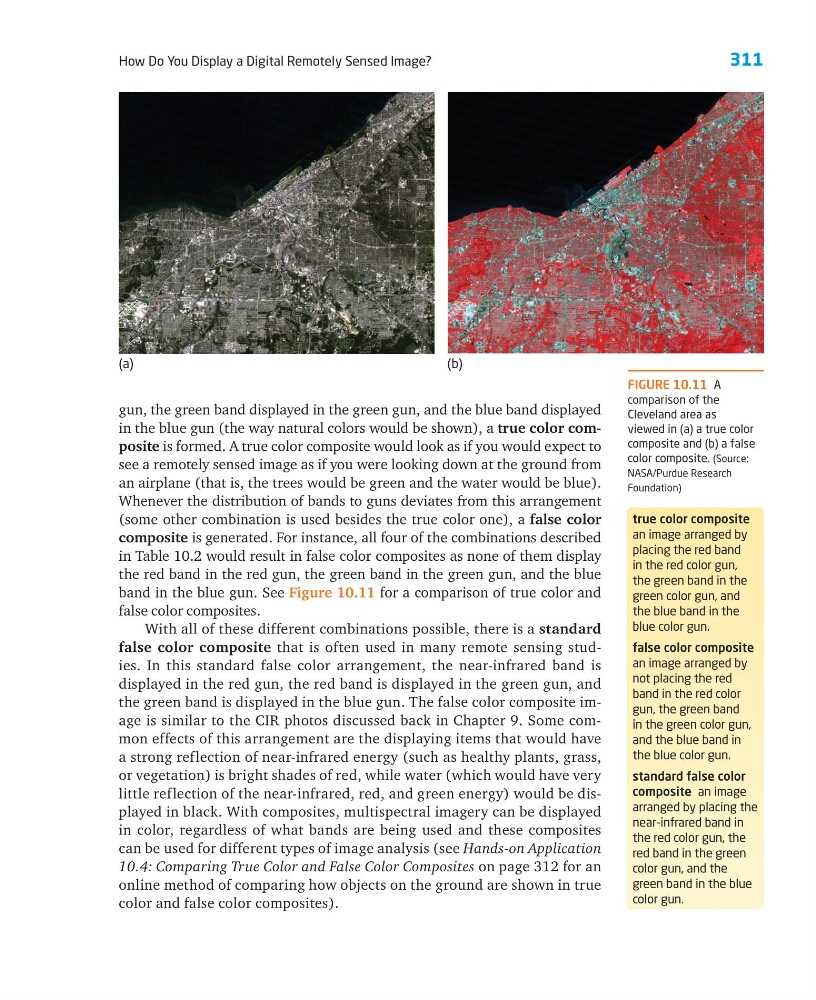
band in the blue gun. See Figure 10.11 for a comparison of true color and
false color composites.
With all of these different combinations possible, there is a standard
false color composite that is often used in many remote sensing studies. In this standard false color arrangement, the near-infrared band is
displayed in the red gun, the red band is displayed in the green gun, and
the green band is displayed in the blue gun. The false color composite image is similar to the CIR photos discussed back in Chapter 9. Some common effects of this arrangement are the displaying items that would have
a strong reflection of near-infrared energy (such as healthy plants, grass,
or vegetation) is bright shades of red, while water (which would have very
little reflection of the near-infrared, red, and green energy) would be displayed in black. With composites, multispectral imagery can be displayed
in color, regardless of what bands are being used and these composites
can be used for different types of image analysis (see Hands-on Application
10.4: Comparing True Color and False Color Composites on page 312 for an
online method of comparing how objects on the ground are shown in true
color and false color composites).
true color composite
an image arranged by
placing the red band
in the red color gun,
the green band in the
green color gun, and
the blue band in the
blue color gun.
false color composite
an image arranged by
not placing the red
band in the red color
gun, the green band
in the green color gun,
and the blue band in
the blue color gun.
standard false color
composite an image
arranged by placing the
near-infrared band in
the red color gun, the
red band in the green
color gun, and the
green band in the blue
color gun.
FIGURE 10.11 A
comparison of the
Cleveland area as
viewed in (a) a true color
composite and (b) a false
color composite. (Source:
NASA/Purdue Research
Foundation)
(a)
(b)
How Do You Display a Digital Remotely Sensed Image?
gun, the green band displayed in the green gun, and the blue band displayed
in the blue gun (the way natural colors would be shown), a true color composite is formed. A true color composite would look as if you would expect to
see a remotely sensed image as if you were looking down at the ground from
an airplane (that is, the trees would be green and the water would be blue).
Whenever the distribution of bands to guns deviates from this arrangement
(some other combination is used besides the true color one), a false color
composite is generated. For instance, all four of the combinations described
in Table 10.2 would result in false color composites as none of them display
the red band in the red gun, the green band in the green gun, and the blue
band in the blue gun. See Figure 10.11 for a comparison of true color and
false color composites.
With all of these different combinations possible, there is a standard
false color composite that is often used in many remote sensing studies. In this standard false color arrangement, the near-infrared band is
displayed in the red gun, the red band is displayed in the green gun, and
the green band is displayed in the blue gun. The false color composite image is similar to the CIR photos discussed back in Chapter 9. Some common effects of this arrangement are the displaying items that would have
a strong reflection of near-infrared energy (such as healthy plants, grass,
or vegetation) is bright shades of red, while water (which would have very
little reflection of the near-infrared, red, and green energy) would be displayed in black. With composites, multispectral imagery can be displayed
in color, regardless of what bands are being used and these composites
can be used for different types of image analysis (see Hands-on Application
10.4: Comparing True Color and False Color Composites on page 312 for an
online method of comparing how objects on the ground are shown in true
color and false color composites).
true color composite
an image arranged by
placing the red band
in the red color gun,
the green band in the
green color gun, and
the blue band in the
blue color gun.
false color composite
an image arranged by
not placing the red
band in the red color
gun, the green band
in the green color gun,
and the blue band in
the blue color gun.
standard false color
composite an image
arranged by placing the
near-infrared band in
the red color gun, the
red band in the green
color gun, and the
green band in the blue
color gun.
FIGURE 10.11 A
comparison of the
Cleveland area as
viewed in (a) a true color
composite and (b) a false
color composite. (Source:
NASA/Purdue Research
Foundation)
(a)
(b)