

265
Geocoding and Shortest Path Analysis: ArcGIS Version
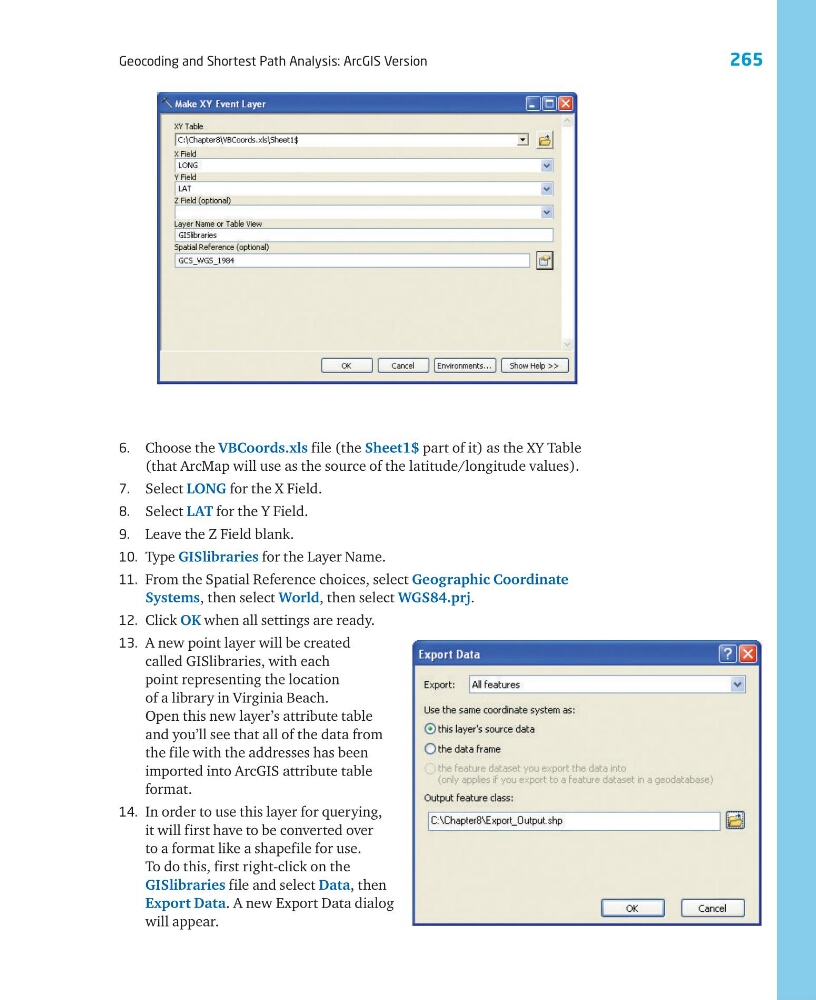
6. Choose the VBCoords.xls file (the Sheet1$ part of it) as the XY Table
(that ArcMap will use as the source of the latitude/longitude values).
7. Select LONG for the X Field.
8. Select LAT for the Y Field.
9. Leave the Z Field blank.
10. Type GISlibraries for the Layer Name.
11. From the Spatial Reference choices, select Geographic Coordinate
Systems, then select World, then select WGS84.prj.
12. Click OK when all settings are ready.
13. A new point layer will be created
called GISlibraries, with each
point representing the location
of a library in Virginia Beach.
Open this new layer’s attribute table
and you’ll see that all of the data from
the file with the addresses has been
imported into ArcGIS attribute table
format.
14. In order to use this layer for querying,
it will first have to be converted over
to a format like a shapefile for use.
To do this, first right-click on the
GISlibraries file and select Data, then
Export Data. A new Export Data dialog
will appear.
Geocoding and Shortest Path Analysis: ArcGIS Version
6. Choose the VBCoords.xls file (the Sheet1$ part of it) as the XY Table
(that ArcMap will use as the source of the latitude/longitude values).
7. Select LONG for the X Field.
8. Select LAT for the Y Field.
9. Leave the Z Field blank.
10. Type GISlibraries for the Layer Name.
11. From the Spatial Reference choices, select Geographic Coordinate
Systems, then select World, then select WGS84.prj.
12. Click OK when all settings are ready.
13. A new point layer will be created
called GISlibraries, with each
point representing the location
of a library in Virginia Beach.
Open this new layer’s attribute table
and you’ll see that all of the data from
the file with the addresses has been
imported into ArcGIS attribute table
format.
14. In order to use this layer for querying,
it will first have to be converted over
to a format like a shapefile for use.
To do this, first right-click on the
GISlibraries file and select Data, then
Export Data. A new Export Data dialog
will appear.