

206
Chapter 7 Using GIS to Make a Map
3. Select an appropriate north arrow and click OK. Use the cursor to
position or resize the north arrow on the layout.
7.8 Inserting a Legend
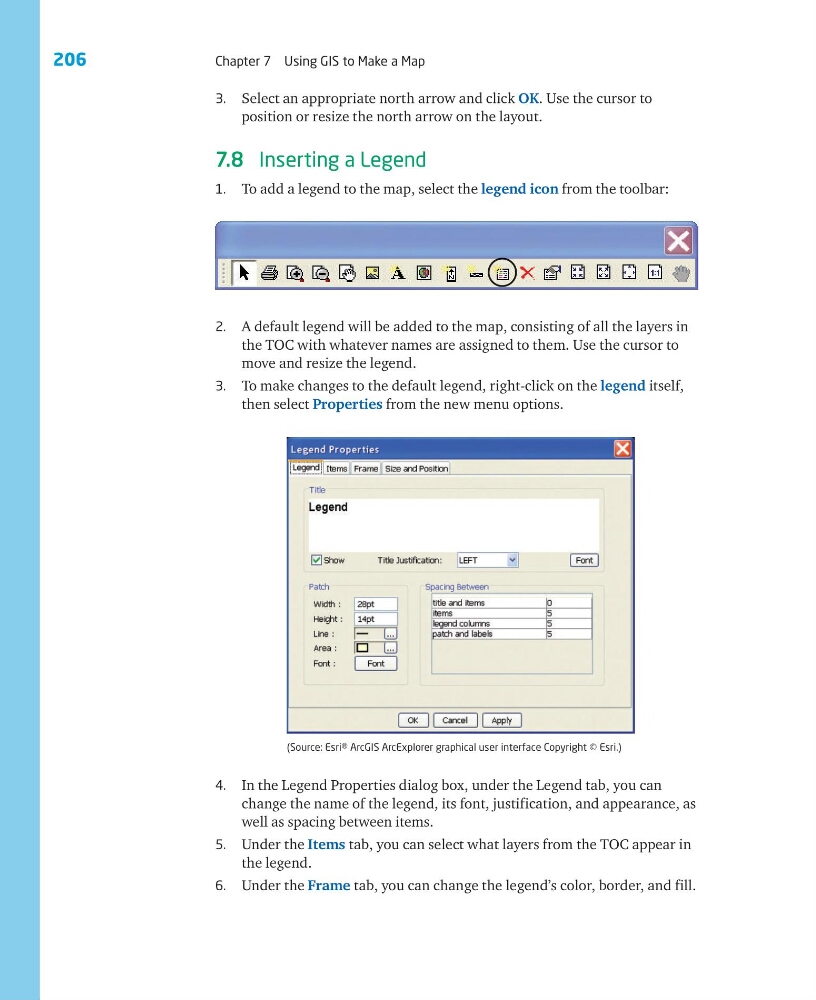
1. To add a legend to the map, select the legend icon from the toolbar:
2. A default legend will be added to the map, consisting of all the layers in
the TOC with whatever names are assigned to them. Use the cursor to
move and resize the legend.
3. To make changes to the default legend, right-click on the legend itself,
then select Properties from the new menu options.
4. In the Legend Properties dialog box, under the Legend tab, you can
change the name of the legend, its font, justification, and appearance, as
well as spacing between items.
5. Under the Items tab, you can select what layers from the TOC appear in
the legend.
6. Under the Frame tab, you can change the legend’s color, border, and fill.
(Source: Esri® ArcGIS ArcExplorer graphical user interface Copyright © Esri.)
Chapter 7 Using GIS to Make a Map
3. Select an appropriate north arrow and click OK. Use the cursor to
position or resize the north arrow on the layout.
7.8 Inserting a Legend
1. To add a legend to the map, select the legend icon from the toolbar:
2. A default legend will be added to the map, consisting of all the layers in
the TOC with whatever names are assigned to them. Use the cursor to
move and resize the legend.
3. To make changes to the default legend, right-click on the legend itself,
then select Properties from the new menu options.
4. In the Legend Properties dialog box, under the Legend tab, you can
change the name of the legend, its font, justification, and appearance, as
well as spacing between items.
5. Under the Items tab, you can select what layers from the TOC appear in
the legend.
6. Under the Frame tab, you can change the legend’s color, border, and fill.
(Source: Esri® ArcGIS ArcExplorer graphical user interface Copyright © Esri.)