

205
GIS Layouts: AEJEE Version
3. Select an appropriate scale bar and click OK. Use the cursor to position
or resize the scale bar on the layout.
7.7 Inserting a North Arrow
1. To add a north arrow to the map, select the north arrow icon from the
toolbar:
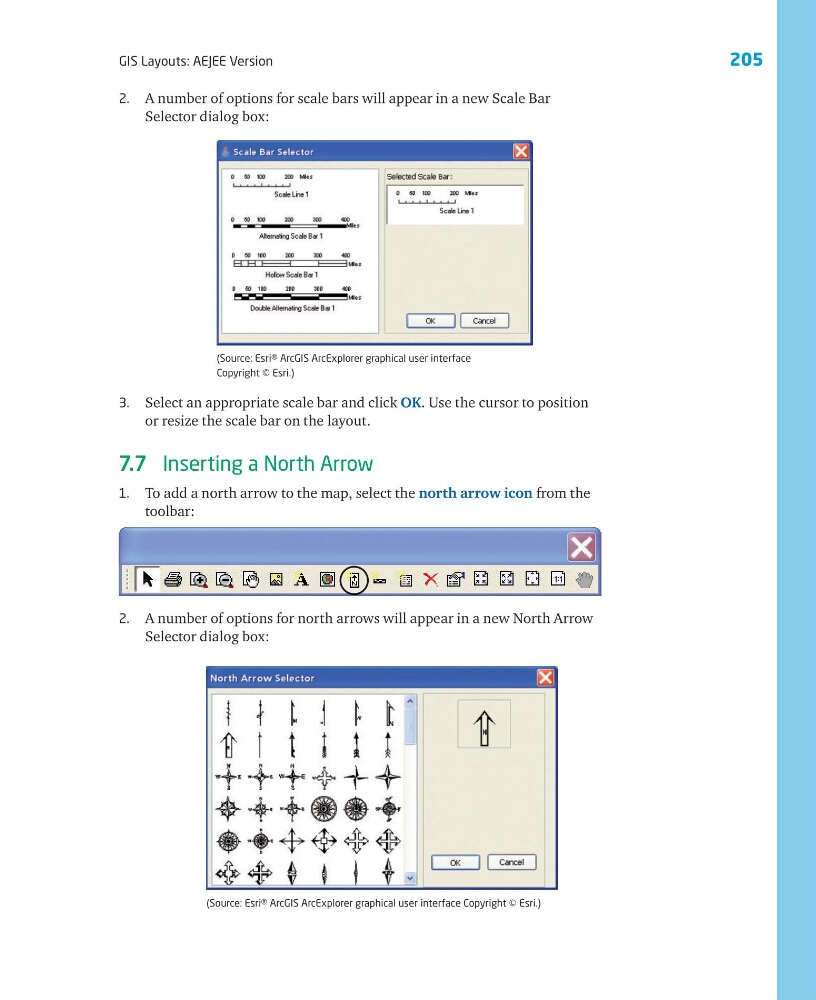
2. A number of options for north arrows will appear in a new North Arrow
Selector dialog box:
2. A number of options for scale bars will appear in a new Scale Bar
Selector dialog box:
(Source: Esri® ArcGIS ArcExplorer graphical user interface
Copyright © Esri.)
(Source: Esri® ArcGIS ArcExplorer graphical user interface Copyright © Esri.)
GIS Layouts: AEJEE Version
3. Select an appropriate scale bar and click OK. Use the cursor to position
or resize the scale bar on the layout.
7.7 Inserting a North Arrow
1. To add a north arrow to the map, select the north arrow icon from the
toolbar:
2. A number of options for north arrows will appear in a new North Arrow
Selector dialog box:
2. A number of options for scale bars will appear in a new Scale Bar
Selector dialog box:
(Source: Esri® ArcGIS ArcExplorer graphical user interface
Copyright © Esri.)
(Source: Esri® ArcGIS ArcExplorer graphical user interface Copyright © Esri.)