

177
GIS Spatial Analysis: ArcGIS Version
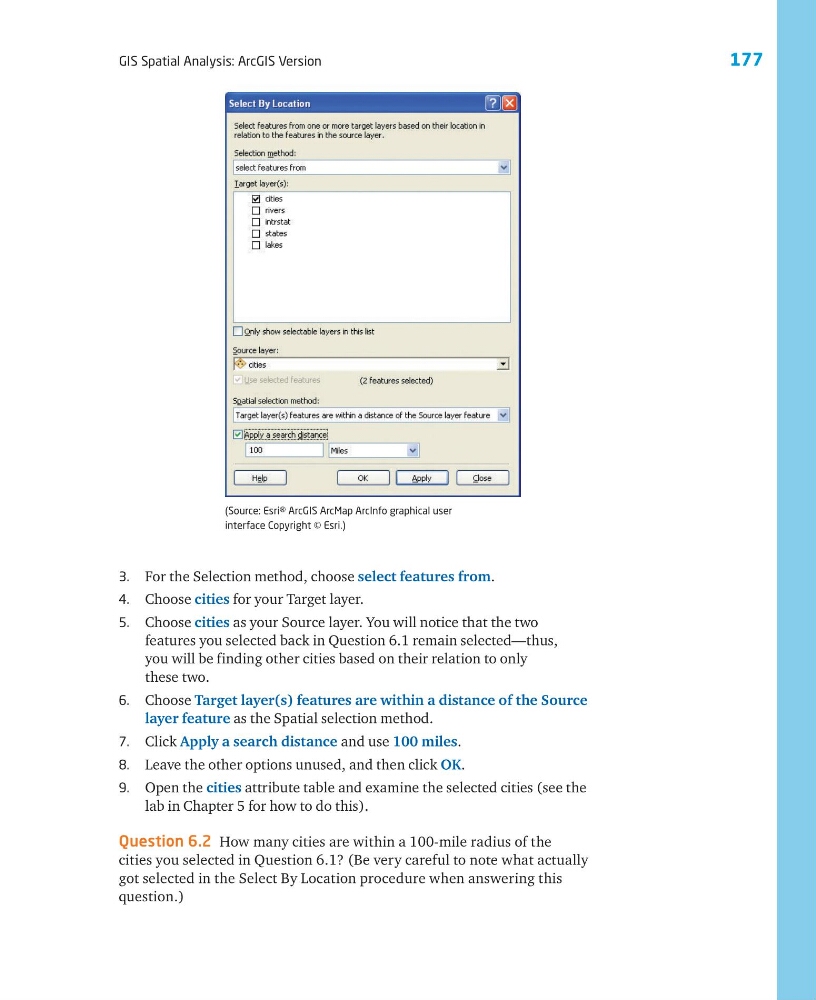
3. For the Selection method, choose select features from.
4. Choose cities for your Target layer.
5. Choose cities as your Source layer. You will notice that the two
features you selected back in Question 6.1 remain selected—thus,
you will be finding other cities based on their relation to only
these two.
6. Choose Target layer(s) features are within a distance of the Source
layer feature as the Spatial selection method.
7. Click Apply a search distance and use 100 miles.
8. Leave the other options unused, and then click OK.
9. Open the cities attribute table and examine the selected cities (see the
lab in Chapter 5 for how to do this).
Question 6.2 How many cities are within a 100-mile radius of the
cities you selected in Question 6.1? (Be very careful to note what actually
got selected in the Select By Location procedure when answering this
question.)
(Source: Esri® ArcGIS ArcMap ArcInfo graphical user
interface Copyright © Esri.)
GIS Spatial Analysis: ArcGIS Version
3. For the Selection method, choose select features from.
4. Choose cities for your Target layer.
5. Choose cities as your Source layer. You will notice that the two
features you selected back in Question 6.1 remain selected—thus,
you will be finding other cities based on their relation to only
these two.
6. Choose Target layer(s) features are within a distance of the Source
layer feature as the Spatial selection method.
7. Click Apply a search distance and use 100 miles.
8. Leave the other options unused, and then click OK.
9. Open the cities attribute table and examine the selected cities (see the
lab in Chapter 5 for how to do this).
Question 6.2 How many cities are within a 100-mile radius of the
cities you selected in Question 6.1? (Be very careful to note what actually
got selected in the Select By Location procedure when answering this
question.)
(Source: Esri® ArcGIS ArcMap ArcInfo graphical user
interface Copyright © Esri.)