

176
Chapter 6 Using GIS for Spatial Analysis
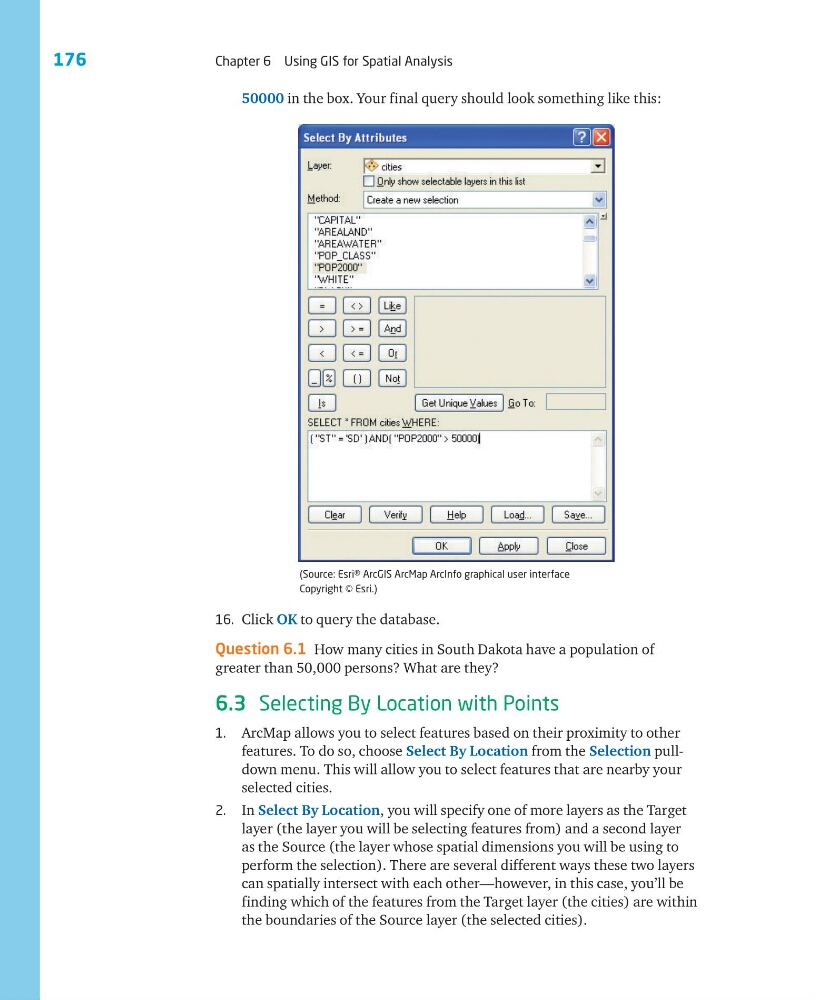
(Source: Esri® ArcGIS ArcMap ArcInfo graphical user interface
Copyright © Esri.)
16. Click OK to query the database.
Question 6.1 How many cities in South Dakota have a population of
greater than 50,000 persons? What are they?
6.3 Selecting By Location with Points
1. ArcMap allows you to select features based on their proximity to other
features. To do so, choose Select By Location from the Selection pulldown menu. This will allow you to select features that are nearby your
selected cities.
2. In Select By Location, you will specify one of more layers as the Target
layer (the layer you will be selecting features from) and a second layer
as the Source (the layer whose spatial dimensions you will be using to
perform the selection). There are several different ways these two layers
can spatially intersect with each other—however, in this case, you’ll be
finding which of the features from the Target layer (the cities) are within
the boundaries of the Source layer (the selected cities).
50000 in the box. Your final query should look something like this:
Chapter 6 Using GIS for Spatial Analysis
(Source: Esri® ArcGIS ArcMap ArcInfo graphical user interface
Copyright © Esri.)
16. Click OK to query the database.
Question 6.1 How many cities in South Dakota have a population of
greater than 50,000 persons? What are they?
6.3 Selecting By Location with Points
1. ArcMap allows you to select features based on their proximity to other
features. To do so, choose Select By Location from the Selection pulldown menu. This will allow you to select features that are nearby your
selected cities.
2. In Select By Location, you will specify one of more layers as the Target
layer (the layer you will be selecting features from) and a second layer
as the Source (the layer whose spatial dimensions you will be using to
perform the selection). There are several different ways these two layers
can spatially intersect with each other—however, in this case, you’ll be
finding which of the features from the Target layer (the cities) are within
the boundaries of the Source layer (the selected cities).
50000 in the box. Your final query should look something like this: