

178
Chapter 6 Using GIS for Spatial Analysis
6.4 Selecting By Location with Lines
1. To create some new selections, you should first clear (unselect) the
currently selected features. Click on the Clear Selected Features icon
on the toolbar:
All of the currently selected points will no longer be selected.
2. For this section, you’ll be using Select By Location with line features and
examining the spatial relations of other objects to these lines.
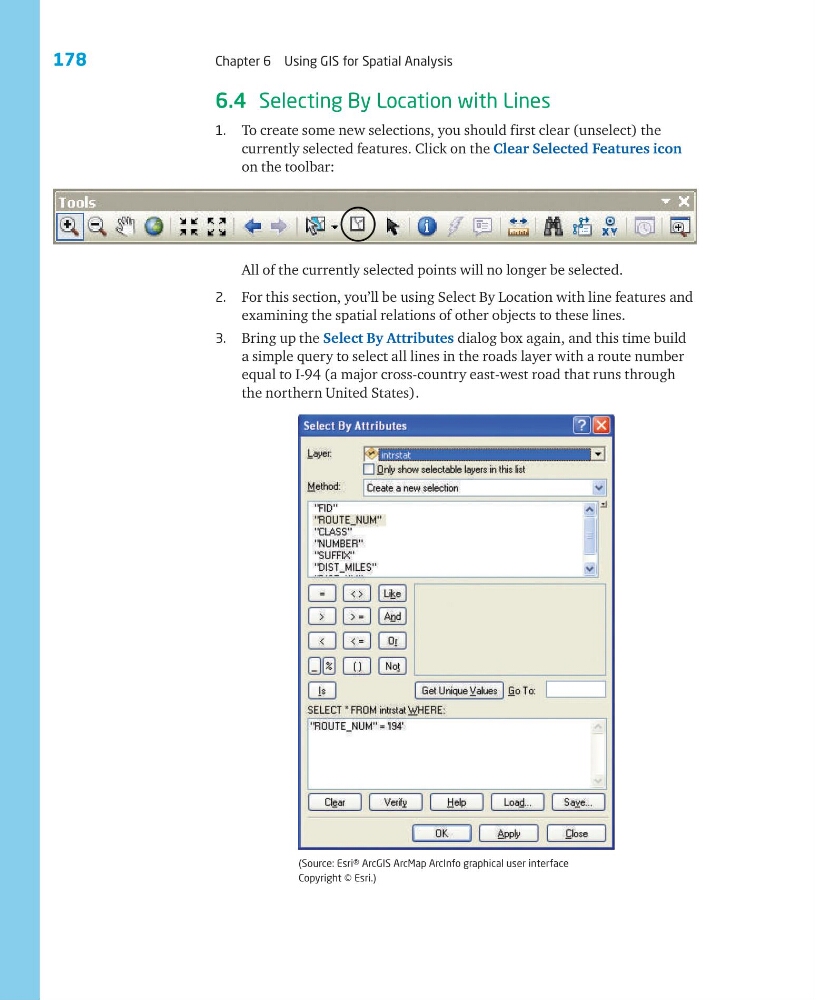
3. Bring up the Select By Attributes dialog box again, and this time build
a simple query to select all lines in the roads layer with a route number
equal to I-94 (a major cross-country east-west road that runs through
the northern United States).
(Source: Esri® ArcGIS ArcMap ArcInfo graphical user interface
Copyright © Esri.)
Chapter 6 Using GIS for Spatial Analysis
6.4 Selecting By Location with Lines
1. To create some new selections, you should first clear (unselect) the
currently selected features. Click on the Clear Selected Features icon
on the toolbar:
All of the currently selected points will no longer be selected.
2. For this section, you’ll be using Select By Location with line features and
examining the spatial relations of other objects to these lines.
3. Bring up the Select By Attributes dialog box again, and this time build
a simple query to select all lines in the roads layer with a route number
equal to I-94 (a major cross-country east-west road that runs through
the northern United States).
(Source: Esri® ArcGIS ArcMap ArcInfo graphical user interface
Copyright © Esri.)