

166
Chapter 6 Using GIS for Spatial Analysis
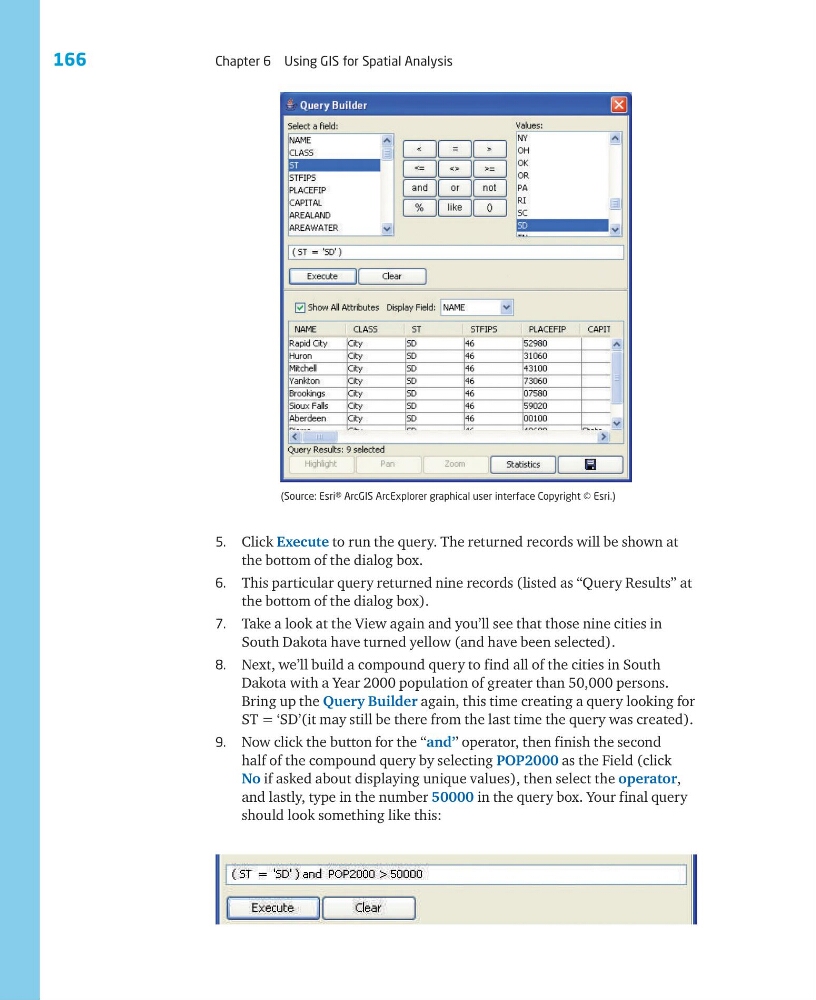
5. Click Execute to run the query. The returned records will be shown at
the bottom of the dialog box.
6. This particular query returned nine records (listed as “Query Results” at
the bottom of the dialog box).
7. Take a look at the View again and you’ll see that those nine cities in
South Dakota have turned yellow (and have been selected).
8. Next, we’ll build a compound query to find all of the cities in South
Dakota with a Year 2000 population of greater than 50,000 persons.
Bring up the Query Builder again, this time creating a query looking for
ST = ‘SD’(it may still be there from the last time the query was created).
9. Now click the button for the ‘‘and’’ operator, then finish the second
half of the compound query by selecting POP2000 as the Field (click
No if asked about displaying unique values), then select the operator,
and lastly, type in the number 50000 in the query box. Your final query
should look something like this:
(Source: Esri® ArcGIS ArcExplorer graphical user interface Copyright © Esri.)
Chapter 6 Using GIS for Spatial Analysis
5. Click Execute to run the query. The returned records will be shown at
the bottom of the dialog box.
6. This particular query returned nine records (listed as “Query Results” at
the bottom of the dialog box).
7. Take a look at the View again and you’ll see that those nine cities in
South Dakota have turned yellow (and have been selected).
8. Next, we’ll build a compound query to find all of the cities in South
Dakota with a Year 2000 population of greater than 50,000 persons.
Bring up the Query Builder again, this time creating a query looking for
ST = ‘SD’(it may still be there from the last time the query was created).
9. Now click the button for the ‘‘and’’ operator, then finish the second
half of the compound query by selecting POP2000 as the Field (click
No if asked about displaying unique values), then select the operator,
and lastly, type in the number 50000 in the query box. Your final query
should look something like this:
(Source: Esri® ArcGIS ArcExplorer graphical user interface Copyright © Esri.)