

6.4 Associative Memory Architecture
91
Word[0]
Word[1]
Word[N]
WORD
Memcell
Memcell
Memcell
Memcell
Memcell
Memcell
Memcell
Memcell
Memcell
WTA
WTA
WTA
Winner-Take-All Logic
SA
SA
SA
Search word based wordline selecƟon
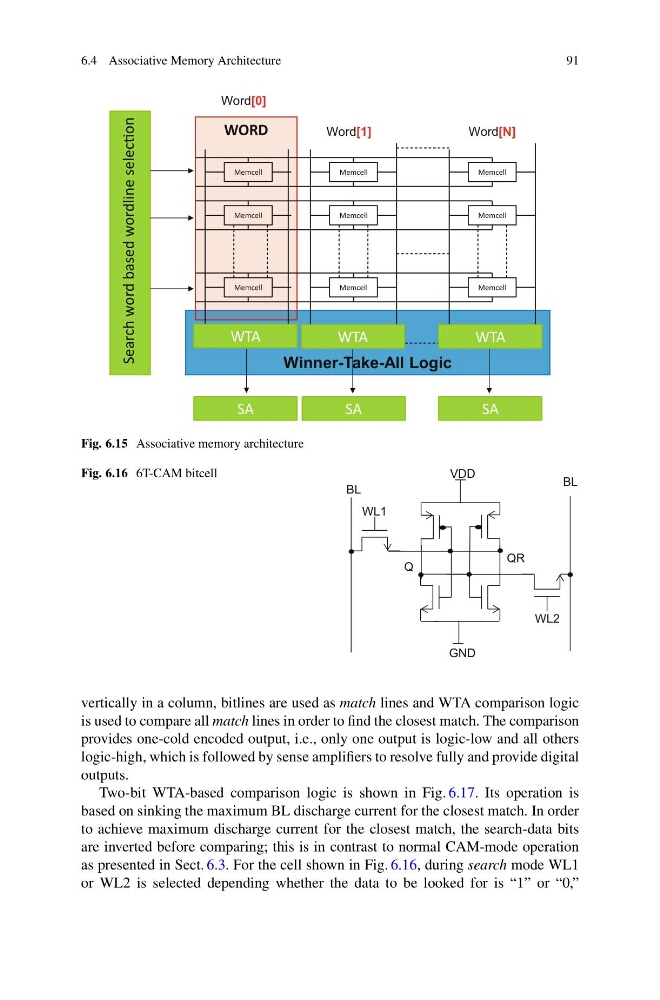
Fig. 6.15 Associative memory architecture
Fig. 6.16 6T-CAM bitcell
GND
VDD
WL1
QR
Q
WL2
BL
BL
vertically in a column, bitlines are used as match lines and WTA comparison logic
is used to compare all match lines in order to find the closest match. The comparison
provides one-cold encoded output, i.e., only one output is logic-low and all others
logic-high, which is followed by sense amplifiers to resolve fully and provide digital
outputs.
Two-bit WTA-based comparison logic is shown in Fig. 6.17. Its operation is
based on sinking the maximum BL discharge current for the closest match. In order
to achieve maximum discharge current for the closest match, the search-data bits
are inverted before comparing; this is in contrast to normal CAM-mode operation
as presented in Sect. 6.3. For the cell shown in Fig. 6.16, during search mode WL1
or WL2 is selected depending whether the data to be looked for is “1” or “0,”
91
Word[0]
Word[1]
Word[N]
WORD
Memcell
Memcell
Memcell
Memcell
Memcell
Memcell
Memcell
Memcell
Memcell
WTA
WTA
WTA
Winner-Take-All Logic
SA
SA
SA
Search word based wordline selecƟon
Fig. 6.15 Associative memory architecture
Fig. 6.16 6T-CAM bitcell
GND
VDD
WL1
QR
Q
WL2
BL
BL
vertically in a column, bitlines are used as match lines and WTA comparison logic
is used to compare all match lines in order to find the closest match. The comparison
provides one-cold encoded output, i.e., only one output is logic-low and all others
logic-high, which is followed by sense amplifiers to resolve fully and provide digital
outputs.
Two-bit WTA-based comparison logic is shown in Fig. 6.17. Its operation is
based on sinking the maximum BL discharge current for the closest match. In order
to achieve maximum discharge current for the closest match, the search-data bits
are inverted before comparing; this is in contrast to normal CAM-mode operation
as presented in Sect. 6.3. For the cell shown in Fig. 6.16, during search mode WL1
or WL2 is selected depending whether the data to be looked for is “1” or “0,”