

like those used by scientists. According to Ellermeijer et al. (1996), once pupils get
used to the data-logging tool, they can decide and reflect at any time about what to
measure, how to calibrate and what readings should be taken. This shows that such
participation in authentic inquiry with the data-logging tool will stimulate pupils to
comprehend scientific inquiry.
12.4.2 Coach Tool for Video Measurement
12.4.2.1 Characteristics
The Coach tool for video measurement enables pupils to conduct experiments in
which, for instance, position and time data of a moving object, registered in a digital
video, are collected in the successive video frames by mouse clicking. Among
different software, Coach includes common steps to gather real-life data from a
video. First, the user must define the video scale, time calibration and coordinate
system. The video clip is scaled by specifying which distance on the video screen
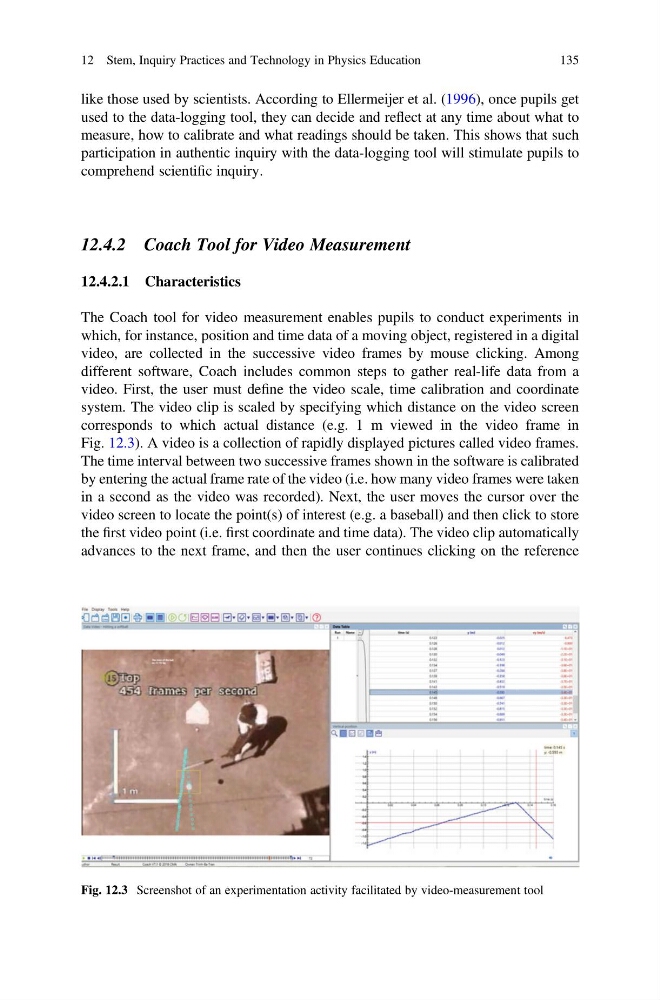
corresponds to which actual distance (e.g. 1 m viewed in the video frame in
Fig. 12.3). A video is a collection of rapidly displayed pictures called video frames.
The time interval between two successive frames shown in the software is calibrated
by entering the actual frame rate of the video (i.e. how many video frames were taken
in a second as the video was recorded). Next, the user moves the cursor over the
video screen to locate the point(s) of interest (e.g. a baseball) and then click to store
the first video point (i.e. first coordinate and time data). The video clip automatically
advances to the next frame, and then the user continues clicking on the reference
Fig. 12.3 Screenshot of an experimentation activity facilitated by video-measurement tool
12 Stem, Inquiry Practices and Technology in Physics Education
135
used to the data-logging tool, they can decide and reflect at any time about what to
measure, how to calibrate and what readings should be taken. This shows that such
participation in authentic inquiry with the data-logging tool will stimulate pupils to
comprehend scientific inquiry.
12.4.2 Coach Tool for Video Measurement
12.4.2.1 Characteristics
The Coach tool for video measurement enables pupils to conduct experiments in
which, for instance, position and time data of a moving object, registered in a digital
video, are collected in the successive video frames by mouse clicking. Among
different software, Coach includes common steps to gather real-life data from a
video. First, the user must define the video scale, time calibration and coordinate
system. The video clip is scaled by specifying which distance on the video screen
corresponds to which actual distance (e.g. 1 m viewed in the video frame in
Fig. 12.3). A video is a collection of rapidly displayed pictures called video frames.
The time interval between two successive frames shown in the software is calibrated
by entering the actual frame rate of the video (i.e. how many video frames were taken
in a second as the video was recorded). Next, the user moves the cursor over the
video screen to locate the point(s) of interest (e.g. a baseball) and then click to store
the first video point (i.e. first coordinate and time data). The video clip automatically
advances to the next frame, and then the user continues clicking on the reference
Fig. 12.3 Screenshot of an experimentation activity facilitated by video-measurement tool
12 Stem, Inquiry Practices and Technology in Physics Education
135