

223
Application of Sensemaking
Phase I
Distribute
Survey
UAS-IO-1S
Collect Survey
Results
Clarify Survey
Results
UAS-IO-IQ
Data Analysis
GCS IO Findings
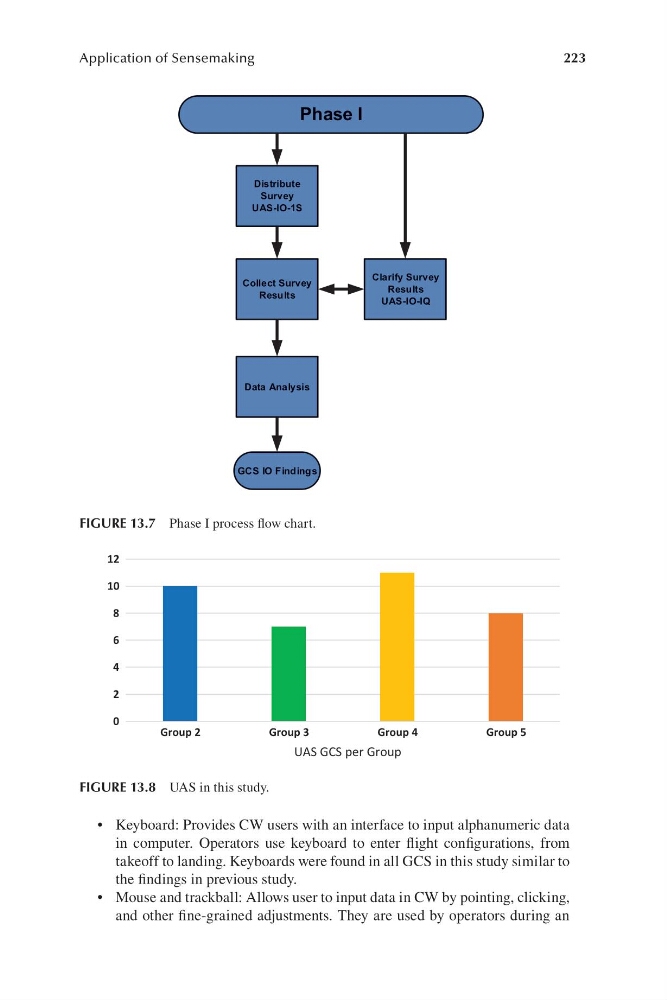
FIGURE 13.7 Phase I process flow chart.
0
2
4
6
8
10
12
Group 2
Group 3
Group 4
Group 5
UAS GCS per Group
FIGURE 13.8 UAS in this study.
• Keyboard: Provides CW users with an interface to input alphanumeric data
in computer. Operators use keyboard to enter flight configurations, from
takeoff to landing. Keyboards were found in all GCS in this study similar to
the findings in previous study.
• Mouse and trackball: Allows user to input data in CW by pointing, clicking,
and other fi ne-grained adjustments. They are used by operators during an
Application of Sensemaking
Phase I
Distribute
Survey
UAS-IO-1S
Collect Survey
Results
Clarify Survey
Results
UAS-IO-IQ
Data Analysis
GCS IO Findings
FIGURE 13.7 Phase I process flow chart.
0
2
4
6
8
10
12
Group 2
Group 3
Group 4
Group 5
UAS GCS per Group
FIGURE 13.8 UAS in this study.
• Keyboard: Provides CW users with an interface to input alphanumeric data
in computer. Operators use keyboard to enter flight configurations, from
takeoff to landing. Keyboards were found in all GCS in this study similar to
the findings in previous study.
• Mouse and trackball: Allows user to input data in CW by pointing, clicking,
and other fi ne-grained adjustments. They are used by operators during an