

65
Edge Detection and Segmentation of Images
horizontal edge-detecting and vertical edge-detecting masks must be used to
capture the edges. However, in small scale, any edge can be approximated by a
number of short horizontal and vertical edge components that can be detected
by the masks described earlier. As a result, in Sobel edge detection, the image
is often divided into smaller blocks, and then, in each block, a combination of
vertical and horizontal Sobel edge detection is performed. Then, the detected
edges in smaller blocks are combined with each other to form the edges in the
complete image.
In MATLAB ® , Sobel edge detection is provided as one of the options in the
command “edge”. The application of this command is described in the following
example:
Example 4.2
The following code reads an image called “image.jpg” and performs edge detection on the image using “edge” command. In “edge” command, one needs to
determine which edge detection method is to be used. For example, here we use
the option “sobel” to implement the Sobel method.
I = imread(‘image.jpg’);
I = rgb2gray(I);
Imshow(I);
J = edge(I,‘sobel’);
Figure,
Imshow(J);
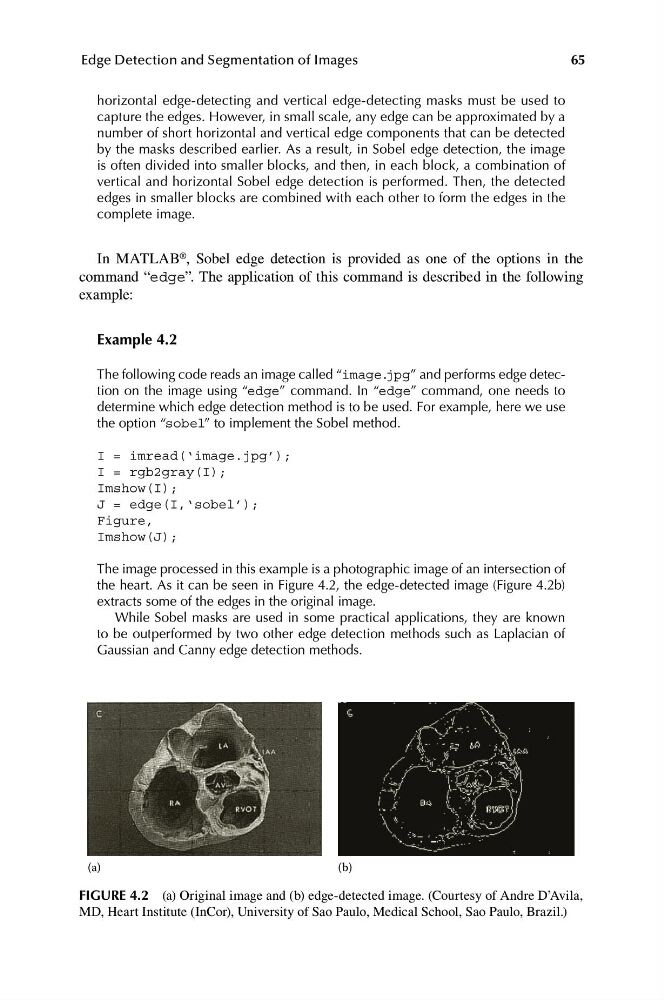
The image processed in this example is a photographic image of an intersection of
the heart. As it can be seen in Figure 4.2, the edge-detected image (Figure 4.2b)
extracts some of the edges in the original image.
While Sobel masks are used in some practical applications, they are known
to be outperformed by two other edge detection methods such as Laplacian of
Gaussian and Canny edge detection methods.
(a)
(b)
FIGURE 4.2 (a) Original image and (b) edge-detected image. (Courtesy of Andre D’Avila,
MD, Heart Institute (InCor), University of Sao Paulo, Medical School, Sao Paulo, Brazil.)
Edge Detection and Segmentation of Images
horizontal edge-detecting and vertical edge-detecting masks must be used to
capture the edges. However, in small scale, any edge can be approximated by a
number of short horizontal and vertical edge components that can be detected
by the masks described earlier. As a result, in Sobel edge detection, the image
is often divided into smaller blocks, and then, in each block, a combination of
vertical and horizontal Sobel edge detection is performed. Then, the detected
edges in smaller blocks are combined with each other to form the edges in the
complete image.
In MATLAB ® , Sobel edge detection is provided as one of the options in the
command “edge”. The application of this command is described in the following
example:
Example 4.2
The following code reads an image called “image.jpg” and performs edge detection on the image using “edge” command. In “edge” command, one needs to
determine which edge detection method is to be used. For example, here we use
the option “sobel” to implement the Sobel method.
I = imread(‘image.jpg’);
I = rgb2gray(I);
Imshow(I);
J = edge(I,‘sobel’);
Figure,
Imshow(J);
The image processed in this example is a photographic image of an intersection of
the heart. As it can be seen in Figure 4.2, the edge-detected image (Figure 4.2b)
extracts some of the edges in the original image.
While Sobel masks are used in some practical applications, they are known
to be outperformed by two other edge detection methods such as Laplacian of
Gaussian and Canny edge detection methods.
(a)
(b)
FIGURE 4.2 (a) Original image and (b) edge-detected image. (Courtesy of Andre D’Avila,
MD, Heart Institute (InCor), University of Sao Paulo, Medical School, Sao Paulo, Brazil.)