

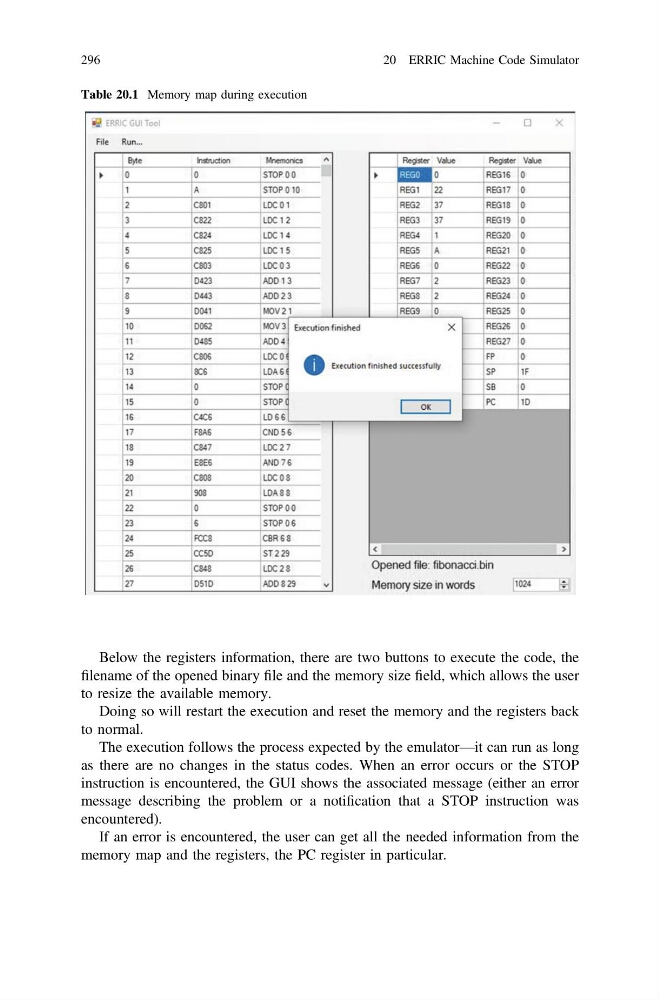
Below the registers information, there are two buttons to execute the code, the
filename of the opened binary file and the memory size field, which allows the user
to resize the available memory.
Doing so will restart the execution and reset the memory and the registers back
to normal.
The execution follows the process expected by the emulator—it can run as long
as there are no changes in the status codes. When an error occurs or the STOP
instruction is encountered, the GUI shows the associated message (either an error
message describing the problem or a notification that a STOP instruction was
encountered).
If an error is encountered, the user can get all the needed information from the
memory map and the registers, the PC register in particular.
Table 20.1 Memory map during execution
296
20 ERRIC Machine Code Simulator
filename of the opened binary file and the memory size field, which allows the user
to resize the available memory.
Doing so will restart the execution and reset the memory and the registers back
to normal.
The execution follows the process expected by the emulator—it can run as long
as there are no changes in the status codes. When an error occurs or the STOP
instruction is encountered, the GUI shows the associated message (either an error
message describing the problem or a notification that a STOP instruction was
encountered).
If an error is encountered, the user can get all the needed information from the
memory map and the registers, the PC register in particular.
Table 20.1 Memory map during execution
296
20 ERRIC Machine Code Simulator