

6.1 Draining of a Tank
231
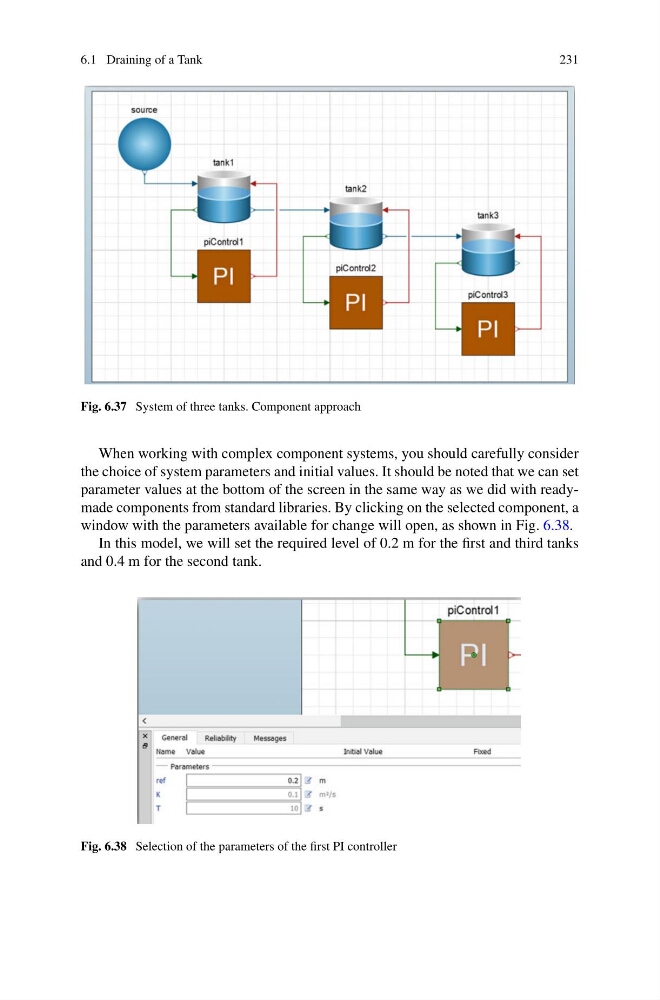
Fig. 6.37 System of three tanks. Component approach
When working with complex component systems, you should carefully consider
the choice of system parameters and initial values. It should be noted that we can set
parameter values at the bottom of the screen in the same way as we did with readymade components from standard libraries. By clicking on the selected component, a
window with the parameters available for change will open, as shown in Fig. 6.38.
In this model, we will set the required level of 0.2 m for the first and third tanks
and 0.4 m for the second tank.
Fig. 6.38 Selection of the parameters of the first PI controller
231
Fig. 6.37 System of three tanks. Component approach
When working with complex component systems, you should carefully consider
the choice of system parameters and initial values. It should be noted that we can set
parameter values at the bottom of the screen in the same way as we did with readymade components from standard libraries. By clicking on the selected component, a
window with the parameters available for change will open, as shown in Fig. 6.38.
In this model, we will set the required level of 0.2 m for the first and third tanks
and 0.4 m for the second tank.
Fig. 6.38 Selection of the parameters of the first PI controller