

Evaluating Code
Another way to affect what MATLAB executes during publishing is to set the Evaluate code option in
the Publish setting pane. This option indicates whether MATLAB evaluates the code in the .m file
that is publishing. If set to true, MATLAB executes the code and includes the results in the output
document.
Because MATLAB does not evaluate the code nor include code results when you set the Evaluate
code option to false, there can be invalid code in the file. Therefore, consider first running the file
with this option set to true.
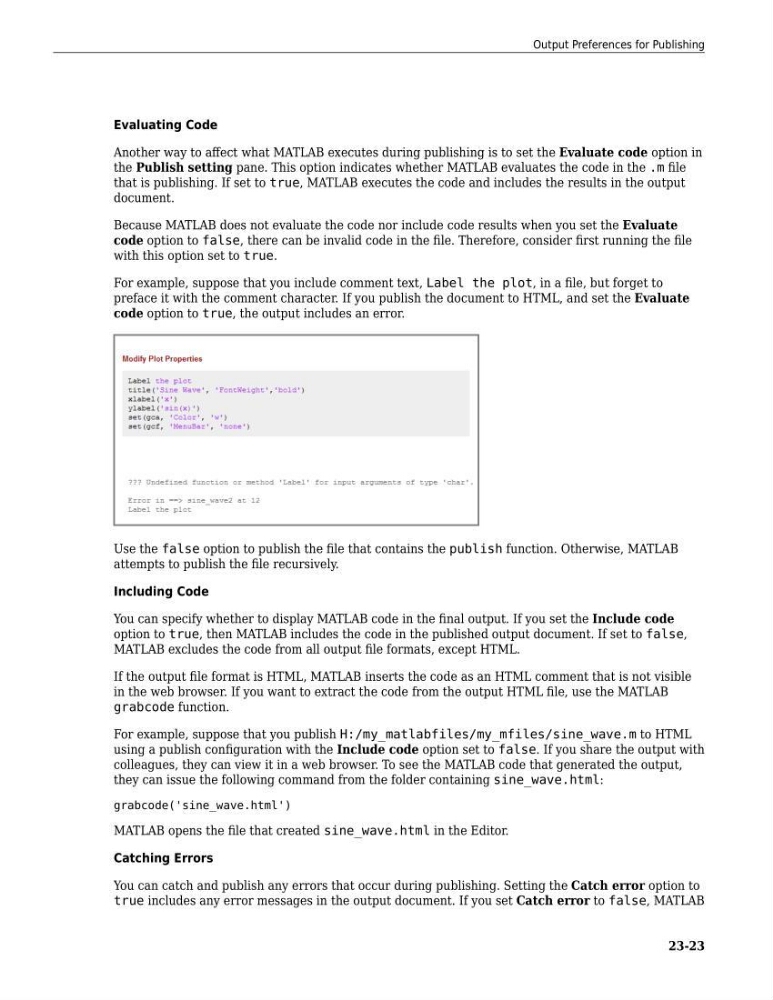
For example, suppose that you include comment text, Label the plot, in a file, but forget to
preface it with the comment character. If you publish the document to HTML, and set the Evaluate
code option to true, the output includes an error.
Use the false option to publish the file that contains the publish function. Otherwise, MATLAB
attempts to publish the file recursively.
Including Code
You can specify whether to display MATLAB code in the final output. If you set the Include code
option to true, then MATLAB includes the code in the published output document. If set to false,
MATLAB excludes the code from all output file formats, except HTML.
If the output file format is HTML, MATLAB inserts the code as an HTML comment that is not visible
in the web browser. If you want to extract the code from the output HTML file, use the MATLAB
grabcode function.
For example, suppose that you publish H:/my_matlabfiles/my_mfiles/sine_wave.m to HTML
using a publish configuration with the Include code option set to false. If you share the output with
colleagues, they can view it in a web browser. To see the MATLAB code that generated the output,
they can issue the following command from the folder containing sine_wave.html:
grabcode('sine_wave.html')
MATLAB opens the file that created sine_wave.html in the Editor.
Catching Errors
You can catch and publish any errors that occur during publishing. Setting the Catch error option to
true includes any error messages in the output document. If you set Catch error to false, MATLAB
Output Preferences for Publishing
23-23
Another way to affect what MATLAB executes during publishing is to set the Evaluate code option in
the Publish setting pane. This option indicates whether MATLAB evaluates the code in the .m file
that is publishing. If set to true, MATLAB executes the code and includes the results in the output
document.
Because MATLAB does not evaluate the code nor include code results when you set the Evaluate
code option to false, there can be invalid code in the file. Therefore, consider first running the file
with this option set to true.
For example, suppose that you include comment text, Label the plot, in a file, but forget to
preface it with the comment character. If you publish the document to HTML, and set the Evaluate
code option to true, the output includes an error.
Use the false option to publish the file that contains the publish function. Otherwise, MATLAB
attempts to publish the file recursively.
Including Code
You can specify whether to display MATLAB code in the final output. If you set the Include code
option to true, then MATLAB includes the code in the published output document. If set to false,
MATLAB excludes the code from all output file formats, except HTML.
If the output file format is HTML, MATLAB inserts the code as an HTML comment that is not visible
in the web browser. If you want to extract the code from the output HTML file, use the MATLAB
grabcode function.
For example, suppose that you publish H:/my_matlabfiles/my_mfiles/sine_wave.m to HTML
using a publish configuration with the Include code option set to false. If you share the output with
colleagues, they can view it in a web browser. To see the MATLAB code that generated the output,
they can issue the following command from the folder containing sine_wave.html:
grabcode('sine_wave.html')
MATLAB opens the file that created sine_wave.html in the Editor.
Catching Errors
You can catch and publish any errors that occur during publishing. Setting the Catch error option to
true includes any error messages in the output document. If you set Catch error to false, MATLAB
Output Preferences for Publishing
23-23