

terminates the publish operation if an error occurs during code evaluation. However, this option has
no effect if you set the Evaluate code property to false.
Limiting the Amount of Output
You can limit the number of lines of code output that is included in the output document by specifying
the Max # of output lines option in the Publish settings pane. Setting this option is useful if a
smaller, representative sample of the code output suffices.
For example, the following loop generates 100 lines in a published output unless Max # of output
lines is set to a lower value.
for n = 1:100
disp(x)
end;
Manipulate Graphics in Publishing Output
• “Choosing an Image Format” on page 23-24
• “Setting an Image Size” on page 23-24
• “Capturing Figures” on page 23-25
• “Specifying a Custom Figure Window” on page 23-25
• “Creating a Thumbnail” on page 23-26
Choosing an Image Format
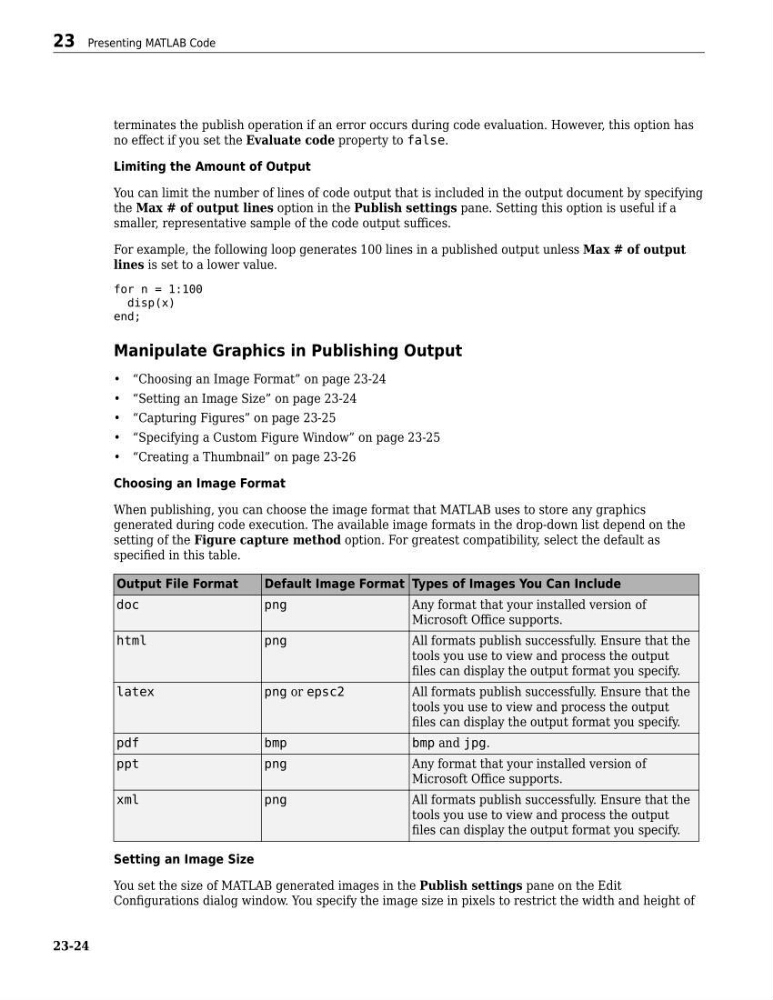
When publishing, you can choose the image format that MATLAB uses to store any graphics
generated during code execution. The available image formats in the drop-down list depend on the
setting of the Figure capture method option. For greatest compatibility, select the default as
specified in this table.
Output File Format
Default Image Format Types of Images You Can Include
doc
png
Any format that your installed version of
Microsoft Office supports.
html
png
All formats publish successfully. Ensure that the
tools you use to view and process the output
files can display the output format you specify.
latex
png or epsc2
All formats publish successfully. Ensure that the
tools you use to view and process the output
files can display the output format you specify.
pdf
bmp
bmp and jpg.
ppt
png
Any format that your installed version of
Microsoft Office supports.
xml
png
All formats publish successfully. Ensure that the
tools you use to view and process the output
files can display the output format you specify.
Setting an Image Size
You set the size of MATLAB generated images in the Publish settings pane on the Edit
Configurations dialog window. You specify the image size in pixels to restrict the width and height of
23 Presenting MATLAB Code
23-24
no effect if you set the Evaluate code property to false.
Limiting the Amount of Output
You can limit the number of lines of code output that is included in the output document by specifying
the Max # of output lines option in the Publish settings pane. Setting this option is useful if a
smaller, representative sample of the code output suffices.
For example, the following loop generates 100 lines in a published output unless Max # of output
lines is set to a lower value.
for n = 1:100
disp(x)
end;
Manipulate Graphics in Publishing Output
• “Choosing an Image Format” on page 23-24
• “Setting an Image Size” on page 23-24
• “Capturing Figures” on page 23-25
• “Specifying a Custom Figure Window” on page 23-25
• “Creating a Thumbnail” on page 23-26
Choosing an Image Format
When publishing, you can choose the image format that MATLAB uses to store any graphics
generated during code execution. The available image formats in the drop-down list depend on the
setting of the Figure capture method option. For greatest compatibility, select the default as
specified in this table.
Output File Format
Default Image Format Types of Images You Can Include
doc
png
Any format that your installed version of
Microsoft Office supports.
html
png
All formats publish successfully. Ensure that the
tools you use to view and process the output
files can display the output format you specify.
latex
png or epsc2
All formats publish successfully. Ensure that the
tools you use to view and process the output
files can display the output format you specify.
bmp
bmp and jpg.
ppt
png
Any format that your installed version of
Microsoft Office supports.
xml
png
All formats publish successfully. Ensure that the
tools you use to view and process the output
files can display the output format you specify.
Setting an Image Size
You set the size of MATLAB generated images in the Publish settings pane on the Edit
Configurations dialog window. You specify the image size in pixels to restrict the width and height of
23 Presenting MATLAB Code
23-24