

The MATLAB expression pane specifies the code that executes during publishing. The Publish
settings pane contains output, figure, and code execution options. Together, they make what
MATLAB refers to as a publish configuration. MATLAB associates each publish configuration with
an .m file. The name of the publish configuration appears in the top left pane.
Specify Output File
You specify the output format and location on the Publish settings pane.
MATLAB publishes to these formats.
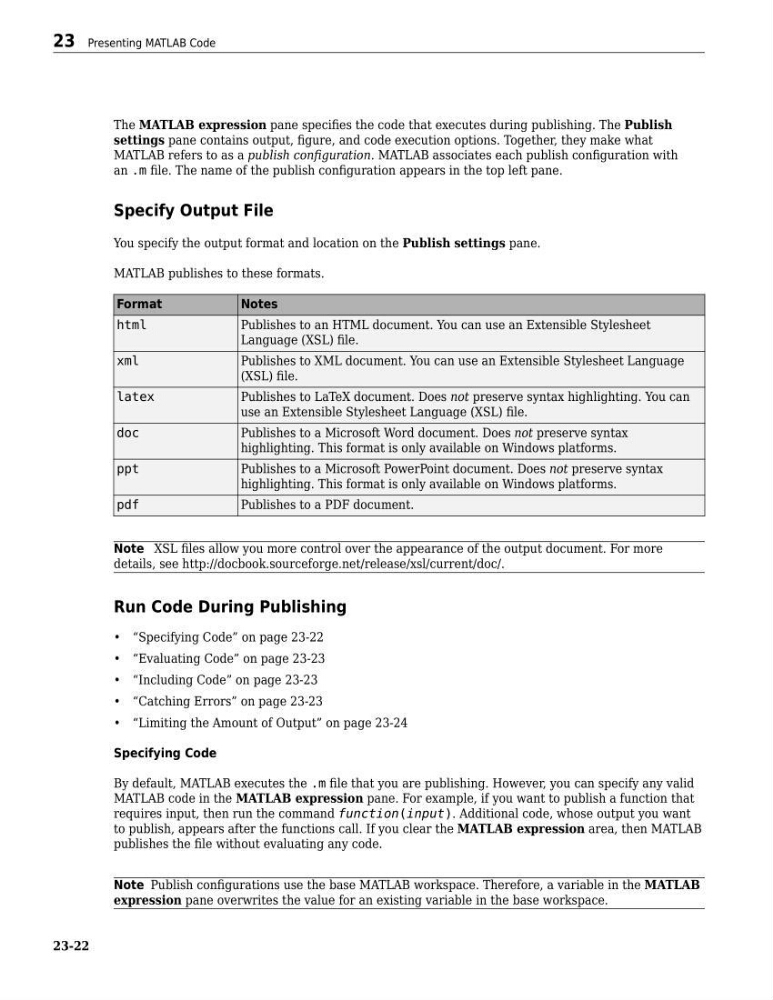
Format
Notes
html
Publishes to an HTML document. You can use an Extensible Stylesheet
Language (XSL) file.
xml
Publishes to XML document. You can use an Extensible Stylesheet Language
(XSL) file.
latex
Publishes to LaTeX document. Does not preserve syntax highlighting. You can
use an Extensible Stylesheet Language (XSL) file.
doc
Publishes to a Microsoft Word document. Does not preserve syntax
highlighting. This format is only available on Windows platforms.
ppt
Publishes to a Microsoft PowerPoint document. Does not preserve syntax
highlighting. This format is only available on Windows platforms.
pdf
Publishes to a PDF document.
Note XSL files allow you more control over the appearance of the output document. For more
details, see http://docbook.sourceforge.net/release/xsl/current/doc/.
Run Code During Publishing
• “Specifying Code” on page 23-22
• “Evaluating Code” on page 23-23
• “Including Code” on page 23-23
• “Catching Errors” on page 23-23
• “Limiting the Amount of Output” on page 23-24
Specifying Code
By default, MATLAB executes the .m file that you are publishing. However, you can specify any valid
MATLAB code in the MATLAB expression pane. For example, if you want to publish a function that
requires input, then run the command function(input). Additional code, whose output you want
to publish, appears after the functions call. If you clear the MATLAB expression area, then MATLAB
publishes the file without evaluating any code.
Note Publish configurations use the base MATLAB workspace. Therefore, a variable in the MATLAB
expression pane overwrites the value for an existing variable in the base workspace.
23 Presenting MATLAB Code
23-22
settings pane contains output, figure, and code execution options. Together, they make what
MATLAB refers to as a publish configuration. MATLAB associates each publish configuration with
an .m file. The name of the publish configuration appears in the top left pane.
Specify Output File
You specify the output format and location on the Publish settings pane.
MATLAB publishes to these formats.
Format
Notes
html
Publishes to an HTML document. You can use an Extensible Stylesheet
Language (XSL) file.
xml
Publishes to XML document. You can use an Extensible Stylesheet Language
(XSL) file.
latex
Publishes to LaTeX document. Does not preserve syntax highlighting. You can
use an Extensible Stylesheet Language (XSL) file.
doc
Publishes to a Microsoft Word document. Does not preserve syntax
highlighting. This format is only available on Windows platforms.
ppt
Publishes to a Microsoft PowerPoint document. Does not preserve syntax
highlighting. This format is only available on Windows platforms.
Publishes to a PDF document.
Note XSL files allow you more control over the appearance of the output document. For more
details, see http://docbook.sourceforge.net/release/xsl/current/doc/.
Run Code During Publishing
• “Specifying Code” on page 23-22
• “Evaluating Code” on page 23-23
• “Including Code” on page 23-23
• “Catching Errors” on page 23-23
• “Limiting the Amount of Output” on page 23-24
Specifying Code
By default, MATLAB executes the .m file that you are publishing. However, you can specify any valid
MATLAB code in the MATLAB expression pane. For example, if you want to publish a function that
requires input, then run the command function(input). Additional code, whose output you want
to publish, appears after the functions call. If you clear the MATLAB expression area, then MATLAB
publishes the file without evaluating any code.
Note Publish configurations use the base MATLAB workspace. Therefore, a variable in the MATLAB
expression pane overwrites the value for an existing variable in the base workspace.
23 Presenting MATLAB Code
23-22