

For example, click the
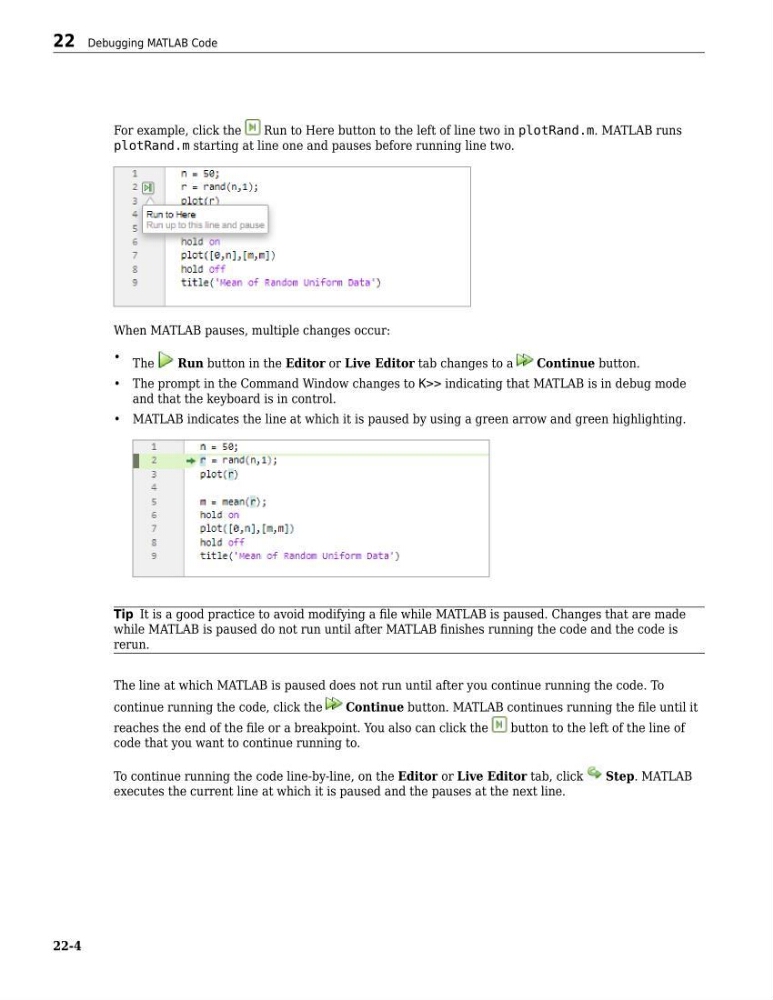
Run to Here button to the left of line two in plotRand.m. MATLAB runs
plotRand.m starting at line one and pauses before running line two.
When MATLAB pauses, multiple changes occur:
• The
Run button in the Editor or Live Editor tab changes to a
Continue button.
• The prompt in the Command Window changes to K>> indicating that MATLAB is in debug mode
and that the keyboard is in control.
• MATLAB indicates the line at which it is paused by using a green arrow and green highlighting.
Tip It is a good practice to avoid modifying a file while MATLAB is paused. Changes that are made
while MATLAB is paused do not run until after MATLAB finishes running the code and the code is
rerun.
The line at which MATLAB is paused does not run until after you continue running the code. To
continue running the code, click the
Continue button. MATLAB continues running the file until it
reaches the end of the file or a breakpoint. You also can click the
button to the left of the line of
code that you want to continue running to.
To continue running the code line-by-line, on the Editor or Live Editor tab, click
Step. MATLAB
executes the current line at which it is paused and the pauses at the next line.
22 Debugging MATLAB Code
22-4
Run to Here button to the left of line two in plotRand.m. MATLAB runs
plotRand.m starting at line one and pauses before running line two.
When MATLAB pauses, multiple changes occur:
• The
Run button in the Editor or Live Editor tab changes to a
Continue button.
• The prompt in the Command Window changes to K>> indicating that MATLAB is in debug mode
and that the keyboard is in control.
• MATLAB indicates the line at which it is paused by using a green arrow and green highlighting.
Tip It is a good practice to avoid modifying a file while MATLAB is paused. Changes that are made
while MATLAB is paused do not run until after MATLAB finishes running the code and the code is
rerun.
The line at which MATLAB is paused does not run until after you continue running the code. To
continue running the code, click the
Continue button. MATLAB continues running the file until it
reaches the end of the file or a breakpoint. You also can click the
button to the left of the line of
code that you want to continue running to.
To continue running the code line-by-line, on the Editor or Live Editor tab, click
Step. MATLAB
executes the current line at which it is paused and the pauses at the next line.
22 Debugging MATLAB Code
22-4