

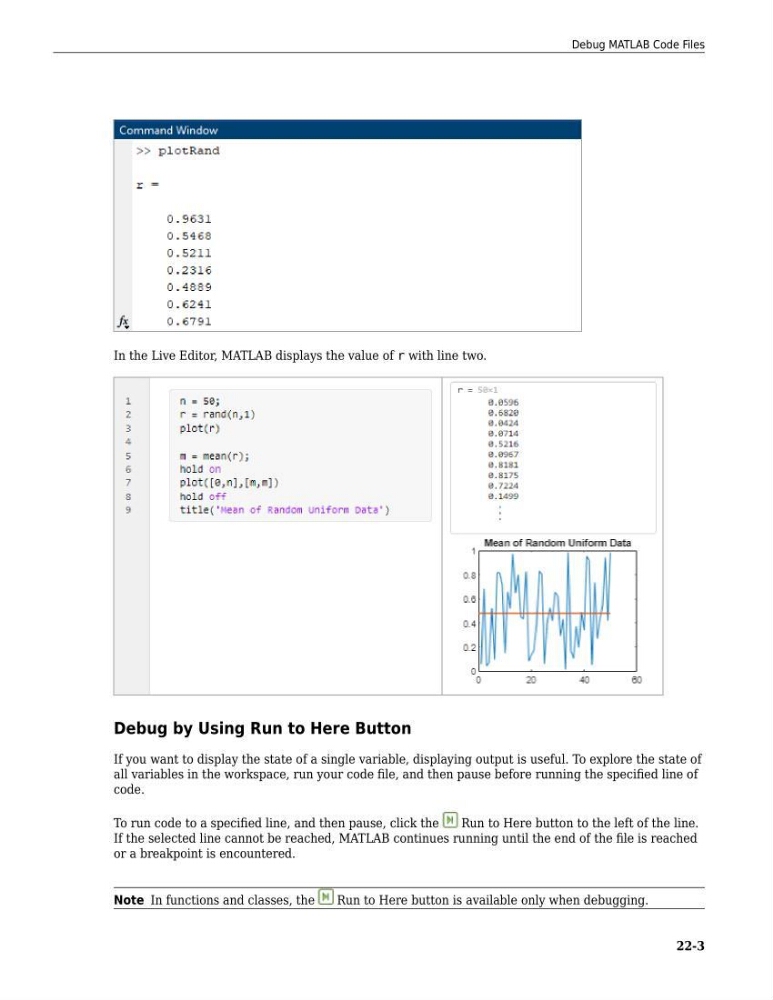
In the Live Editor, MATLAB displays the value of r with line two.
Debug by Using Run to Here Button
If you want to display the state of a single variable, displaying output is useful. To explore the state of
all variables in the workspace, run your code file, and then pause before running the specified line of
code.
To run code to a specified line, and then pause, click the
Run to Here button to the left of the line.
If the selected line cannot be reached, MATLAB continues running until the end of the file is reached
or a breakpoint is encountered.
Note In functions and classes, the
Run to Here button is available only when debugging.
Debug MATLAB Code Files
22-3
Debug by Using Run to Here Button
If you want to display the state of a single variable, displaying output is useful. To explore the state of
all variables in the workspace, run your code file, and then pause before running the specified line of
code.
To run code to a specified line, and then pause, click the
Run to Here button to the left of the line.
If the selected line cannot be reached, MATLAB continues running until the end of the file is reached
or a breakpoint is encountered.
Note In functions and classes, the
Run to Here button is available only when debugging.
Debug MATLAB Code Files
22-3