

Add Help for Live Functions
You can provide help for the live functions you write. Help text appears in the Command Window
when you use the help command. You also can use the doc command to display the help text in a
separate browser.
Create help text by inserting text at the beginning of the file, immediately before the function
definition line (the line with the function keyword).
For example, create a live function called addme.mlx with this code:
function c = addme(a,b)
switch nargin
case 2
c = a + b;
case 1
c = a + a;
otherwise
c = 0;
end
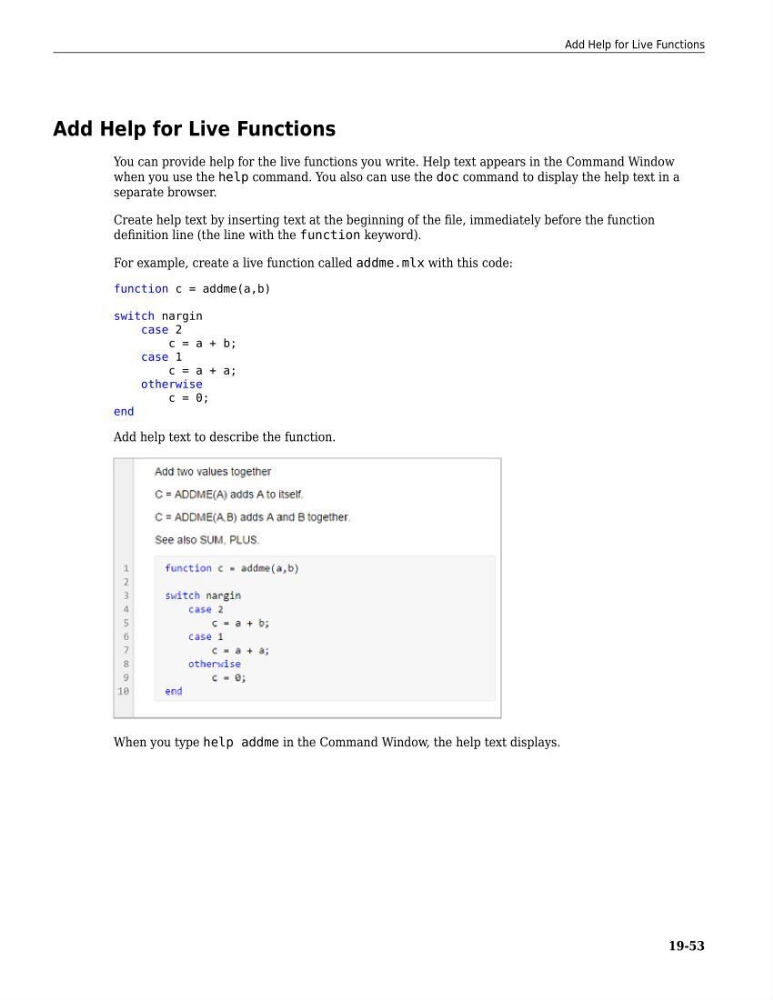
Add help text to describe the function.
When you type help addme in the Command Window, the help text displays.
Add Help for Live Functions
19-53
You can provide help for the live functions you write. Help text appears in the Command Window
when you use the help command. You also can use the doc command to display the help text in a
separate browser.
Create help text by inserting text at the beginning of the file, immediately before the function
definition line (the line with the function keyword).
For example, create a live function called addme.mlx with this code:
function c = addme(a,b)
switch nargin
case 2
c = a + b;
case 1
c = a + a;
otherwise
c = 0;
end
Add help text to describe the function.
When you type help addme in the Command Window, the help text displays.
Add Help for Live Functions
19-53