

/
\
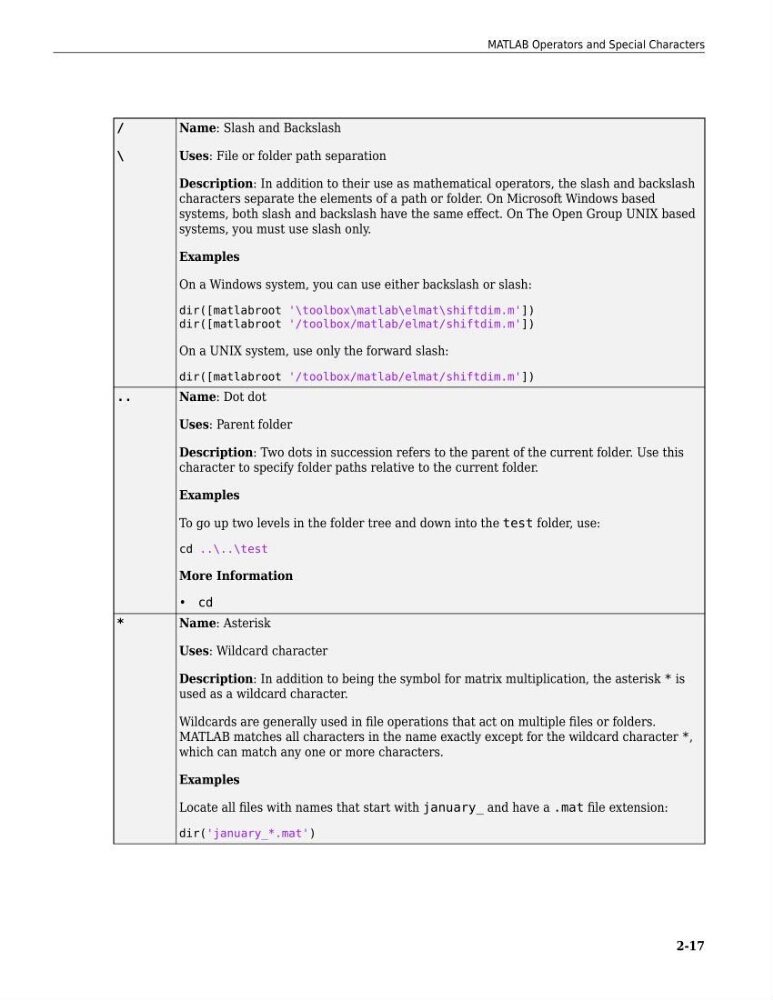
Name: Slash and Backslash
Uses: File or folder path separation
Description: In addition to their use as mathematical operators, the slash and backslash
characters separate the elements of a path or folder. On Microsoft Windows based
systems, both slash and backslash have the same effect. On The Open Group UNIX based
systems, you must use slash only.
Examples
On a Windows system, you can use either backslash or slash:
dir([matlabroot '\toolbox\matlab\elmat\shiftdim.m'])
dir([matlabroot '/toolbox/matlab/elmat/shiftdim.m'])
On a UNIX system, use only the forward slash:
dir([matlabroot '/toolbox/matlab/elmat/shiftdim.m'])
..
Name: Dot dot
Uses: Parent folder
Description: Two dots in succession refers to the parent of the current folder. Use this
character to specify folder paths relative to the current folder.
Examples
To go up two levels in the folder tree and down into the test folder, use:
cd ..\..\test
More Information
• cd
*
Name: Asterisk
Uses: Wildcard character
Description: In addition to being the symbol for matrix multiplication, the asterisk * is
used as a wildcard character.
Wildcards are generally used in file operations that act on multiple files or folders.
MATLAB matches all characters in the name exactly except for the wildcard character *,
which can match any one or more characters.
Examples
Locate all files with names that start with january_ and have a .mat file extension:
dir('january_*.mat')
MATLAB Operators and Special Characters
2-17
\
Name: Slash and Backslash
Uses: File or folder path separation
Description: In addition to their use as mathematical operators, the slash and backslash
characters separate the elements of a path or folder. On Microsoft Windows based
systems, both slash and backslash have the same effect. On The Open Group UNIX based
systems, you must use slash only.
Examples
On a Windows system, you can use either backslash or slash:
dir([matlabroot '\toolbox\matlab\elmat\shiftdim.m'])
dir([matlabroot '/toolbox/matlab/elmat/shiftdim.m'])
On a UNIX system, use only the forward slash:
dir([matlabroot '/toolbox/matlab/elmat/shiftdim.m'])
..
Name: Dot dot
Uses: Parent folder
Description: Two dots in succession refers to the parent of the current folder. Use this
character to specify folder paths relative to the current folder.
Examples
To go up two levels in the folder tree and down into the test folder, use:
cd ..\..\test
More Information
• cd
*
Name: Asterisk
Uses: Wildcard character
Description: In addition to being the symbol for matrix multiplication, the asterisk * is
used as a wildcard character.
Wildcards are generally used in file operations that act on multiple files or folders.
MATLAB matches all characters in the name exactly except for the wildcard character *,
which can match any one or more characters.
Examples
Locate all files with names that start with january_ and have a .mat file extension:
dir('january_*.mat')
MATLAB Operators and Special Characters
2-17