

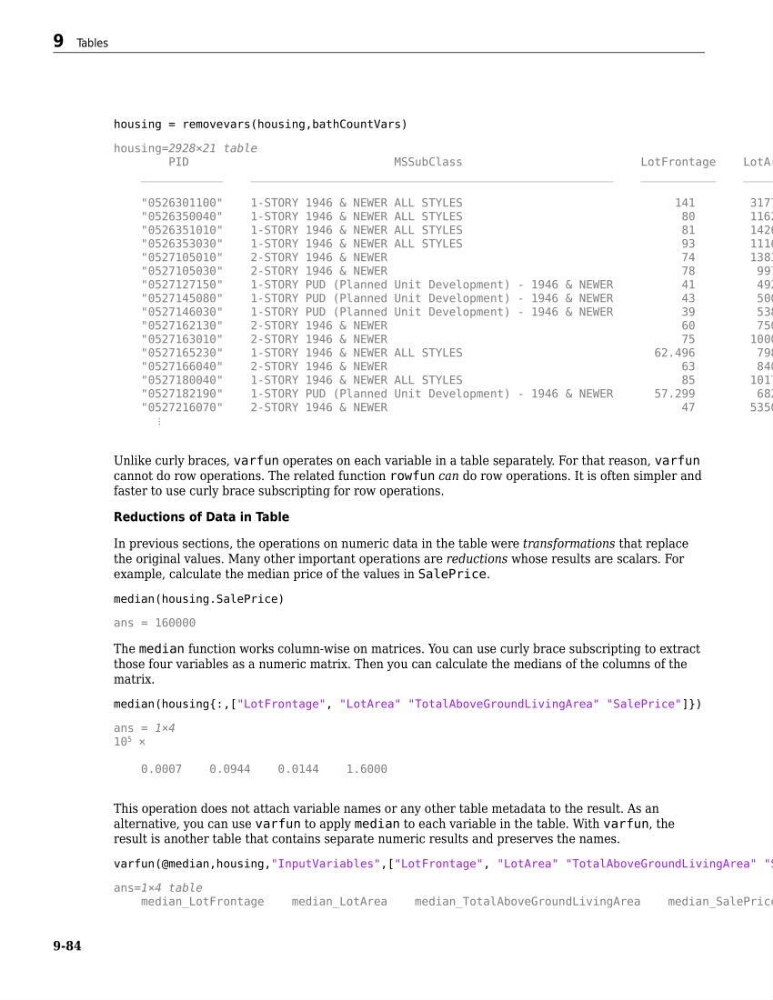
housing = removevars(housing,bathCountVars)
housing=2928×21 table
PID
MSSubClass
LotFrontage
LotAr
____________
_____________________________________________________
___________
_____
"0526301100"
1-STORY 1946 & NEWER ALL STYLES
141
3177
"0526350040"
1-STORY 1946 & NEWER ALL STYLES
80
1162
"0526351010"
1-STORY 1946 & NEWER ALL STYLES
81
1426
"0526353030"
1-STORY 1946 & NEWER ALL STYLES
93
1116
"0527105010"
2-STORY 1946 & NEWER
74
1383
"0527105030"
2-STORY 1946 & NEWER
78
997
"0527127150"
1-STORY PUD (Planned Unit Development) - 1946 & NEWER
41
492
"0527145080"
1-STORY PUD (Planned Unit Development) - 1946 & NEWER
43
500
"0527146030"
1-STORY PUD (Planned Unit Development) - 1946 & NEWER
39
538
"0527162130"
2-STORY 1946 & NEWER
60
750
"0527163010"
2-STORY 1946 & NEWER
75
1000
"0527165230"
1-STORY 1946 & NEWER ALL STYLES
62.496
798
"0527166040"
2-STORY 1946 & NEWER
63
840
"0527180040"
1-STORY 1946 & NEWER ALL STYLES
85
1017
"0527182190"
1-STORY PUD (Planned Unit Development) - 1946 & NEWER
57.299
682
"0527216070"
2-STORY 1946 & NEWER
47
5350
⋮
Unlike curly braces, varfun operates on each variable in a table separately. For that reason, varfun
cannot do row operations. The related function rowfun can do row operations. It is often simpler and
faster to use curly brace subscripting for row operations.
Reductions of Data in Table
In previous sections, the operations on numeric data in the table were transformations that replace
the original values. Many other important operations are reductions whose results are scalars. For
example, calculate the median price of the values in SalePrice.
median(housing.SalePrice)
ans = 160000
The median function works column-wise on matrices. You can use curly brace subscripting to extract
those four variables as a numeric matrix. Then you can calculate the medians of the columns of the
matrix.
median(housing{:,["LotFrontage", "LotArea" "TotalAboveGroundLivingArea" "SalePrice"]})
ans = 1×4
10
5
×
0.0007
0.0944
0.0144
1.6000
This operation does not attach variable names or any other table metadata to the result. As an
alternative, you can use varfun to apply median to each variable in the table. With varfun, the
result is another table that contains separate numeric results and preserves the names.
varfun(@median,housing,"InputVariables",["LotFrontage", "LotArea" "TotalAboveGroundLivingArea" "S
ans=1×4 table
median_LotFrontage
median_LotArea
median_TotalAboveGroundLivingArea
median_SalePrice
9 Tables
9-84
housing=2928×21 table
PID
MSSubClass
LotFrontage
LotAr
____________
_____________________________________________________
___________
_____
"0526301100"
1-STORY 1946 & NEWER ALL STYLES
141
3177
"0526350040"
1-STORY 1946 & NEWER ALL STYLES
80
1162
"0526351010"
1-STORY 1946 & NEWER ALL STYLES
81
1426
"0526353030"
1-STORY 1946 & NEWER ALL STYLES
93
1116
"0527105010"
2-STORY 1946 & NEWER
74
1383
"0527105030"
2-STORY 1946 & NEWER
78
997
"0527127150"
1-STORY PUD (Planned Unit Development) - 1946 & NEWER
41
492
"0527145080"
1-STORY PUD (Planned Unit Development) - 1946 & NEWER
43
500
"0527146030"
1-STORY PUD (Planned Unit Development) - 1946 & NEWER
39
538
"0527162130"
2-STORY 1946 & NEWER
60
750
"0527163010"
2-STORY 1946 & NEWER
75
1000
"0527165230"
1-STORY 1946 & NEWER ALL STYLES
62.496
798
"0527166040"
2-STORY 1946 & NEWER
63
840
"0527180040"
1-STORY 1946 & NEWER ALL STYLES
85
1017
"0527182190"
1-STORY PUD (Planned Unit Development) - 1946 & NEWER
57.299
682
"0527216070"
2-STORY 1946 & NEWER
47
5350
⋮
Unlike curly braces, varfun operates on each variable in a table separately. For that reason, varfun
cannot do row operations. The related function rowfun can do row operations. It is often simpler and
faster to use curly brace subscripting for row operations.
Reductions of Data in Table
In previous sections, the operations on numeric data in the table were transformations that replace
the original values. Many other important operations are reductions whose results are scalars. For
example, calculate the median price of the values in SalePrice.
median(housing.SalePrice)
ans = 160000
The median function works column-wise on matrices. You can use curly brace subscripting to extract
those four variables as a numeric matrix. Then you can calculate the medians of the columns of the
matrix.
median(housing{:,["LotFrontage", "LotArea" "TotalAboveGroundLivingArea" "SalePrice"]})
ans = 1×4
10
5
×
0.0007
0.0944
0.0144
1.6000
This operation does not attach variable names or any other table metadata to the result. As an
alternative, you can use varfun to apply median to each variable in the table. With varfun, the
result is another table that contains separate numeric results and preserves the names.
varfun(@median,housing,"InputVariables",["LotFrontage", "LotArea" "TotalAboveGroundLivingArea" "S
ans=1×4 table
median_LotFrontage
median_LotArea
median_TotalAboveGroundLivingArea
median_SalePrice
9 Tables
9-84