

You might think to sum the rows of that matrix as:
sum(housing{:,bathCountVars},2);
but that sum is not correct. Half-baths count only half as much as full bathrooms. A trend in real
estate listings is to account for multiple half-baths by counting them after the decimal point. Matrix
multiplication makes that operation one line.
TotalBaths = housing{:,bathCountVars} * [.1; .1; 1; 1];
Replace those four variables with TotalBaths, rather than adding a new variable at the end of the
table. Begin this replacement by using addvars to add TotalBaths next to the existing variables.
housing = addvars(housing,TotalBaths, 'After',"HalfBath");
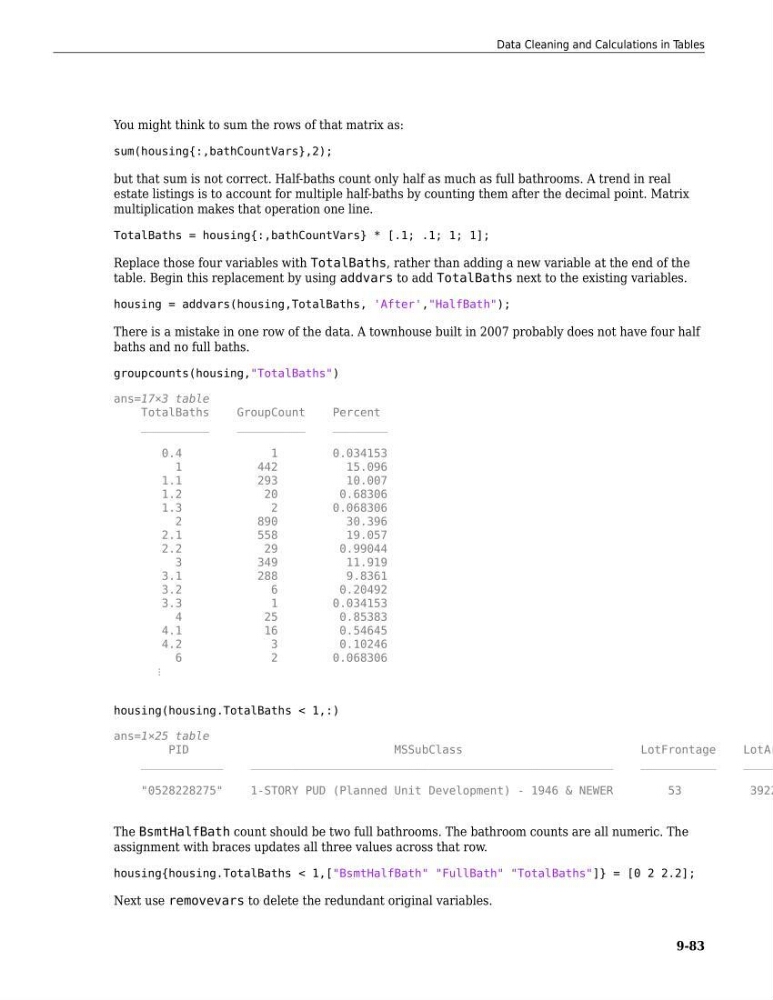
There is a mistake in one row of the data. A townhouse built in 2007 probably does not have four half
baths and no full baths.
groupcounts(housing,"TotalBaths")
ans=17×3 table
TotalBaths
GroupCount
Percent
__________
__________
________
0.4
1
0.034153
1
442
15.096
1.1
293
10.007
1.2
20
0.68306
1.3
2
0.068306
2
890
30.396
2.1
558
19.057
2.2
29
0.99044
3
349
11.919
3.1
288
9.8361
3.2
6
0.20492
3.3
1
0.034153
4
25
0.85383
4.1
16
0.54645
4.2
3
0.10246
6
2
0.068306
⋮
housing(housing.TotalBaths < 1,:)
ans=1×25 table
PID
MSSubClass
LotFrontage
LotAr
____________
_____________________________________________________
___________
_____
"0528228275"
1-STORY PUD (Planned Unit Development) - 1946 & NEWER
53
3922
The BsmtHalfBath count should be two full bathrooms. The bathroom counts are all numeric. The
assignment with braces updates all three values across that row.
housing{housing.TotalBaths < 1,["BsmtHalfBath" "FullBath" "TotalBaths"]} = [0 2 2.2];
Next use removevars to delete the redundant original variables.
Data Cleaning and Calculations in Tables
9-83
sum(housing{:,bathCountVars},2);
but that sum is not correct. Half-baths count only half as much as full bathrooms. A trend in real
estate listings is to account for multiple half-baths by counting them after the decimal point. Matrix
multiplication makes that operation one line.
TotalBaths = housing{:,bathCountVars} * [.1; .1; 1; 1];
Replace those four variables with TotalBaths, rather than adding a new variable at the end of the
table. Begin this replacement by using addvars to add TotalBaths next to the existing variables.
housing = addvars(housing,TotalBaths, 'After',"HalfBath");
There is a mistake in one row of the data. A townhouse built in 2007 probably does not have four half
baths and no full baths.
groupcounts(housing,"TotalBaths")
ans=17×3 table
TotalBaths
GroupCount
Percent
__________
__________
________
0.4
1
0.034153
1
442
15.096
1.1
293
10.007
1.2
20
0.68306
1.3
2
0.068306
2
890
30.396
2.1
558
19.057
2.2
29
0.99044
3
349
11.919
3.1
288
9.8361
3.2
6
0.20492
3.3
1
0.034153
4
25
0.85383
4.1
16
0.54645
4.2
3
0.10246
6
2
0.068306
⋮
housing(housing.TotalBaths < 1,:)
ans=1×25 table
PID
MSSubClass
LotFrontage
LotAr
____________
_____________________________________________________
___________
_____
"0528228275"
1-STORY PUD (Planned Unit Development) - 1946 & NEWER
53
3922
The BsmtHalfBath count should be two full bathrooms. The bathroom counts are all numeric. The
assignment with braces updates all three values across that row.
housing{housing.TotalBaths < 1,["BsmtHalfBath" "FullBath" "TotalBaths"]} = [0 2 2.2];
Next use removevars to delete the redundant original variables.
Data Cleaning and Calculations in Tables
9-83