

16
"0527216070"
"060"
"RL"
47
53504
"Pave"
"NA"
⋮
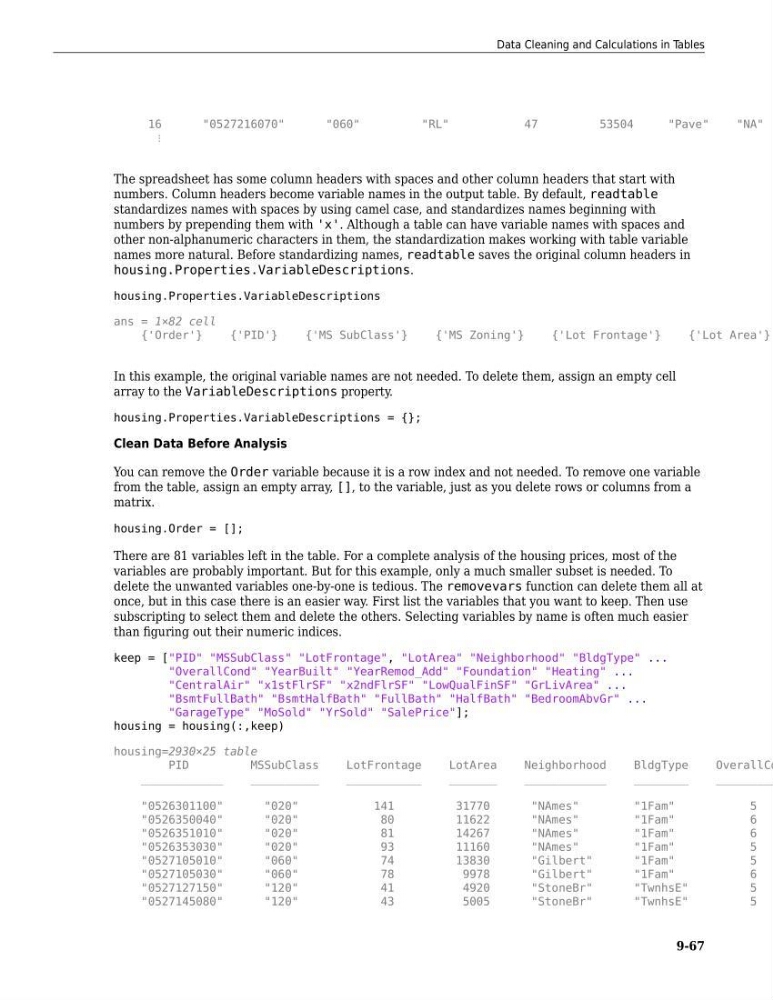
The spreadsheet has some column headers with spaces and other column headers that start with
numbers. Column headers become variable names in the output table. By default, readtable
standardizes names with spaces by using camel case, and standardizes names beginning with
numbers by prepending them with 'x'. Although a table can have variable names with spaces and
other non-alphanumeric characters in them, the standardization makes working with table variable
names more natural. Before standardizing names, readtable saves the original column headers in
housing.Properties.VariableDescriptions.
housing.Properties.VariableDescriptions
ans = 1×82 cell
{'Order'}
{'PID'}
{'MS SubClass'}
{'MS Zoning'}
{'Lot Frontage'}
{'Lot Area'}
In this example, the original variable names are not needed. To delete them, assign an empty cell
array to the VariableDescriptions property.
housing.Properties.VariableDescriptions = {};
Clean Data Before Analysis
You can remove the Order variable because it is a row index and not needed. To remove one variable
from the table, assign an empty array, [], to the variable, just as you delete rows or columns from a
matrix.
housing.Order = [];
There are 81 variables left in the table. For a complete analysis of the housing prices, most of the
variables are probably important. But for this example, only a much smaller subset is needed. To
delete the unwanted variables one-by-one is tedious. The removevars function can delete them all at
once, but in this case there is an easier way. First list the variables that you want to keep. Then use
subscripting to select them and delete the others. Selecting variables by name is often much easier
than figuring out their numeric indices.
keep = ["PID" "MSSubClass" "LotFrontage", "LotArea" "Neighborhood" "BldgType" ...
"OverallCond" "YearBuilt" "YearRemod_Add" "Foundation" "Heating" ...
"CentralAir" "x1stFlrSF" "x2ndFlrSF" "LowQualFinSF" "GrLivArea" ...
"BsmtFullBath" "BsmtHalfBath" "FullBath" "HalfBath" "BedroomAbvGr" ...
"GarageType" "MoSold" "YrSold" "SalePrice"];
housing = housing(:,keep)
housing=2930×25 table
PID
MSSubClass
LotFrontage
LotArea
Neighborhood
BldgType
OverallCo
____________
__________
___________
_______
____________
________
_________
"0526301100"
"020"
141
31770
"NAmes"
"1Fam"
5
"0526350040"
"020"
80
11622
"NAmes"
"1Fam"
6
"0526351010"
"020"
81
14267
"NAmes"
"1Fam"
6
"0526353030"
"020"
93
11160
"NAmes"
"1Fam"
5
"0527105010"
"060"
74
13830
"Gilbert"
"1Fam"
5
"0527105030"
"060"
78
9978
"Gilbert"
"1Fam"
6
"0527127150"
"120"
41
4920
"StoneBr"
"TwnhsE"
5
"0527145080"
"120"
43
5005
"StoneBr"
"TwnhsE"
5
Data Cleaning and Calculations in Tables
9-67
"0527216070"
"060"
"RL"
47
53504
"Pave"
"NA"
⋮
The spreadsheet has some column headers with spaces and other column headers that start with
numbers. Column headers become variable names in the output table. By default, readtable
standardizes names with spaces by using camel case, and standardizes names beginning with
numbers by prepending them with 'x'. Although a table can have variable names with spaces and
other non-alphanumeric characters in them, the standardization makes working with table variable
names more natural. Before standardizing names, readtable saves the original column headers in
housing.Properties.VariableDescriptions.
housing.Properties.VariableDescriptions
ans = 1×82 cell
{'Order'}
{'PID'}
{'MS SubClass'}
{'MS Zoning'}
{'Lot Frontage'}
{'Lot Area'}
In this example, the original variable names are not needed. To delete them, assign an empty cell
array to the VariableDescriptions property.
housing.Properties.VariableDescriptions = {};
Clean Data Before Analysis
You can remove the Order variable because it is a row index and not needed. To remove one variable
from the table, assign an empty array, [], to the variable, just as you delete rows or columns from a
matrix.
housing.Order = [];
There are 81 variables left in the table. For a complete analysis of the housing prices, most of the
variables are probably important. But for this example, only a much smaller subset is needed. To
delete the unwanted variables one-by-one is tedious. The removevars function can delete them all at
once, but in this case there is an easier way. First list the variables that you want to keep. Then use
subscripting to select them and delete the others. Selecting variables by name is often much easier
than figuring out their numeric indices.
keep = ["PID" "MSSubClass" "LotFrontage", "LotArea" "Neighborhood" "BldgType" ...
"OverallCond" "YearBuilt" "YearRemod_Add" "Foundation" "Heating" ...
"CentralAir" "x1stFlrSF" "x2ndFlrSF" "LowQualFinSF" "GrLivArea" ...
"BsmtFullBath" "BsmtHalfBath" "FullBath" "HalfBath" "BedroomAbvGr" ...
"GarageType" "MoSold" "YrSold" "SalePrice"];
housing = housing(:,keep)
housing=2930×25 table
PID
MSSubClass
LotFrontage
LotArea
Neighborhood
BldgType
OverallCo
____________
__________
___________
_______
____________
________
_________
"0526301100"
"020"
141
31770
"NAmes"
"1Fam"
5
"0526350040"
"020"
80
11622
"NAmes"
"1Fam"
6
"0526351010"
"020"
81
14267
"NAmes"
"1Fam"
6
"0526353030"
"020"
93
11160
"NAmes"
"1Fam"
5
"0527105010"
"060"
74
13830
"Gilbert"
"1Fam"
5
"0527105030"
"060"
78
9978
"Gilbert"
"1Fam"
6
"0527127150"
"120"
41
4920
"StoneBr"
"TwnhsE"
5
"0527145080"
"120"
43
5005
"StoneBr"
"TwnhsE"
5
Data Cleaning and Calculations in Tables
9-67