

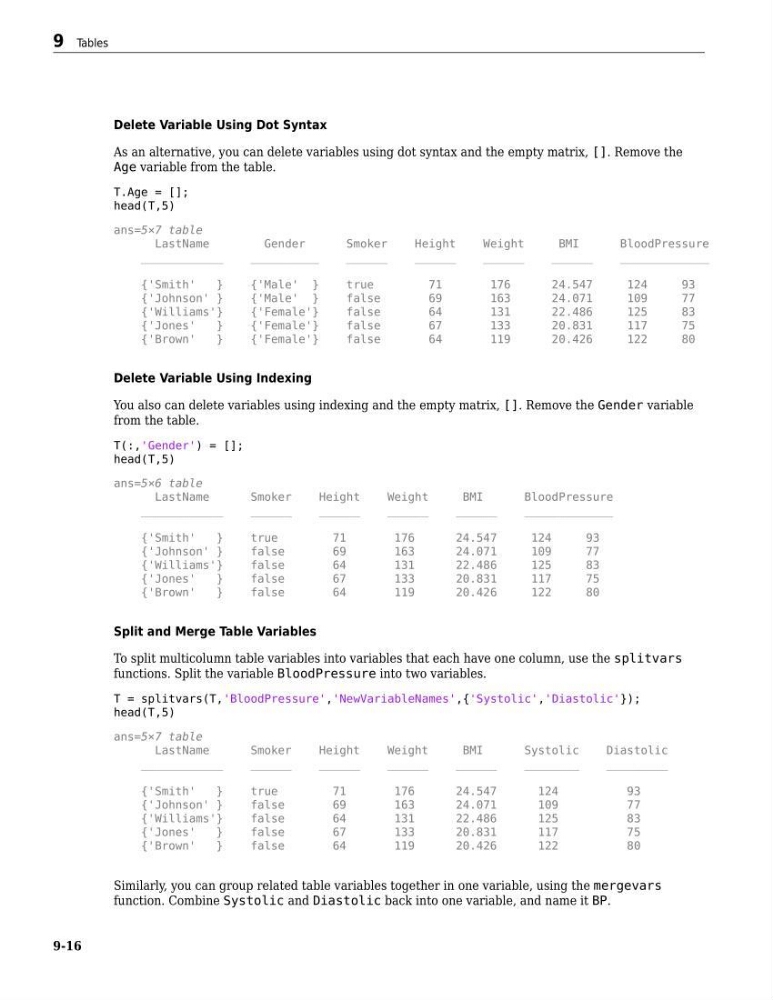
Delete Variable Using Dot Syntax
As an alternative, you can delete variables using dot syntax and the empty matrix, []. Remove the
Age variable from the table.
T.Age = [];
head(T,5)
ans=5×7 table
LastName
Gender
Smoker
Height
Weight
BMI
BloodPressure
____________
__________
______
______
______
______
_____________
{'Smith'
}
{'Male' }
true
71
176
24.547
124
93
{'Johnson' }
{'Male' }
false
69
163
24.071
109
77
{'Williams'}
{'Female'}
false
64
131
22.486
125
83
{'Jones'
}
{'Female'}
false
67
133
20.831
117
75
{'Brown'
}
{'Female'}
false
64
119
20.426
122
80
Delete Variable Using Indexing
You also can delete variables using indexing and the empty matrix, []. Remove the Gender variable
from the table.
T(:,'Gender') = [];
head(T,5)
ans=5×6 table
LastName
Smoker
Height
Weight
BMI
BloodPressure
____________
______
______
______
______
_____________
{'Smith'
}
true
71
176
24.547
124
93
{'Johnson' }
false
69
163
24.071
109
77
{'Williams'}
false
64
131
22.486
125
83
{'Jones'
}
false
67
133
20.831
117
75
{'Brown'
}
false
64
119
20.426
122
80
Split and Merge Table Variables
To split multicolumn table variables into variables that each have one column, use the splitvars
functions. Split the variable BloodPressure into two variables.
T = splitvars(T,'BloodPressure','NewVariableNames',{'Systolic','Diastolic'});
head(T,5)
ans=5×7 table
LastName
Smoker
Height
Weight
BMI
Systolic
Diastolic
____________
______
______
______
______
________
_________
{'Smith'
}
true
71
176
24.547
124
93
{'Johnson' }
false
69
163
24.071
109
77
{'Williams'}
false
64
131
22.486
125
83
{'Jones'
}
false
67
133
20.831
117
75
{'Brown'
}
false
64
119
20.426
122
80
Similarly, you can group related table variables together in one variable, using the mergevars
function. Combine Systolic and Diastolic back into one variable, and name it BP.
9 Tables
9-16
As an alternative, you can delete variables using dot syntax and the empty matrix, []. Remove the
Age variable from the table.
T.Age = [];
head(T,5)
ans=5×7 table
LastName
Gender
Smoker
Height
Weight
BMI
BloodPressure
____________
__________
______
______
______
______
_____________
{'Smith'
}
{'Male' }
true
71
176
24.547
124
93
{'Johnson' }
{'Male' }
false
69
163
24.071
109
77
{'Williams'}
{'Female'}
false
64
131
22.486
125
83
{'Jones'
}
{'Female'}
false
67
133
20.831
117
75
{'Brown'
}
{'Female'}
false
64
119
20.426
122
80
Delete Variable Using Indexing
You also can delete variables using indexing and the empty matrix, []. Remove the Gender variable
from the table.
T(:,'Gender') = [];
head(T,5)
ans=5×6 table
LastName
Smoker
Height
Weight
BMI
BloodPressure
____________
______
______
______
______
_____________
{'Smith'
}
true
71
176
24.547
124
93
{'Johnson' }
false
69
163
24.071
109
77
{'Williams'}
false
64
131
22.486
125
83
{'Jones'
}
false
67
133
20.831
117
75
{'Brown'
}
false
64
119
20.426
122
80
Split and Merge Table Variables
To split multicolumn table variables into variables that each have one column, use the splitvars
functions. Split the variable BloodPressure into two variables.
T = splitvars(T,'BloodPressure','NewVariableNames',{'Systolic','Diastolic'});
head(T,5)
ans=5×7 table
LastName
Smoker
Height
Weight
BMI
Systolic
Diastolic
____________
______
______
______
______
________
_________
{'Smith'
}
true
71
176
24.547
124
93
{'Johnson' }
false
69
163
24.071
109
77
{'Williams'}
false
64
131
22.486
125
83
{'Jones'
}
false
67
133
20.831
117
75
{'Brown'
}
false
64
119
20.426
122
80
Similarly, you can group related table variables together in one variable, using the mergevars
function. Combine Systolic and Diastolic back into one variable, and name it BP.
9 Tables
9-16