

ans=5×10 table
LastName
Age
Gender
Smoker
Height
Weight
BMI
Systolic
Dias
____________
___
__________
______
______
______
______
________
____
{'Smith'
}
38
{'Male' }
true
71
176
24.547
124
9
{'Johnson' }
43
{'Male' }
false
69
163
24.071
109
7
{'Williams'}
38
{'Female'}
false
64
131
22.486
125
8
{'Jones'
}
40
{'Female'}
false
67
133
20.831
117
7
{'Brown'
}
49
{'Female'}
false
64
119
20.426
122
8
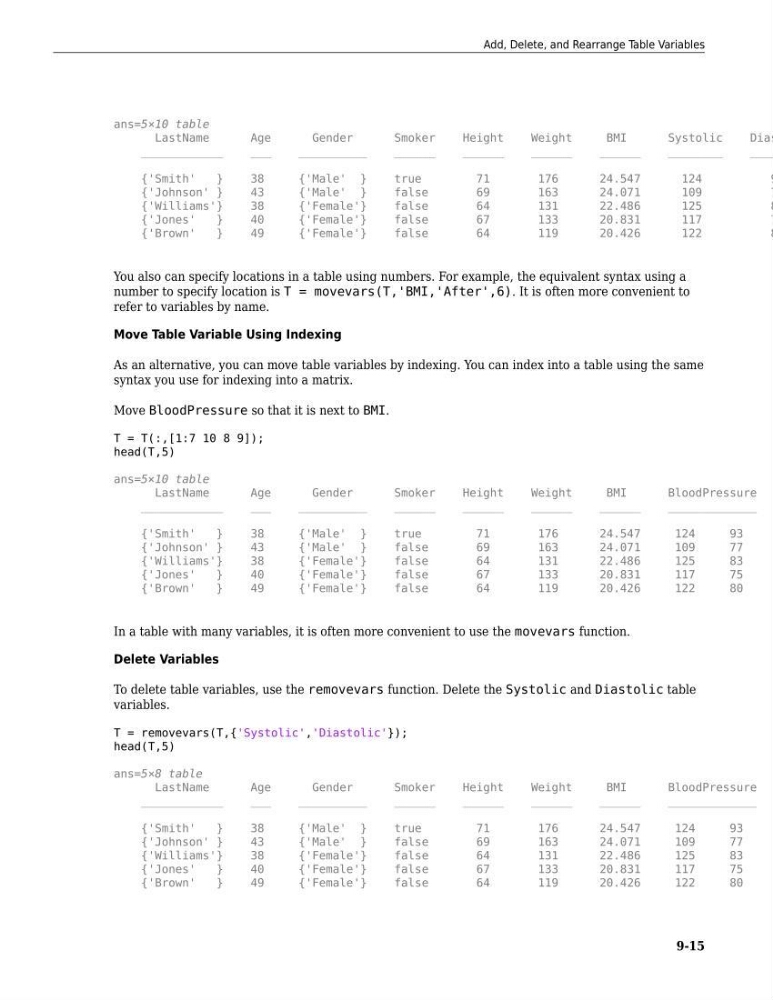
You also can specify locations in a table using numbers. For example, the equivalent syntax using a
number to specify location is T = movevars(T,'BMI,'After',6). It is often more convenient to
refer to variables by name.
Move Table Variable Using Indexing
As an alternative, you can move table variables by indexing. You can index into a table using the same
syntax you use for indexing into a matrix.
Move BloodPressure so that it is next to BMI.
T = T(:,[1:7 10 8 9]);
head(T,5)
ans=5×10 table
LastName
Age
Gender
Smoker
Height
Weight
BMI
BloodPressure
____________
___
__________
______
______
______
______
_____________
{'Smith'
}
38
{'Male' }
true
71
176
24.547
124
93
{'Johnson' }
43
{'Male' }
false
69
163
24.071
109
77
{'Williams'}
38
{'Female'}
false
64
131
22.486
125
83
{'Jones'
}
40
{'Female'}
false
67
133
20.831
117
75
{'Brown'
}
49
{'Female'}
false
64
119
20.426
122
80
In a table with many variables, it is often more convenient to use the movevars function.
Delete Variables
To delete table variables, use the removevars function. Delete the Systolic and Diastolic table
variables.
T = removevars(T,{'Systolic','Diastolic'});
head(T,5)
ans=5×8 table
LastName
Age
Gender
Smoker
Height
Weight
BMI
BloodPressure
____________
___
__________
______
______
______
______
_____________
{'Smith'
}
38
{'Male' }
true
71
176
24.547
124
93
{'Johnson' }
43
{'Male' }
false
69
163
24.071
109
77
{'Williams'}
38
{'Female'}
false
64
131
22.486
125
83
{'Jones'
}
40
{'Female'}
false
67
133
20.831
117
75
{'Brown'
}
49
{'Female'}
false
64
119
20.426
122
80
Add, Delete, and Rearrange Table Variables
9-15
LastName
Age
Gender
Smoker
Height
Weight
BMI
Systolic
Dias
____________
___
__________
______
______
______
______
________
____
{'Smith'
}
38
{'Male' }
true
71
176
24.547
124
9
{'Johnson' }
43
{'Male' }
false
69
163
24.071
109
7
{'Williams'}
38
{'Female'}
false
64
131
22.486
125
8
{'Jones'
}
40
{'Female'}
false
67
133
20.831
117
7
{'Brown'
}
49
{'Female'}
false
64
119
20.426
122
8
You also can specify locations in a table using numbers. For example, the equivalent syntax using a
number to specify location is T = movevars(T,'BMI,'After',6). It is often more convenient to
refer to variables by name.
Move Table Variable Using Indexing
As an alternative, you can move table variables by indexing. You can index into a table using the same
syntax you use for indexing into a matrix.
Move BloodPressure so that it is next to BMI.
T = T(:,[1:7 10 8 9]);
head(T,5)
ans=5×10 table
LastName
Age
Gender
Smoker
Height
Weight
BMI
BloodPressure
____________
___
__________
______
______
______
______
_____________
{'Smith'
}
38
{'Male' }
true
71
176
24.547
124
93
{'Johnson' }
43
{'Male' }
false
69
163
24.071
109
77
{'Williams'}
38
{'Female'}
false
64
131
22.486
125
83
{'Jones'
}
40
{'Female'}
false
67
133
20.831
117
75
{'Brown'
}
49
{'Female'}
false
64
119
20.426
122
80
In a table with many variables, it is often more convenient to use the movevars function.
Delete Variables
To delete table variables, use the removevars function. Delete the Systolic and Diastolic table
variables.
T = removevars(T,{'Systolic','Diastolic'});
head(T,5)
ans=5×8 table
LastName
Age
Gender
Smoker
Height
Weight
BMI
BloodPressure
____________
___
__________
______
______
______
______
_____________
{'Smith'
}
38
{'Male' }
true
71
176
24.547
124
93
{'Johnson' }
43
{'Male' }
false
69
163
24.071
109
77
{'Williams'}
38
{'Female'}
false
64
131
22.486
125
83
{'Jones'
}
40
{'Female'}
false
67
133
20.831
117
75
{'Brown'
}
49
{'Female'}
false
64
119
20.426
122
80
Add, Delete, and Rearrange Table Variables
9-15