

Use the metacharacters and operators described in this documentation to express each segment
of your search pattern as a regular expression. Then combine these expression segments into the
single expression to use in the search.
3
Call the appropriate search function on page 2-54
Pass the text you want to parse to one of the search functions, such as regexp or regexpi, or to
the text replacement function, regexprep.
The example shown in this section searches a record containing contact information belonging to a
group of five friends. This information includes each person's name, telephone number, place of
residence, and email address. The goal is to extract specific information from the text..
contacts = { ...
'Harry 287-625-7315 Columbus, OH hparker@hmail.com'; ...
'Janice 529-882-1759 Fresno, CA jan_stephens@horizon.net'; ...
'Mike 793-136-0975 Richmond, VA sue_and_mike@hmail.net'; ...
'Nadine 648-427-9947 Tampa, FL nadine_berry@horizon.net'; ...
'Jason 697-336-7728 Montrose, CO jason_blake@mymail.com'};
The first part of the example builds a regular expression that represents the format of a standard
email address. Using that expression, the example then searches the information for the email
address of one of the group of friends. Contact information for Janice is in row 2 of the contacts cell
array:
contacts{2}
ans =
'Janice 529-882-1759 Fresno, CA jan_stephens@horizon.net'
Step 1 — Identify Unique Patterns in the Text
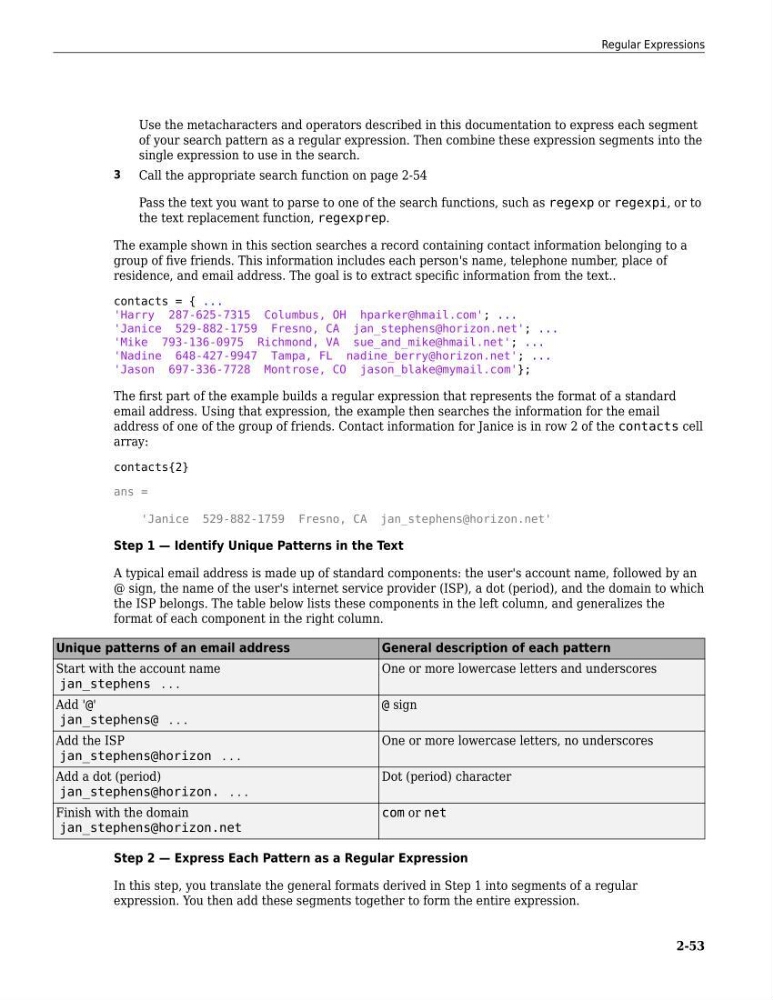
A typical email address is made up of standard components: the user's account name, followed by an
@ sign, the name of the user's internet service provider (ISP), a dot (period), and the domain to which
the ISP belongs. The table below lists these components in the left column, and generalizes the
format of each component in the right column.
Unique patterns of an email address
General description of each pattern
Start with the account name
jan_stephens . . .
One or more lowercase letters and underscores
Add '@'
jan_stephens@ . . .
@ sign
Add the ISP
jan_stephens@horizon . . .
One or more lowercase letters, no underscores
Add a dot (period)
jan_stephens@horizon. . . .
Dot (period) character
Finish with the domain
jan_stephens@horizon.net
com or net
Step 2 — Express Each Pattern as a Regular Expression
In this step, you translate the general formats derived in Step 1 into segments of a regular
expression. You then add these segments together to form the entire expression.
Regular Expressions
2-53
of your search pattern as a regular expression. Then combine these expression segments into the
single expression to use in the search.
3
Call the appropriate search function on page 2-54
Pass the text you want to parse to one of the search functions, such as regexp or regexpi, or to
the text replacement function, regexprep.
The example shown in this section searches a record containing contact information belonging to a
group of five friends. This information includes each person's name, telephone number, place of
residence, and email address. The goal is to extract specific information from the text..
contacts = { ...
'Harry 287-625-7315 Columbus, OH hparker@hmail.com'; ...
'Janice 529-882-1759 Fresno, CA jan_stephens@horizon.net'; ...
'Mike 793-136-0975 Richmond, VA sue_and_mike@hmail.net'; ...
'Nadine 648-427-9947 Tampa, FL nadine_berry@horizon.net'; ...
'Jason 697-336-7728 Montrose, CO jason_blake@mymail.com'};
The first part of the example builds a regular expression that represents the format of a standard
email address. Using that expression, the example then searches the information for the email
address of one of the group of friends. Contact information for Janice is in row 2 of the contacts cell
array:
contacts{2}
ans =
'Janice 529-882-1759 Fresno, CA jan_stephens@horizon.net'
Step 1 — Identify Unique Patterns in the Text
A typical email address is made up of standard components: the user's account name, followed by an
@ sign, the name of the user's internet service provider (ISP), a dot (period), and the domain to which
the ISP belongs. The table below lists these components in the left column, and generalizes the
format of each component in the right column.
Unique patterns of an email address
General description of each pattern
Start with the account name
jan_stephens . . .
One or more lowercase letters and underscores
Add '@'
jan_stephens@ . . .
@ sign
Add the ISP
jan_stephens@horizon . . .
One or more lowercase letters, no underscores
Add a dot (period)
jan_stephens@horizon. . . .
Dot (period) character
Finish with the domain
jan_stephens@horizon.net
com or net
Step 2 — Express Each Pattern as a Regular Expression
In this step, you translate the general formats derived in Step 1 into segments of a regular
expression. You then add these segments together to form the entire expression.
Regular Expressions
2-53