

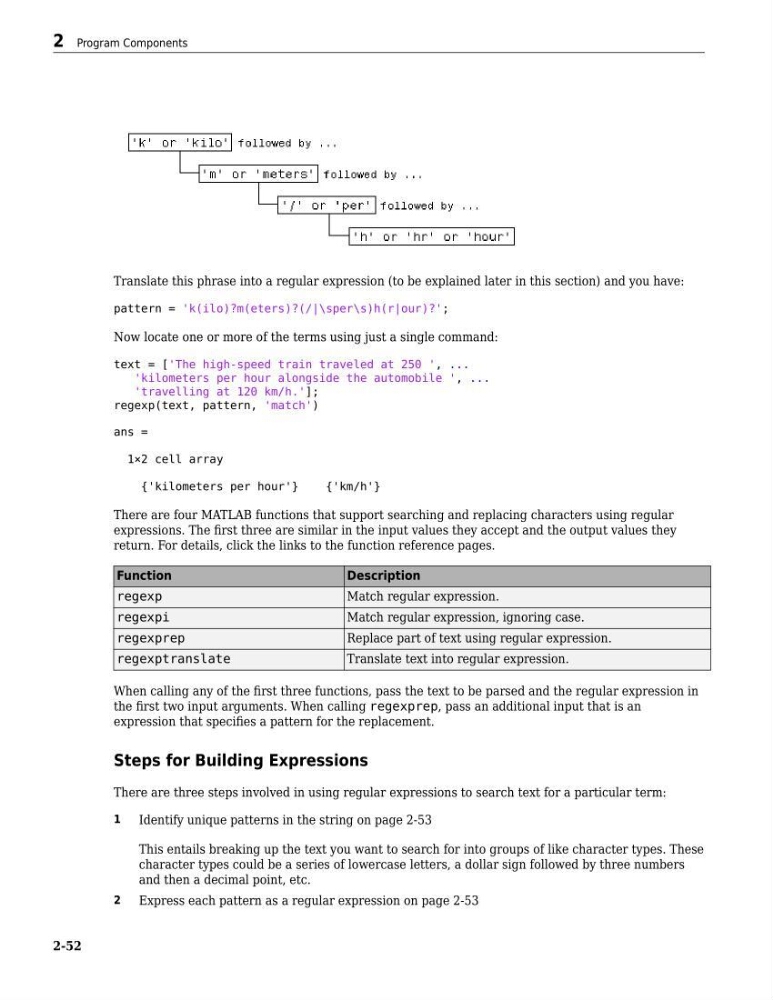
Translate this phrase into a regular expression (to be explained later in this section) and you have:
pattern = 'k(ilo)?m(eters)?(/|\sper\s)h(r|our)?';
Now locate one or more of the terms using just a single command:
text = ['The high-speed train traveled at 250 ', ...
'kilometers per hour alongside the automobile ', ...
'travelling at 120 km/h.'];
regexp(text, pattern, 'match')
ans =
1×2 cell array
{'kilometers per hour'}
{'km/h'}
There are four MATLAB functions that support searching and replacing characters using regular
expressions. The first three are similar in the input values they accept and the output values they
return. For details, click the links to the function reference pages.
Function
Description
regexp
Match regular expression.
regexpi
Match regular expression, ignoring case.
regexprep
Replace part of text using regular expression.
regexptranslate
Translate text into regular expression.
When calling any of the first three functions, pass the text to be parsed and the regular expression in
the first two input arguments. When calling regexprep, pass an additional input that is an
expression that specifies a pattern for the replacement.
Steps for Building Expressions
There are three steps involved in using regular expressions to search text for a particular term:
1
Identify unique patterns in the string on page 2-53
This entails breaking up the text you want to search for into groups of like character types. These
character types could be a series of lowercase letters, a dollar sign followed by three numbers
and then a decimal point, etc.
2
Express each pattern as a regular expression on page 2-53
2 Program Components
2-52
pattern = 'k(ilo)?m(eters)?(/|\sper\s)h(r|our)?';
Now locate one or more of the terms using just a single command:
text = ['The high-speed train traveled at 250 ', ...
'kilometers per hour alongside the automobile ', ...
'travelling at 120 km/h.'];
regexp(text, pattern, 'match')
ans =
1×2 cell array
{'kilometers per hour'}
{'km/h'}
There are four MATLAB functions that support searching and replacing characters using regular
expressions. The first three are similar in the input values they accept and the output values they
return. For details, click the links to the function reference pages.
Function
Description
regexp
Match regular expression.
regexpi
Match regular expression, ignoring case.
regexprep
Replace part of text using regular expression.
regexptranslate
Translate text into regular expression.
When calling any of the first three functions, pass the text to be parsed and the regular expression in
the first two input arguments. When calling regexprep, pass an additional input that is an
expression that specifies a pattern for the replacement.
Steps for Building Expressions
There are three steps involved in using regular expressions to search text for a particular term:
1
Identify unique patterns in the string on page 2-53
This entails breaking up the text you want to search for into groups of like character types. These
character types could be a series of lowercase letters, a dollar sign followed by three numbers
and then a decimal point, etc.
2
Express each pattern as a regular expression on page 2-53
2 Program Components
2-52