

CHAPTER 12 ■ IOT PLATFORMS
265
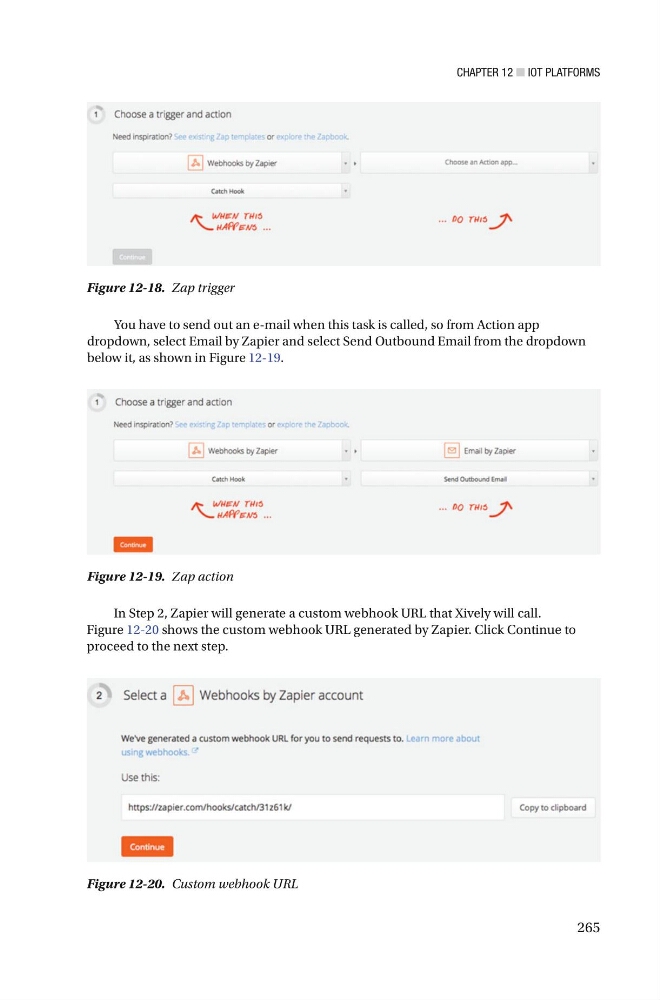
You have to send out an e-mail when this task is called, so from Action app
dropdown, select Email by Zapier and select Send Outbound Email from the dropdown
below it, as shown in Figure 12-19 .
Figure 12-18. Zap trigger
Figure 12-19. Zap action
Figure 12-20. Custom webhook URL
In Step 2, Zapier will generate a custom webhook URL that Xively will call.
Figure 12-20 shows the custom webhook URL generated by Zapier. Click Continue to
proceed to the next step.
265
You have to send out an e-mail when this task is called, so from Action app
dropdown, select Email by Zapier and select Send Outbound Email from the dropdown
below it, as shown in Figure 12-19 .
Figure 12-18. Zap trigger
Figure 12-19. Zap action
Figure 12-20. Custom webhook URL
In Step 2, Zapier will generate a custom webhook URL that Xively will call.
Figure 12-20 shows the custom webhook URL generated by Zapier. Click Continue to
proceed to the next step.