

144
materials. Under the “Openings” tab, Athena asks for information on any windows
and doors included in the wall being defined. Athena needs information regarding
the number and size of openings as well as the materials that make up the windows
or doors. Only one type of window or door can be added to a single wall assembly.
The “Envelope” tab asks for information regarding the rest of the materials in the
wall construction beyond the main assembly component. Any cladding materials,
insulation, sheathing, or membrane layers are added here.
Adding any other assembly groups included in the study, including foundations,
roofs, and floors, follows a similar structure with different options customized to
that specific building component.
8.4.2.3 Additional Features
Athena has a few features built into the dashboard that make it easy for the user to
save time and quickly understand what is happening as a result of the decisions they
make. The first is the ability to copy an assembly. After one assembly has been
added, right-clicking on it brings up a list of options, including the ability to copy it
to any open projects. This can be useful to quickly add the same structural system
on multiple floors, for example. By copying it to the same project, the user can then
make any quick adjustments needed to the new assembly.
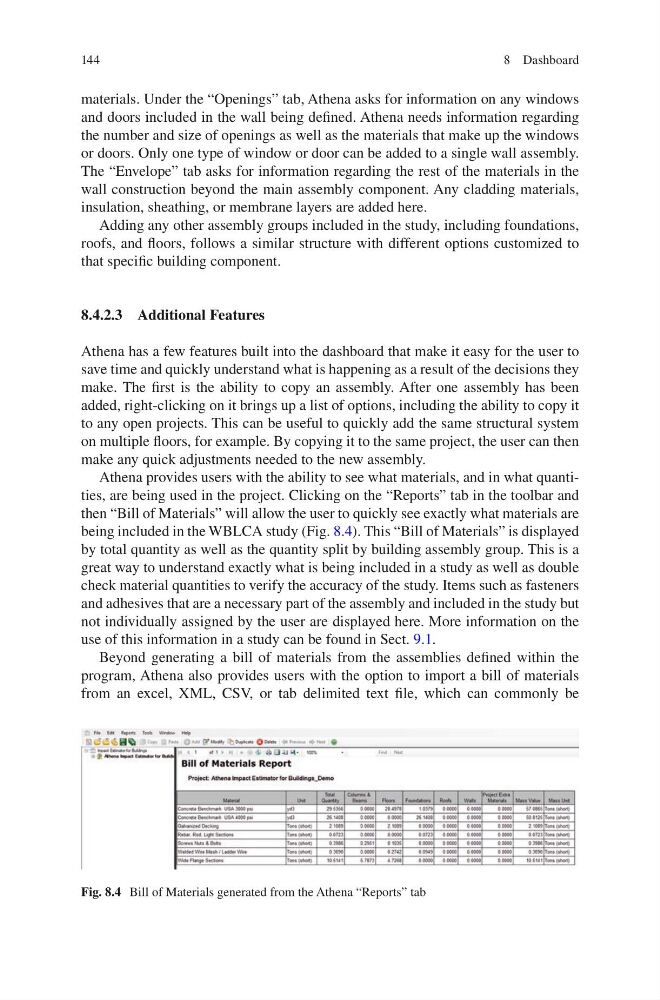
Athena provides users with the ability to see what materials, and in what quantities, are being used in the project. Clicking on the “Reports” tab in the toolbar and
then “Bill of Materials” will allow the user to quickly see exactly what materials are
being included in the WBLCA study (Fig. 8.4). This “Bill of Materials” is displayed
by total quantity as well as the quantity split by building assembly group. This is a
great way to understand exactly what is being included in a study as well as double
check material quantities to verify the accuracy of the study. Items such as fasteners
and adhesives that are a necessary part of the assembly and included in the study but
not individually assigned by the user are displayed here. More information on the
use of this information in a study can be found in Sect. 9.1.
Beyond generating a bill of materials from the assemblies defined within the
program, Athena also provides users with the option to import a bill of materials
from an excel, XML, CSV, or tab delimited text file, which can commonly be
Fig. 8.4 Bill of Materials generated from the Athena “Reports” tab
8 Dashboard
materials. Under the “Openings” tab, Athena asks for information on any windows
and doors included in the wall being defined. Athena needs information regarding
the number and size of openings as well as the materials that make up the windows
or doors. Only one type of window or door can be added to a single wall assembly.
The “Envelope” tab asks for information regarding the rest of the materials in the
wall construction beyond the main assembly component. Any cladding materials,
insulation, sheathing, or membrane layers are added here.
Adding any other assembly groups included in the study, including foundations,
roofs, and floors, follows a similar structure with different options customized to
that specific building component.
8.4.2.3 Additional Features
Athena has a few features built into the dashboard that make it easy for the user to
save time and quickly understand what is happening as a result of the decisions they
make. The first is the ability to copy an assembly. After one assembly has been
added, right-clicking on it brings up a list of options, including the ability to copy it
to any open projects. This can be useful to quickly add the same structural system
on multiple floors, for example. By copying it to the same project, the user can then
make any quick adjustments needed to the new assembly.
Athena provides users with the ability to see what materials, and in what quantities, are being used in the project. Clicking on the “Reports” tab in the toolbar and
then “Bill of Materials” will allow the user to quickly see exactly what materials are
being included in the WBLCA study (Fig. 8.4). This “Bill of Materials” is displayed
by total quantity as well as the quantity split by building assembly group. This is a
great way to understand exactly what is being included in a study as well as double
check material quantities to verify the accuracy of the study. Items such as fasteners
and adhesives that are a necessary part of the assembly and included in the study but
not individually assigned by the user are displayed here. More information on the
use of this information in a study can be found in Sect. 9.1.
Beyond generating a bill of materials from the assemblies defined within the
program, Athena also provides users with the option to import a bill of materials
from an excel, XML, CSV, or tab delimited text file, which can commonly be
Fig. 8.4 Bill of Materials generated from the Athena “Reports” tab
8 Dashboard