

142
energy is something that can be included in a WBLCA study but must be calculated
outside of the program and manually entered.
8.4.2.2 Add Project Assemblies
After all of the basic project information has been entered, the next steps are to enter
all of the information about the building assemblies and quantities. Right-clicking
on the project that was just created, in the project tree, brings up a menu of different
options, including the option to add an assembly. Athena can calculate life cycle
information about foundations, walls, columns and beams, roofs, and floors. There
is also an assembly group called “Project Extra Materials” that allows the user to
input information outside of the listed assembly groups. All of the materials and
assemblies that can be used are limited to the available LCI data. The assembly
groups offered above encompass everything that is typically included in a WBLCA
study and cover the most common building material assemblies of the region.
Under each of these assembly groups, there are different options, appropriate to
the selected assembly type, which represent common building constructions and
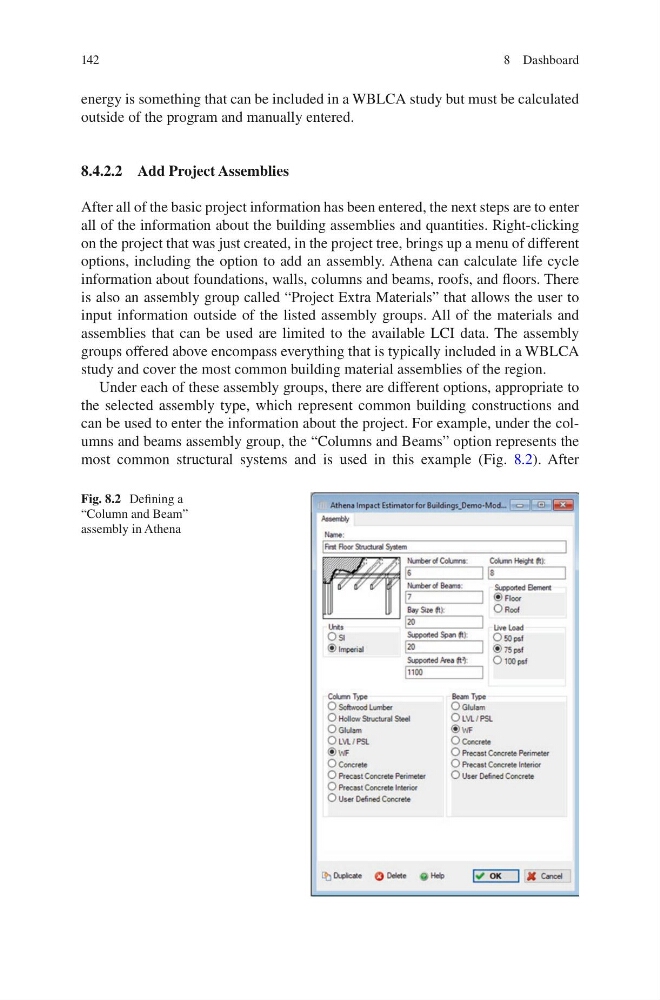
can be used to enter the information about the project. For example, under the columns and beams assembly group, the “Columns and Beams” option represents the
most common structural systems and is used in this example (Fig. 8.2). After
Fig. 8.2 Defining a
“Column and Beam”
assembly in Athena
8 Dashboard
energy is something that can be included in a WBLCA study but must be calculated
outside of the program and manually entered.
8.4.2.2 Add Project Assemblies
After all of the basic project information has been entered, the next steps are to enter
all of the information about the building assemblies and quantities. Right-clicking
on the project that was just created, in the project tree, brings up a menu of different
options, including the option to add an assembly. Athena can calculate life cycle
information about foundations, walls, columns and beams, roofs, and floors. There
is also an assembly group called “Project Extra Materials” that allows the user to
input information outside of the listed assembly groups. All of the materials and
assemblies that can be used are limited to the available LCI data. The assembly
groups offered above encompass everything that is typically included in a WBLCA
study and cover the most common building material assemblies of the region.
Under each of these assembly groups, there are different options, appropriate to
the selected assembly type, which represent common building constructions and
can be used to enter the information about the project. For example, under the columns and beams assembly group, the “Columns and Beams” option represents the
most common structural systems and is used in this example (Fig. 8.2). After
Fig. 8.2 Defining a
“Column and Beam”
assembly in Athena
8 Dashboard