

141
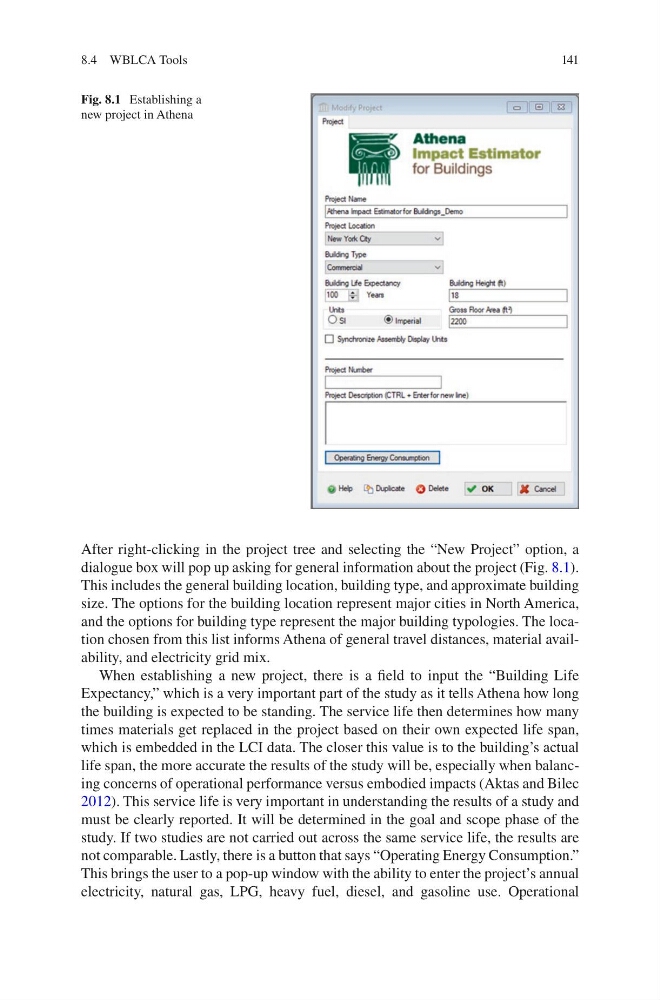
After right-clicking in the project tree and selecting the “New Project” option, a
dialogue box will pop up asking for general information about the project (Fig. 8.1).
This includes the general building location, building type, and approximate building
size. The options for the building location represent major cities in North America,
and the options for building type represent the major building typologies. The location chosen from this list informs Athena of general travel distances, material availability, and electricity grid mix.
When establishing a new project, there is a field to input the “Building Life
Expectancy,” which is a very important part of the study as it tells Athena how long
the building is expected to be standing. The service life then determines how many
times materials get replaced in the project based on their own expected life span,
which is embedded in the LCI data. The closer this value is to the building’s actual
life span, the more accurate the results of the study will be, especially when balancing concerns of operational performance versus embodied impacts (Aktas and Bilec
2012). This service life is very important in understanding the results of a study and
must be clearly reported. It will be determined in the goal and scope phase of the
study. If two studies are not carried out across the same service life, the results are
not comparable. Lastly, there is a button that says “Operating Energy Consumption.”
This brings the user to a pop-up window with the ability to enter the project’s annual
electricity, natural gas, LPG, heavy fuel, diesel, and gasoline use. Operational
Fig. 8.1 Establishing a
new project in Athena
8.4 WBLCA Tools
After right-clicking in the project tree and selecting the “New Project” option, a
dialogue box will pop up asking for general information about the project (Fig. 8.1).
This includes the general building location, building type, and approximate building
size. The options for the building location represent major cities in North America,
and the options for building type represent the major building typologies. The location chosen from this list informs Athena of general travel distances, material availability, and electricity grid mix.
When establishing a new project, there is a field to input the “Building Life
Expectancy,” which is a very important part of the study as it tells Athena how long
the building is expected to be standing. The service life then determines how many
times materials get replaced in the project based on their own expected life span,
which is embedded in the LCI data. The closer this value is to the building’s actual
life span, the more accurate the results of the study will be, especially when balancing concerns of operational performance versus embodied impacts (Aktas and Bilec
2012). This service life is very important in understanding the results of a study and
must be clearly reported. It will be determined in the goal and scope phase of the
study. If two studies are not carried out across the same service life, the results are
not comparable. Lastly, there is a button that says “Operating Energy Consumption.”
This brings the user to a pop-up window with the ability to enter the project’s annual
electricity, natural gas, LPG, heavy fuel, diesel, and gasoline use. Operational
Fig. 8.1 Establishing a
new project in Athena
8.4 WBLCA Tools