

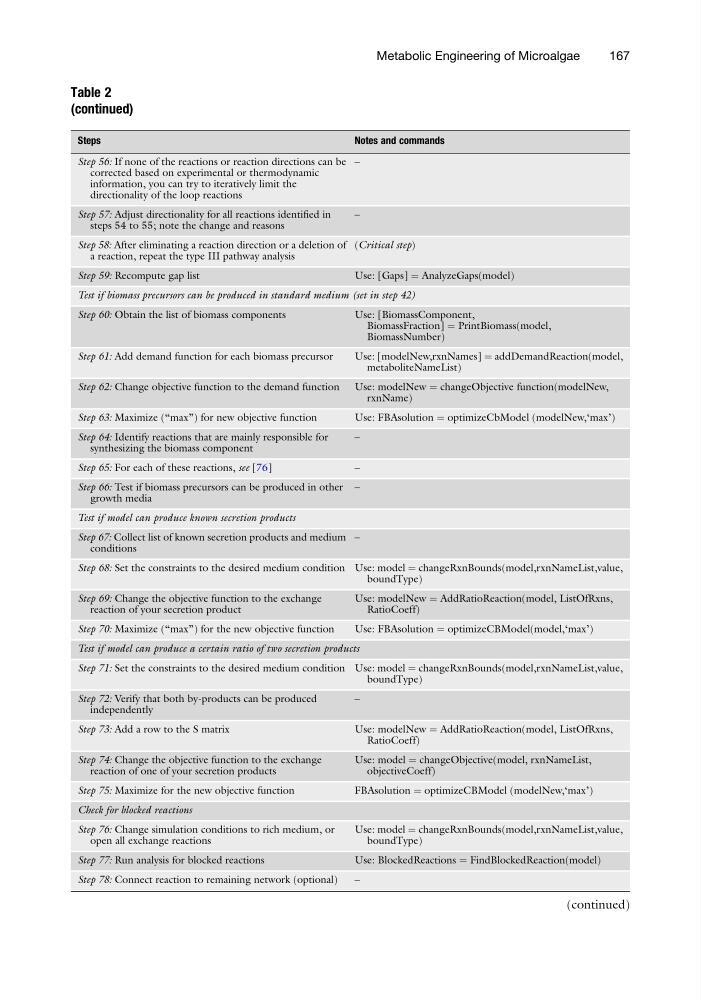
Table 2
(continued)
Steps
Notes and commands
Step 56: If none of the reactions or reaction directions can be
corrected based on experimental or thermodynamic
information, you can try to iteratively limit the
directionality of the loop reactions
–
Step 57: Adjust directionality for all reactions identified in
steps 54 to 55; note the change and reasons
–
Step 58: After eliminating a reaction direction or a deletion of
a reaction, repeat the type III pathway analysis
(Critical step)
Step 59: Recompute gap list
Use: [Gaps] ¼ AnalyzeGaps(model)
Test if biomass precursors can be produced in standard medium (set in step 42)
Step 60: Obtain the list of biomass components
Use: [BiomassComponent,
BiomassFraction] ¼ PrintBiomass(model,
BiomassNumber)
Step 61: Add demand function for each biomass precursor
Use: [modelNew,rxnNames] ¼ addDemandReaction(model,
metaboliteNameList)
Step 62: Change objective function to the demand function Use: modelNew ¼ changeObjective function(modelNew,
rxnName)
Step 63: Maximize (“max”) for new objective function
Use: FBAsolution ¼ optimizeCbModel (modelNew,‘max’)
Step 64: Identify reactions that are mainly responsible for
synthesizing the biomass component
–
Step 65: For each of these reactions, see [76]
–
Step 66: Test if biomass precursors can be produced in other
growth media
–
Test if model can produce known secretion products
Step 67: Collect list of known secretion products and medium
conditions
–
Step 68: Set the constraints to the desired medium condition Use: model ¼ changeRxnBounds(model,rxnNameList,value,
boundType)
Step 69: Change the objective function to the exchange
reaction of your secretion product
Use: modelNew ¼ AddRatioReaction(model, ListOfRxns,
RatioCoeff)
Step 70: Maximize (“max”) for the new objective function
Use: FBAsolution ¼ optimizeCBModel(model,‘max’)
Test if model can produce a certain ratio of two secretion products
Step 71: Set the constraints to the desired medium condition Use: model ¼ changeRxnBounds(model,rxnNameList,value,
boundType)
Step 72: Verify that both by-products can be produced
independently
–
Step 73: Add a row to the S matrix
Use: modelNew ¼ AddRatioReaction(model, ListOfRxns,
RatioCoeff)
Step 74: Change the objective function to the exchange
reaction of one of your secretion products
Use: model ¼ changeObjective(model, rxnNameList,
objectiveCoeff)
Step 75: Maximize for the new objective function
FBAsolution ¼ optimizeCBModel (modelNew,‘max’)
Check for blocked reactions
Step 76: Change simulation conditions to rich medium, or
open all exchange reactions
Use: model ¼ changeRxnBounds(model,rxnNameList,value,
boundType)
Step 77: Run analysis for blocked reactions
Use: BlockedReactions ¼ FindBlockedReaction(model)
Step 78: Connect reaction to remaining network (optional)
–
(continued)
Metabolic Engineering of Microalgae
167
(continued)
Steps
Notes and commands
Step 56: If none of the reactions or reaction directions can be
corrected based on experimental or thermodynamic
information, you can try to iteratively limit the
directionality of the loop reactions
–
Step 57: Adjust directionality for all reactions identified in
steps 54 to 55; note the change and reasons
–
Step 58: After eliminating a reaction direction or a deletion of
a reaction, repeat the type III pathway analysis
(Critical step)
Step 59: Recompute gap list
Use: [Gaps] ¼ AnalyzeGaps(model)
Test if biomass precursors can be produced in standard medium (set in step 42)
Step 60: Obtain the list of biomass components
Use: [BiomassComponent,
BiomassFraction] ¼ PrintBiomass(model,
BiomassNumber)
Step 61: Add demand function for each biomass precursor
Use: [modelNew,rxnNames] ¼ addDemandReaction(model,
metaboliteNameList)
Step 62: Change objective function to the demand function Use: modelNew ¼ changeObjective function(modelNew,
rxnName)
Step 63: Maximize (“max”) for new objective function
Use: FBAsolution ¼ optimizeCbModel (modelNew,‘max’)
Step 64: Identify reactions that are mainly responsible for
synthesizing the biomass component
–
Step 65: For each of these reactions, see [76]
–
Step 66: Test if biomass precursors can be produced in other
growth media
–
Test if model can produce known secretion products
Step 67: Collect list of known secretion products and medium
conditions
–
Step 68: Set the constraints to the desired medium condition Use: model ¼ changeRxnBounds(model,rxnNameList,value,
boundType)
Step 69: Change the objective function to the exchange
reaction of your secretion product
Use: modelNew ¼ AddRatioReaction(model, ListOfRxns,
RatioCoeff)
Step 70: Maximize (“max”) for the new objective function
Use: FBAsolution ¼ optimizeCBModel(model,‘max’)
Test if model can produce a certain ratio of two secretion products
Step 71: Set the constraints to the desired medium condition Use: model ¼ changeRxnBounds(model,rxnNameList,value,
boundType)
Step 72: Verify that both by-products can be produced
independently
–
Step 73: Add a row to the S matrix
Use: modelNew ¼ AddRatioReaction(model, ListOfRxns,
RatioCoeff)
Step 74: Change the objective function to the exchange
reaction of one of your secretion products
Use: model ¼ changeObjective(model, rxnNameList,
objectiveCoeff)
Step 75: Maximize for the new objective function
FBAsolution ¼ optimizeCBModel (modelNew,‘max’)
Check for blocked reactions
Step 76: Change simulation conditions to rich medium, or
open all exchange reactions
Use: model ¼ changeRxnBounds(model,rxnNameList,value,
boundType)
Step 77: Run analysis for blocked reactions
Use: BlockedReactions ¼ FindBlockedReaction(model)
Step 78: Connect reaction to remaining network (optional)
–
(continued)
Metabolic Engineering of Microalgae
167