

29
4.4
Generate Your Own Silhouettes
As discussed in Sect. 4.3, cliparts are convenient to illustrate concepts without distracting the audience. The most effective cliparts are called “silhouettes”, consisting
of black and white simplified drawings (no shades of grey, just black and white).
Many of those are available directly from the Internet (add the keyword “silhouette”
when searching images).
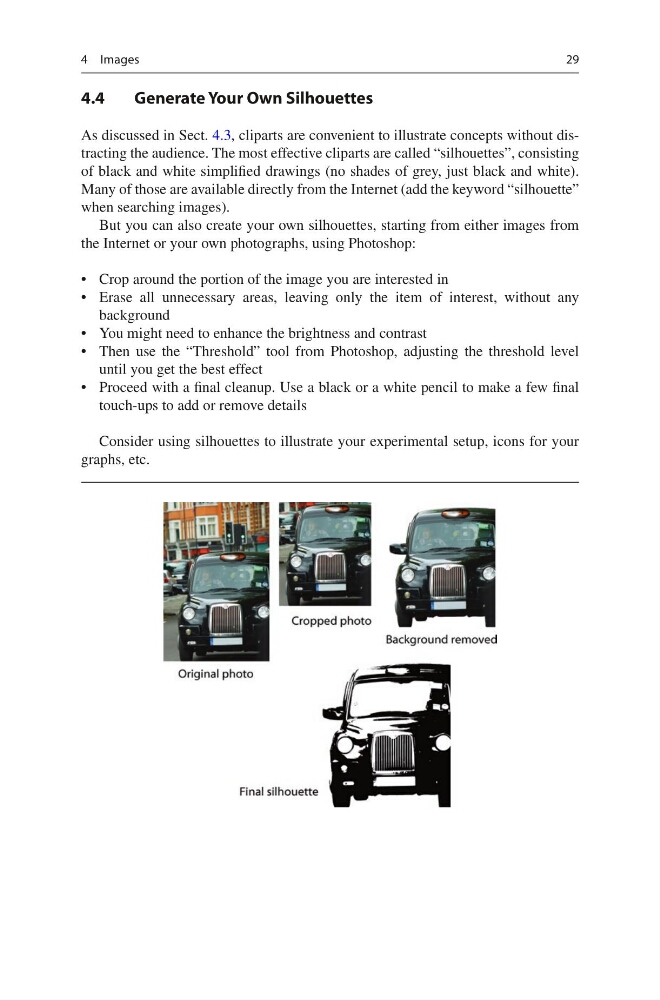
But you can also create your own silhouettes, starting from either images from
the Internet or your own photographs, using Photoshop:
• Crop around the portion of the image you are interested in
• Erase all unnecessary areas, leaving only the item of interest, without any
background
• You might need to enhance the brightness and contrast
• Then use the “Threshold” tool from Photoshop, adjusting the threshold level
until you get the best effect
• Proceed with a final cleanup. Use a black or a white pencil to make a few final
touch-ups to add or remove details
Consider using silhouettes to illustrate your experimental setup, icons for your
graphs, etc.
4 Images
4.4
Generate Your Own Silhouettes
As discussed in Sect. 4.3, cliparts are convenient to illustrate concepts without distracting the audience. The most effective cliparts are called “silhouettes”, consisting
of black and white simplified drawings (no shades of grey, just black and white).
Many of those are available directly from the Internet (add the keyword “silhouette”
when searching images).
But you can also create your own silhouettes, starting from either images from
the Internet or your own photographs, using Photoshop:
• Crop around the portion of the image you are interested in
• Erase all unnecessary areas, leaving only the item of interest, without any
background
• You might need to enhance the brightness and contrast
• Then use the “Threshold” tool from Photoshop, adjusting the threshold level
until you get the best effect
• Proceed with a final cleanup. Use a black or a white pencil to make a few final
touch-ups to add or remove details
Consider using silhouettes to illustrate your experimental setup, icons for your
graphs, etc.
4 Images