

172
K. Miller et al.
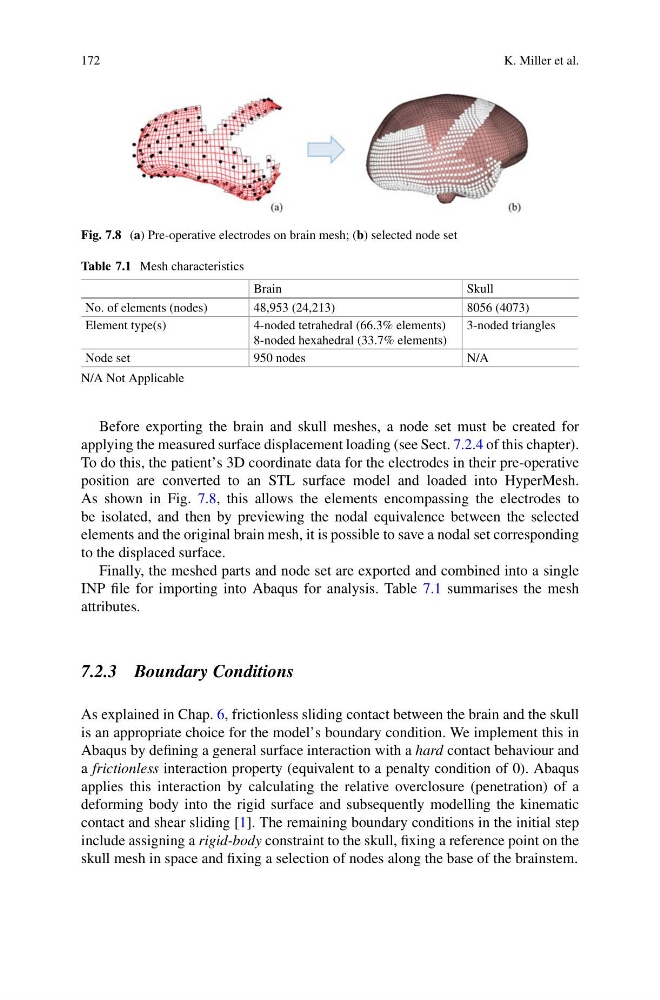
Fig. 7.8 (a) Pre-operative electrodes on brain mesh; (b) selected node set
Table 7.1 Mesh characteristics
Brain
Skull
No. of elements (nodes)
48,953 (24,213)
8056 (4073)
Element type(s)
4-noded tetrahedral (66.3% elements)
8-noded hexahedral (33.7% elements)
3-noded triangles
Node set
950 nodes
N/A
N/A Not Applicable
Before exporting the brain and skull meshes, a node set must be created for
applying the measured surface displacement loading (see Sect. 7.2.4 of this chapter).
To do this, the patient’s 3D coordinate data for the electrodes in their pre-operative
position are converted to an STL surface model and loaded into HyperMesh.
As shown in Fig. 7.8, this allows the elements encompassing the electrodes to
be isolated, and then by previewing the nodal equivalence between the selected
elements and the original brain mesh, it is possible to save a nodal set corresponding
to the displaced surface.
Finally, the meshed parts and node set are exported and combined into a single
INP file for importing into Abaqus for analysis. Table 7.1 summarises the mesh
attributes.
7.2.3 Boundary Conditions
As explained in Chap. 6, frictionless sliding contact between the brain and the skull
is an appropriate choice for the model’s boundary condition. We implement this in
Abaqus by defining a general surface interaction with a hard contact behaviour and
a frictionless interaction property (equivalent to a penalty condition of 0). Abaqus
applies this interaction by calculating the relative overclosure (penetration) of a
deforming body into the rigid surface and subsequently modelling the kinematic
contact and shear sliding [1]. The remaining boundary conditions in the initial step
include assigning a rigid-body constraint to the skull, fixing a reference point on the
skull mesh in space and fixing a selection of nodes along the base of the brainstem.
K. Miller et al.
Fig. 7.8 (a) Pre-operative electrodes on brain mesh; (b) selected node set
Table 7.1 Mesh characteristics
Brain
Skull
No. of elements (nodes)
48,953 (24,213)
8056 (4073)
Element type(s)
4-noded tetrahedral (66.3% elements)
8-noded hexahedral (33.7% elements)
3-noded triangles
Node set
950 nodes
N/A
N/A Not Applicable
Before exporting the brain and skull meshes, a node set must be created for
applying the measured surface displacement loading (see Sect. 7.2.4 of this chapter).
To do this, the patient’s 3D coordinate data for the electrodes in their pre-operative
position are converted to an STL surface model and loaded into HyperMesh.
As shown in Fig. 7.8, this allows the elements encompassing the electrodes to
be isolated, and then by previewing the nodal equivalence between the selected
elements and the original brain mesh, it is possible to save a nodal set corresponding
to the displaced surface.
Finally, the meshed parts and node set are exported and combined into a single
INP file for importing into Abaqus for analysis. Table 7.1 summarises the mesh
attributes.
7.2.3 Boundary Conditions
As explained in Chap. 6, frictionless sliding contact between the brain and the skull
is an appropriate choice for the model’s boundary condition. We implement this in
Abaqus by defining a general surface interaction with a hard contact behaviour and
a frictionless interaction property (equivalent to a penalty condition of 0). Abaqus
applies this interaction by calculating the relative overclosure (penetration) of a
deforming body into the rigid surface and subsequently modelling the kinematic
contact and shear sliding [1]. The remaining boundary conditions in the initial step
include assigning a rigid-body constraint to the skull, fixing a reference point on the
skull mesh in space and fixing a selection of nodes along the base of the brainstem.