

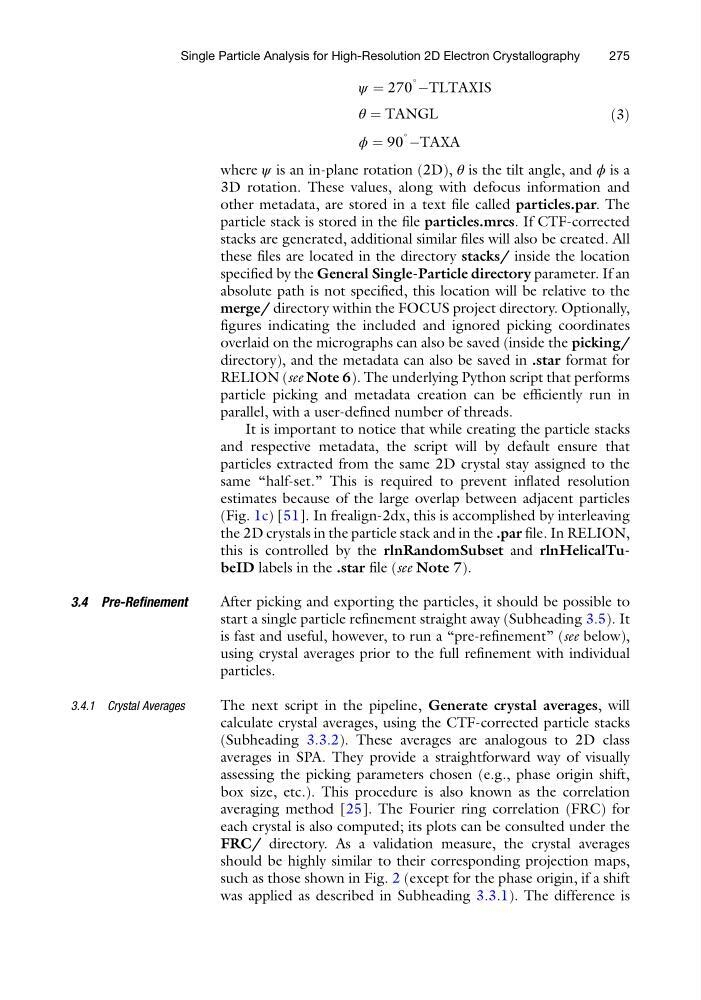
ψ ¼ 270
∘ ÀTLTAXIS
θ ¼ TANGL
ϕ ¼ 90
∘ ÀTAXA
ð3Þ
where ψ is an in-plane rotation (2D), θ is the tilt angle, and ϕ is a
3D rotation. These values, along with defocus information and
other metadata, are stored in a text file called particles.par. The
particle stack is stored in the file particles.mrcs. If CTF-corrected
stacks are generated, additional similar files will also be created. All
these files are located in the directory stacks/ inside the location
specified by the General Single-Particle directory parameter. If an
absolute path is not specified, this location will be relative to the
merge/ directory within the FOCUS project directory. Optionally,
figures indicating the included and ignored picking coordinates
overlaid on the micrographs can also be saved (inside the picking/
directory), and the metadata can also be saved in .star format for
RELION (see Note 6). The underlying Python script that performs
particle picking and metadata creation can be efficiently run in
parallel, with a user-defined number of threads.
It is important to notice that while creating the particle stacks
and respective metadata, the script will by default ensure that
particles extracted from the same 2D crystal stay assigned to the
same “half-set.” This is required to prevent inflated resolution
estimates because of the large overlap between adjacent particles
(Fig. 1c) [51]. In frealign-2dx, this is accomplished by interleaving
the 2D crystals in the particle stack and in the .par file. In RELION,
this is controlled by the rlnRandomSubset and rlnHelicalTubeID labels in the .star file (see Note 7).
3.4 Pre-Refinement
After picking and exporting the particles, it should be possible to
start a single particle refinement straight away (Subheading 3.5). It
is fast and useful, however, to run a “pre-refinement” (see below),
using crystal averages prior to the full refinement with individual
particles.
3.4.1 Crystal Averages
The next script in the pipeline, Generate crystal averages, will
calculate crystal averages, using the CTF-corrected particle stacks
(Subheading 3.3.2). These averages are analogous to 2D class
averages in SPA. They provide a straightforward way of visually
assessing the picking parameters chosen (e.g., phase origin shift,
box size, etc.). This procedure is also known as the correlation
averaging method [25]. The Fourier ring correlation (FRC) for
each crystal is also computed; its plots can be consulted under the
FRC/ directory. As a validation measure, the crystal averages
should be highly similar to their corresponding projection maps,
such as those shown in Fig. 2 (except for the phase origin, if a shift
was applied as described in Subheading 3.3.1). The difference is
Single Particle Analysis for High-Resolution 2D Electron Crystallography
275
∘ ÀTLTAXIS
θ ¼ TANGL
ϕ ¼ 90
∘ ÀTAXA
ð3Þ
where ψ is an in-plane rotation (2D), θ is the tilt angle, and ϕ is a
3D rotation. These values, along with defocus information and
other metadata, are stored in a text file called particles.par. The
particle stack is stored in the file particles.mrcs. If CTF-corrected
stacks are generated, additional similar files will also be created. All
these files are located in the directory stacks/ inside the location
specified by the General Single-Particle directory parameter. If an
absolute path is not specified, this location will be relative to the
merge/ directory within the FOCUS project directory. Optionally,
figures indicating the included and ignored picking coordinates
overlaid on the micrographs can also be saved (inside the picking/
directory), and the metadata can also be saved in .star format for
RELION (see Note 6). The underlying Python script that performs
particle picking and metadata creation can be efficiently run in
parallel, with a user-defined number of threads.
It is important to notice that while creating the particle stacks
and respective metadata, the script will by default ensure that
particles extracted from the same 2D crystal stay assigned to the
same “half-set.” This is required to prevent inflated resolution
estimates because of the large overlap between adjacent particles
(Fig. 1c) [51]. In frealign-2dx, this is accomplished by interleaving
the 2D crystals in the particle stack and in the .par file. In RELION,
this is controlled by the rlnRandomSubset and rlnHelicalTubeID labels in the .star file (see Note 7).
3.4 Pre-Refinement
After picking and exporting the particles, it should be possible to
start a single particle refinement straight away (Subheading 3.5). It
is fast and useful, however, to run a “pre-refinement” (see below),
using crystal averages prior to the full refinement with individual
particles.
3.4.1 Crystal Averages
The next script in the pipeline, Generate crystal averages, will
calculate crystal averages, using the CTF-corrected particle stacks
(Subheading 3.3.2). These averages are analogous to 2D class
averages in SPA. They provide a straightforward way of visually
assessing the picking parameters chosen (e.g., phase origin shift,
box size, etc.). This procedure is also known as the correlation
averaging method [25]. The Fourier ring correlation (FRC) for
each crystal is also computed; its plots can be consulted under the
FRC/ directory. As a validation measure, the crystal averages
should be highly similar to their corresponding projection maps,
such as those shown in Fig. 2 (except for the phase origin, if a shift
was applied as described in Subheading 3.3.1). The difference is
Single Particle Analysis for High-Resolution 2D Electron Crystallography
275