

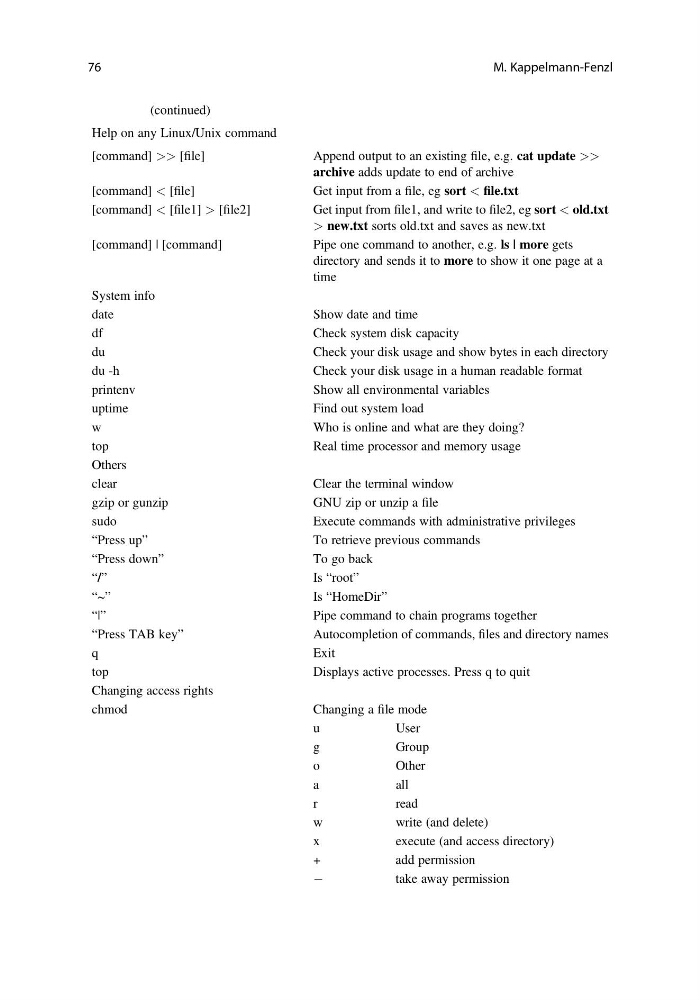
Table 6.1 (continued)
Help on any Linux/Unix command
[command] >> [file]
Append output to an existing file, e.g. cat update >>
archive adds update to end of archive
[command] < [file]
Get input from a file, eg sort < file.txt
[command] < [file1] > [file2]
Get input from file1, and write to file2, eg sort < old.txt
> new.txt sorts old.txt and saves as new.txt
[command] | [command]
Pipe one command to another, e.g. ls | more gets
directory and sends it to more to show it one page at a
time
System info
date
Show date and time
df
Check system disk capacity
du
Check your disk usage and show bytes in each directory
du -h
Check your disk usage in a human readable format
printenv
Show all environmental variables
uptime
Find out system load
w
Who is online and what are they doing?
top
Real time processor and memory usage
Others
clear
Clear the terminal window
gzip or gunzip
GNU zip or unzip a file
sudo
Execute commands with administrative privileges
“Press up”
To retrieve previous commands
“Press down”
To go back
“/”
Is “root”
“~”
Is “HomeDir”
“|”
Pipe command to chain programs together
“Press TAB key”
Autocompletion of commands, files and directory names
q
Exit
top
Displays active processes. Press q to quit
Changing access rights
chmod
Changing a file mode
u
User
g
Group
o
Other
a
all
r
read
w
write (and delete)
x
execute (and access directory)
+
add permission
À
take away permission
76
M. Kappelmann-Fenzl
Help on any Linux/Unix command
[command] >> [file]
Append output to an existing file, e.g. cat update >>
archive adds update to end of archive
[command] < [file]
Get input from a file, eg sort < file.txt
[command] < [file1] > [file2]
Get input from file1, and write to file2, eg sort < old.txt
> new.txt sorts old.txt and saves as new.txt
[command] | [command]
Pipe one command to another, e.g. ls | more gets
directory and sends it to more to show it one page at a
time
System info
date
Show date and time
df
Check system disk capacity
du
Check your disk usage and show bytes in each directory
du -h
Check your disk usage in a human readable format
printenv
Show all environmental variables
uptime
Find out system load
w
Who is online and what are they doing?
top
Real time processor and memory usage
Others
clear
Clear the terminal window
gzip or gunzip
GNU zip or unzip a file
sudo
Execute commands with administrative privileges
“Press up”
To retrieve previous commands
“Press down”
To go back
“/”
Is “root”
“~”
Is “HomeDir”
“|”
Pipe command to chain programs together
“Press TAB key”
Autocompletion of commands, files and directory names
q
Exit
top
Displays active processes. Press q to quit
Changing access rights
chmod
Changing a file mode
u
User
g
Group
o
Other
a
all
r
read
w
write (and delete)
x
execute (and access directory)
+
add permission
À
take away permission
76
M. Kappelmann-Fenzl