

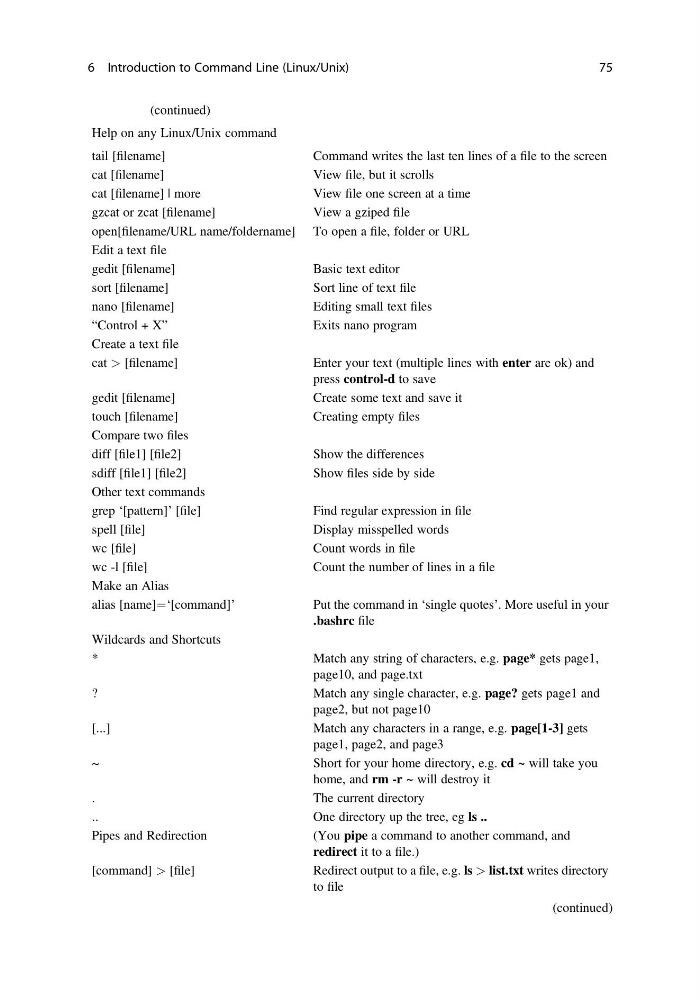
Table 6.1 (continued)
Help on any Linux/Unix command
tail [filename]
Command writes the last ten lines of a file to the screen
cat [filename]
View file, but it scrolls
cat [filename] | more
View file one screen at a time
gzcat or zcat [filename]
View a gziped file
open[filename/URL name/foldername] To open a file, folder or URL
Edit a text file
gedit [filename]
Basic text editor
sort [filename]
Sort line of text file
nano [filename]
Editing small text files
“Control + X”
Exits nano program
Create a text file
cat > [filename]
Enter your text (multiple lines with enter are ok) and
press control-d to save
gedit [filename]
Create some text and save it
touch [filename]
Creating empty files
Compare two files
diff [file1] [file2]
Show the differences
sdiff [file1] [file2]
Show files side by side
Other text commands
grep ‘[pattern]’ [file]
Find regular expression in file
spell [file]
Display misspelled words
wc [file]
Count words in file
wc -l [file]
Count the number of lines in a file
Make an Alias
alias [name]¼‘[command]’
Put the command in ‘single quotes’. More useful in your
.bashrc file
Wildcards and Shortcuts
*
Match any string of characters, e.g. page* gets page1,
page10, and page.txt
?
Match any single character, e.g. page? gets page1 and
page2, but not page10
[...]
Match any characters in a range, e.g. page[1-3] gets
page1, page2, and page3
~
Short for your home directory, e.g. cd ~ will take you
home, and rm -r ~ will destroy it
.
The current directory
..
One directory up the tree, eg ls ..
Pipes and Redirection
(You pipe a command to another command, and
redirect it to a file.)
[command] > [file]
Redirect output to a file, e.g. ls > list.txt writes directory
to file
(continued)
6 Introduction to Command Line (Linux/Unix)
75
Help on any Linux/Unix command
tail [filename]
Command writes the last ten lines of a file to the screen
cat [filename]
View file, but it scrolls
cat [filename] | more
View file one screen at a time
gzcat or zcat [filename]
View a gziped file
open[filename/URL name/foldername] To open a file, folder or URL
Edit a text file
gedit [filename]
Basic text editor
sort [filename]
Sort line of text file
nano [filename]
Editing small text files
“Control + X”
Exits nano program
Create a text file
cat > [filename]
Enter your text (multiple lines with enter are ok) and
press control-d to save
gedit [filename]
Create some text and save it
touch [filename]
Creating empty files
Compare two files
diff [file1] [file2]
Show the differences
sdiff [file1] [file2]
Show files side by side
Other text commands
grep ‘[pattern]’ [file]
Find regular expression in file
spell [file]
Display misspelled words
wc [file]
Count words in file
wc -l [file]
Count the number of lines in a file
Make an Alias
alias [name]¼‘[command]’
Put the command in ‘single quotes’. More useful in your
.bashrc file
Wildcards and Shortcuts
*
Match any string of characters, e.g. page* gets page1,
page10, and page.txt
?
Match any single character, e.g. page? gets page1 and
page2, but not page10
[...]
Match any characters in a range, e.g. page[1-3] gets
page1, page2, and page3
~
Short for your home directory, e.g. cd ~ will take you
home, and rm -r ~ will destroy it
.
The current directory
..
One directory up the tree, eg ls ..
Pipes and Redirection
(You pipe a command to another command, and
redirect it to a file.)
[command] > [file]
Redirect output to a file, e.g. ls > list.txt writes directory
to file
(continued)
6 Introduction to Command Line (Linux/Unix)
75