

412
Chapter 14 See the World in 3D
around the world). It’s easy to create 3D objects, structures, buildings, landforms, and more through the use of the Google SketchUp (GSU) software
program and then view them in Google Earth. The regular version of GSU is
made freely available for download by Google, while a Pro version with additional features is available for purchase (you’ll be downloading and using
the free version of GSU in this chapter’s lab). GSU is a very versatile (and
intuitive to use) program that allows for a full range of 3D design capabilities.
Structures created with GSU can be as realistic, detailed, or as basic as you
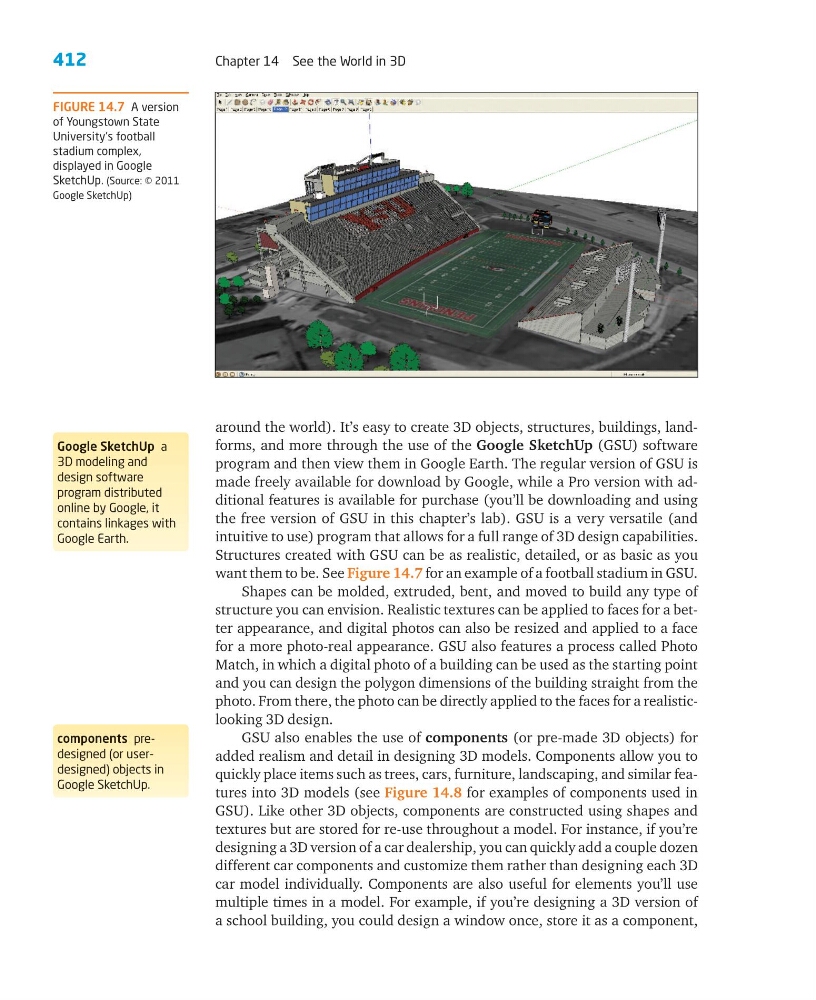
want them to be. See Figure 14.7 for an example of a football stadium in GSU.
Shapes can be molded, extruded, bent, and moved to build any type of
structure you can envision. Realistic textures can be applied to faces for a better appearance, and digital photos can also be resized and applied to a face
for a more photo-real appearance. GSU also features a process called Photo
Match, in which a digital photo of a building can be used as the starting point
and you can design the polygon dimensions of the building straight from the
photo. From there, the photo can be directly applied to the faces for a realisticlooking 3D design.
GSU also enables the use of components (or pre-made 3D objects) for
added realism and detail in designing 3D models. Components allow you to
quickly place items such as trees, cars, furniture, landscaping, and similar features into 3D models (see Figure 14.8 for examples of components used in
GSU). Like other 3D objects, components are constructed using shapes and
textures but are stored for re-use throughout a model. For instance, if you’re
designing a 3D version of a car dealership, you can quickly add a couple dozen
different car components and customize them rather than designing each 3D
car model individually. Components are also useful for elements you’ll use
multiple times in a model. For example, if you’re designing a 3D version of
a school building, you could design a window once, store it as a component,
FIGURE 14.7 A version
of Youngstown State
University’s football
stadium complex,
displayed in Google
SketchUp. (Source: © 2011
Google SketchUp)
Google SketchUp a
3D modeling and
design software
program distributed
online by Google, it
contains linkages with
Google Earth.
components predesigned (or userdesigned) objects in
Google SketchUp.
Chapter 14 See the World in 3D
around the world). It’s easy to create 3D objects, structures, buildings, landforms, and more through the use of the Google SketchUp (GSU) software
program and then view them in Google Earth. The regular version of GSU is
made freely available for download by Google, while a Pro version with additional features is available for purchase (you’ll be downloading and using
the free version of GSU in this chapter’s lab). GSU is a very versatile (and
intuitive to use) program that allows for a full range of 3D design capabilities.
Structures created with GSU can be as realistic, detailed, or as basic as you
want them to be. See Figure 14.7 for an example of a football stadium in GSU.
Shapes can be molded, extruded, bent, and moved to build any type of
structure you can envision. Realistic textures can be applied to faces for a better appearance, and digital photos can also be resized and applied to a face
for a more photo-real appearance. GSU also features a process called Photo
Match, in which a digital photo of a building can be used as the starting point
and you can design the polygon dimensions of the building straight from the
photo. From there, the photo can be directly applied to the faces for a realisticlooking 3D design.
GSU also enables the use of components (or pre-made 3D objects) for
added realism and detail in designing 3D models. Components allow you to
quickly place items such as trees, cars, furniture, landscaping, and similar features into 3D models (see Figure 14.8 for examples of components used in
GSU). Like other 3D objects, components are constructed using shapes and
textures but are stored for re-use throughout a model. For instance, if you’re
designing a 3D version of a car dealership, you can quickly add a couple dozen
different car components and customize them rather than designing each 3D
car model individually. Components are also useful for elements you’ll use
multiple times in a model. For example, if you’re designing a 3D version of
a school building, you could design a window once, store it as a component,
FIGURE 14.7 A version
of Youngstown State
University’s football
stadium complex,
displayed in Google
SketchUp. (Source: © 2011
Google SketchUp)
Google SketchUp a
3D modeling and
design software
program distributed
online by Google, it
contains linkages with
Google Earth.
components predesigned (or userdesigned) objects in
Google SketchUp.