

169
GIS Spatial Analysis: AEJEE Version
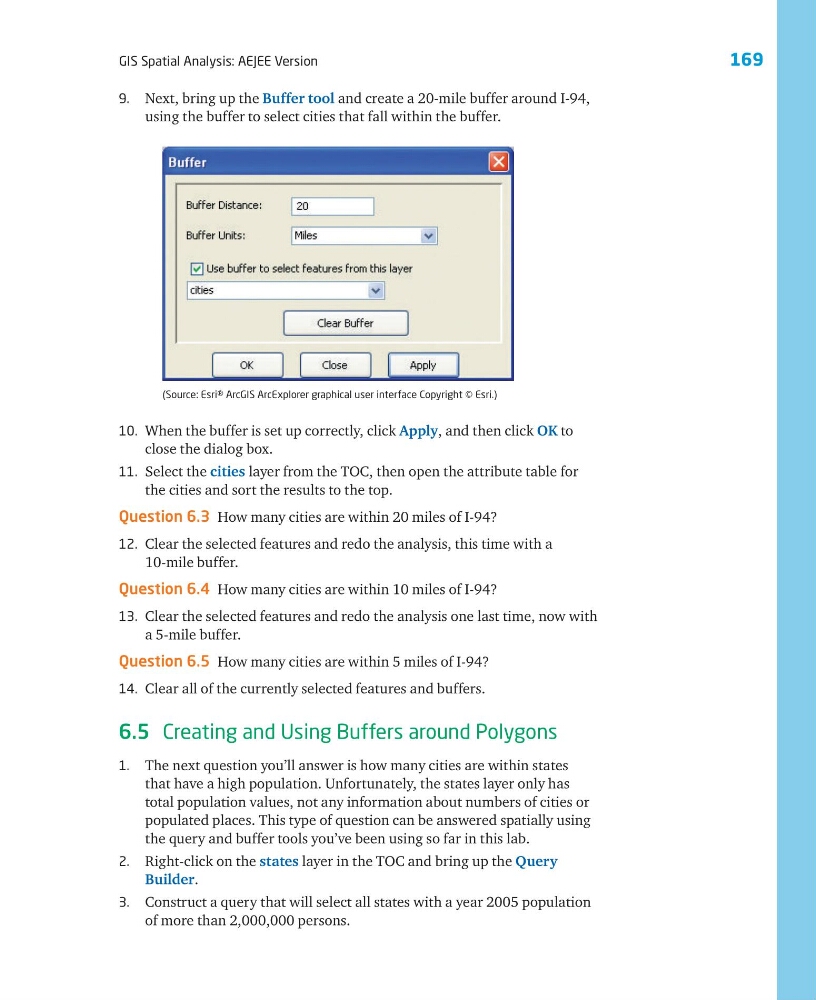
10. When the buffer is set up correctly, click Apply, and then click OK to
close the dialog box.
11. Select the cities layer from the TOC, then open the attribute table for
the cities and sort the results to the top.
Question 6.3 How many cities are within 20 miles of I-94?
12. Clear the selected features and redo the analysis, this time with a
10-mile buffer.
Question 6.4 How many cities are within 10 miles of I-94?
13. Clear the selected features and redo the analysis one last time, now with
a 5-mile buffer.
Question 6.5 How many cities are within 5 miles of I-94?
14. Clear all of the currently selected features and buffers.
6.5 Creating and Using Buffers around Polygons
1. The next question you’ll answer is how many cities are within states
that have a high population. Unfortunately, the states layer only has
total population values, not any information about numbers of cities or
populated places. This type of question can be answered spatially using
the query and buffer tools you’ve been using so far in this lab.
2. Right-click on the states layer in the TOC and bring up the Query
Builder.
3. Construct a query that will select all states with a year 2005 population
of more than 2,000,000 persons.
(Source: Esri® ArcGIS ArcExplorer graphical user interface Copyright © Esri.)
9. Next, bring up the Buffer tool and create a 20-mile buffer around I-94,
using the buffer to select cities that fall within the buffer.
GIS Spatial Analysis: AEJEE Version
10. When the buffer is set up correctly, click Apply, and then click OK to
close the dialog box.
11. Select the cities layer from the TOC, then open the attribute table for
the cities and sort the results to the top.
Question 6.3 How many cities are within 20 miles of I-94?
12. Clear the selected features and redo the analysis, this time with a
10-mile buffer.
Question 6.4 How many cities are within 10 miles of I-94?
13. Clear the selected features and redo the analysis one last time, now with
a 5-mile buffer.
Question 6.5 How many cities are within 5 miles of I-94?
14. Clear all of the currently selected features and buffers.
6.5 Creating and Using Buffers around Polygons
1. The next question you’ll answer is how many cities are within states
that have a high population. Unfortunately, the states layer only has
total population values, not any information about numbers of cities or
populated places. This type of question can be answered spatially using
the query and buffer tools you’ve been using so far in this lab.
2. Right-click on the states layer in the TOC and bring up the Query
Builder.
3. Construct a query that will select all states with a year 2005 population
of more than 2,000,000 persons.
(Source: Esri® ArcGIS ArcExplorer graphical user interface Copyright © Esri.)
9. Next, bring up the Buffer tool and create a 20-mile buffer around I-94,
using the buffer to select cities that fall within the buffer.