

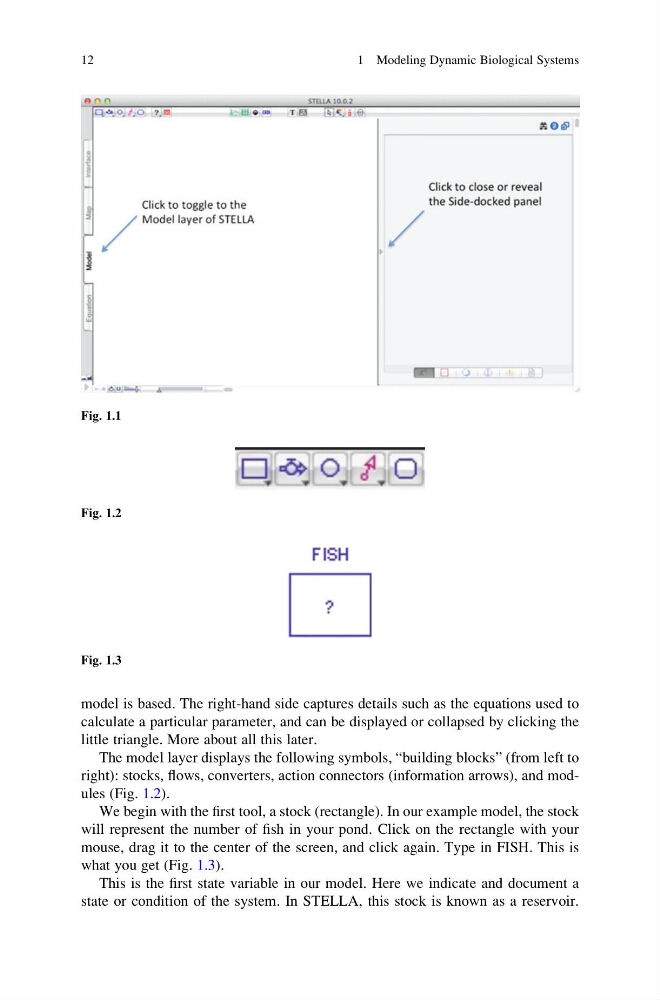
model is based. The right-hand side captures details such as the equations used to
calculate a particular parameter, and can be displayed or collapsed by clicking the
little triangle. More about all this later.
The model layer displays the following symbols, “building blocks” (from left to
right): stocks, flows, converters, action connectors (information arrows), and modules (Fig. 1.2).
We begin with the first tool, a stock (rectangle). In our example model, the stock
will represent the number of fish in your pond. Click on the rectangle with your
mouse, drag it to the center of the screen, and click again. Type in FISH. This is
what you get (Fig. 1.3).
This is the first state variable in our model. Here we indicate and document a
state or condition of the system. In STELLA, this stock is known as a reservoir.
Fig. 1.1
Fig. 1.2
Fig. 1.3
12
1 Modeling Dynamic Biological Systems
calculate a particular parameter, and can be displayed or collapsed by clicking the
little triangle. More about all this later.
The model layer displays the following symbols, “building blocks” (from left to
right): stocks, flows, converters, action connectors (information arrows), and modules (Fig. 1.2).
We begin with the first tool, a stock (rectangle). In our example model, the stock
will represent the number of fish in your pond. Click on the rectangle with your
mouse, drag it to the center of the screen, and click again. Type in FISH. This is
what you get (Fig. 1.3).
This is the first state variable in our model. Here we indicate and document a
state or condition of the system. In STELLA, this stock is known as a reservoir.
Fig. 1.1
Fig. 1.2
Fig. 1.3
12
1 Modeling Dynamic Biological Systems