

13.4.1 Overview of the HuLiS Program
The user can build a structure, and the Lewis structures can be generated and their
weights are evaluated almost instantaneously. All the process is graphical.
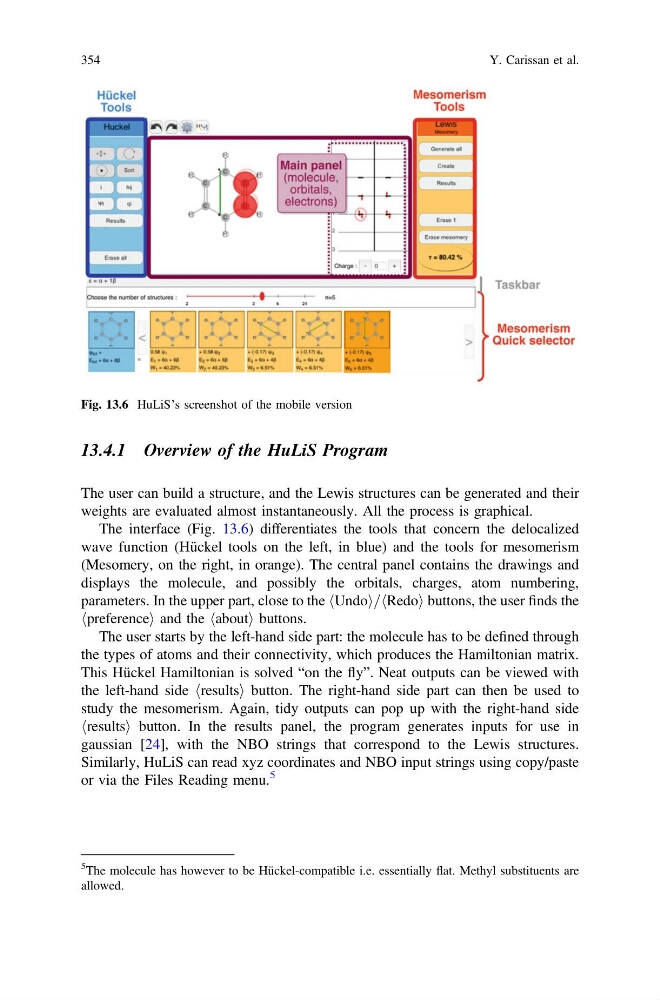
The interface (Fig. 13.6) differentiates the tools that concern the delocalized
wave function (Hückel tools on the left, in blue) and the tools for mesomerism
(Mesomery, on the right, in orange). The central panel contains the drawings and
displays the molecule, and possibly the orbitals, charges, atom numbering,
parameters. In the upper part, close to the hUndoi=hRedoi buttons, the user finds the
hpreferencei and the habouti buttons.
The user starts by the left-hand side part: the molecule has to be defined through
the types of atoms and their connectivity, which produces the Hamiltonian matrix.
This Hückel Hamiltonian is solved “on the fly”. Neat outputs can be viewed with
the left-hand side hresultsi button. The right-hand side part can then be used to
study the mesomerism. Again, tidy outputs can pop up with the right-hand side
hresultsi button. In the results panel, the program generates inputs for use in
gaussian [24], with the NBO strings that correspond to the Lewis structures.
Similarly, HuLiS can read xyz coordinates and NBO input strings using copy/paste
or via the Files Reading menu.
5
Fig. 13.6 HuLiS’s screenshot of the mobile version
5
The molecule has however to be Hückel-compatible i.e. essentially flat. Methyl substituents are
allowed.
354
Y. Carissan et al.
The user can build a structure, and the Lewis structures can be generated and their
weights are evaluated almost instantaneously. All the process is graphical.
The interface (Fig. 13.6) differentiates the tools that concern the delocalized
wave function (Hückel tools on the left, in blue) and the tools for mesomerism
(Mesomery, on the right, in orange). The central panel contains the drawings and
displays the molecule, and possibly the orbitals, charges, atom numbering,
parameters. In the upper part, close to the hUndoi=hRedoi buttons, the user finds the
hpreferencei and the habouti buttons.
The user starts by the left-hand side part: the molecule has to be defined through
the types of atoms and their connectivity, which produces the Hamiltonian matrix.
This Hückel Hamiltonian is solved “on the fly”. Neat outputs can be viewed with
the left-hand side hresultsi button. The right-hand side part can then be used to
study the mesomerism. Again, tidy outputs can pop up with the right-hand side
hresultsi button. In the results panel, the program generates inputs for use in
gaussian [24], with the NBO strings that correspond to the Lewis structures.
Similarly, HuLiS can read xyz coordinates and NBO input strings using copy/paste
or via the Files Reading menu.
5
Fig. 13.6 HuLiS’s screenshot of the mobile version
5
The molecule has however to be Hückel-compatible i.e. essentially flat. Methyl substituents are
allowed.
354
Y. Carissan et al.