

165
Supporting Consistent Design
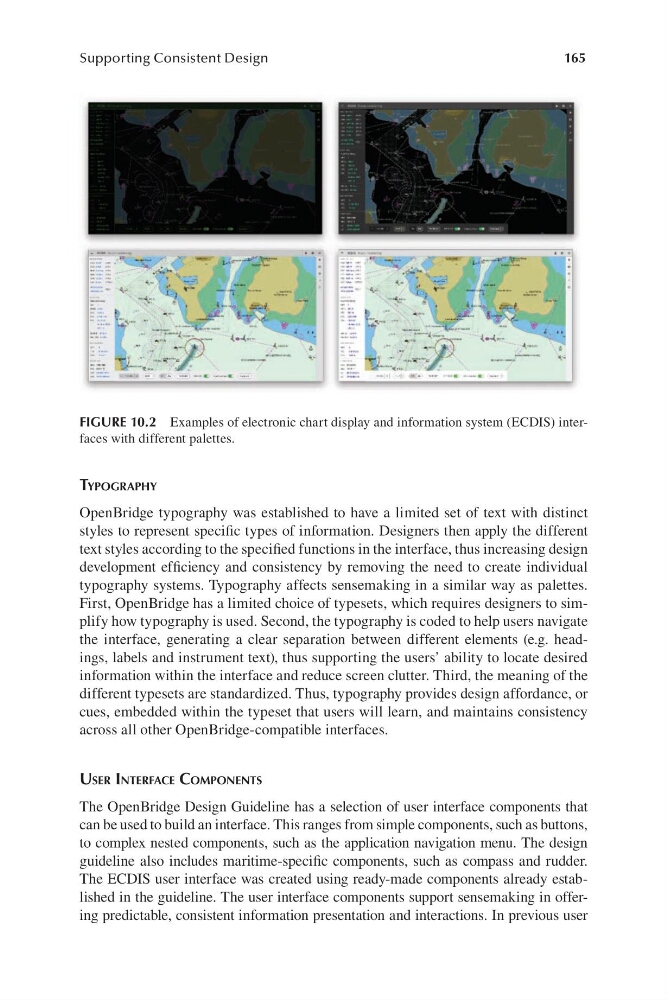
FIGURE 10.2 Examples of electronic chart display and information system ( ECDIS) interfaces with different palettes.
tyPograPhy
OpenBridge typography was established to have a limited set of text with distinct
styles to represent specific types of information. Designers then apply the different
text styles according to the specified functions in the interface, thus increasing design
development efficiency and consistency by removing the need to create individual
typography systems. Typography affects sensemaking in a similar way as palettes.
First, OpenBridge has a limited choice of typesets, which requires designers to simplify how typography is used. Second, the typography is coded to help users navigate
the interface, generating a clear separation between different elements (e .g. headings, labels and instrument text), thus supporting the users’ ability to locate desired
information within the interface and reduce screen clutter. Third, the meaning of the
different typesets are standardized. Thus, typography provides design affordance, or
cues, embedded within the typeset that users will learn, and maintains consistency
across all other OpenBridge-compatible interfaces.
uSer interface comPonentS
The OpenBridge Design Guideline has a selection of user interface components that
can be used to build an interface. This ranges from simple components, such as buttons,
to complex nested components, such as the application navigation menu. The design
guideline also includes m aritime-specific components, such as compass and rudder.
The ECDIS user interface was created using r eady-made components already established in the guideline. The user interface components support sensemaking in offering predictable, consistent information presentation and interactions. In previous user
Supporting Consistent Design
FIGURE 10.2 Examples of electronic chart display and information system ( ECDIS) interfaces with different palettes.
tyPograPhy
OpenBridge typography was established to have a limited set of text with distinct
styles to represent specific types of information. Designers then apply the different
text styles according to the specified functions in the interface, thus increasing design
development efficiency and consistency by removing the need to create individual
typography systems. Typography affects sensemaking in a similar way as palettes.
First, OpenBridge has a limited choice of typesets, which requires designers to simplify how typography is used. Second, the typography is coded to help users navigate
the interface, generating a clear separation between different elements (e .g. headings, labels and instrument text), thus supporting the users’ ability to locate desired
information within the interface and reduce screen clutter. Third, the meaning of the
different typesets are standardized. Thus, typography provides design affordance, or
cues, embedded within the typeset that users will learn, and maintains consistency
across all other OpenBridge-compatible interfaces.
uSer interface comPonentS
The OpenBridge Design Guideline has a selection of user interface components that
can be used to build an interface. This ranges from simple components, such as buttons,
to complex nested components, such as the application navigation menu. The design
guideline also includes m aritime-specific components, such as compass and rudder.
The ECDIS user interface was created using r eady-made components already established in the guideline. The user interface components support sensemaking in offering predictable, consistent information presentation and interactions. In previous user