

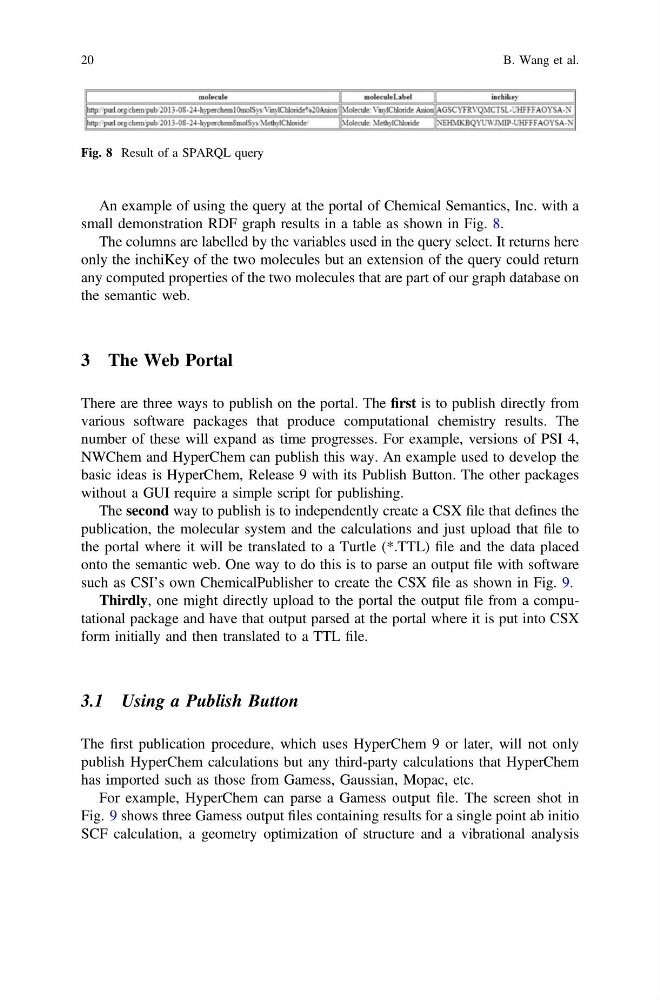
An example of using the query at the portal of Chemical Semantics, Inc. with a
small demonstration RDF graph results in a table as shown in Fig. 8.
The columns are labelled by the variables used in the query select. It returns here
only the inchiKey of the two molecules but an extension of the query could return
any computed properties of the two molecules that are part of our graph database on
the semantic web.
3 The Web Portal
There are three ways to publish on the portal. The first is to publish directly from
various software packages that produce computational chemistry results. The
number of these will expand as time progresses. For example, versions of PSI 4,
NWChem and HyperChem can publish this way. An example used to develop the
basic ideas is HyperChem, Release 9 with its Publish Button. The other packages
without a GUI require a simple script for publishing.
The second way to publish is to independently create a CSX file that defines the
publication, the molecular system and the calculations and just upload that file to
the portal where it will be translated to a Turtle (*.TTL) file and the data placed
onto the semantic web. One way to do this is to parse an output file with software
such as CSI’s own ChemicalPublisher to create the CSX file as shown in Fig. 9.
Thirdly, one might directly upload to the portal the output file from a computational package and have that output parsed at the portal where it is put into CSX
form initially and then translated to a TTL file.
3.1 Using a Publish Button
The first publication procedure, which uses HyperChem 9 or later, will not only
publish HyperChem calculations but any third-party calculations that HyperChem
has imported such as those from Gamess, Gaussian, Mopac, etc.
For example, HyperChem can parse a Gamess output file. The screen shot in
Fig. 9 shows three Gamess output files containing results for a single point ab initio
SCF calculation, a geometry optimization of structure and a vibrational analysis
Fig. 8 Result of a SPARQL query
20
B. Wang et al.
small demonstration RDF graph results in a table as shown in Fig. 8.
The columns are labelled by the variables used in the query select. It returns here
only the inchiKey of the two molecules but an extension of the query could return
any computed properties of the two molecules that are part of our graph database on
the semantic web.
3 The Web Portal
There are three ways to publish on the portal. The first is to publish directly from
various software packages that produce computational chemistry results. The
number of these will expand as time progresses. For example, versions of PSI 4,
NWChem and HyperChem can publish this way. An example used to develop the
basic ideas is HyperChem, Release 9 with its Publish Button. The other packages
without a GUI require a simple script for publishing.
The second way to publish is to independently create a CSX file that defines the
publication, the molecular system and the calculations and just upload that file to
the portal where it will be translated to a Turtle (*.TTL) file and the data placed
onto the semantic web. One way to do this is to parse an output file with software
such as CSI’s own ChemicalPublisher to create the CSX file as shown in Fig. 9.
Thirdly, one might directly upload to the portal the output file from a computational package and have that output parsed at the portal where it is put into CSX
form initially and then translated to a TTL file.
3.1 Using a Publish Button
The first publication procedure, which uses HyperChem 9 or later, will not only
publish HyperChem calculations but any third-party calculations that HyperChem
has imported such as those from Gamess, Gaussian, Mopac, etc.
For example, HyperChem can parse a Gamess output file. The screen shot in
Fig. 9 shows three Gamess output files containing results for a single point ab initio
SCF calculation, a geometry optimization of structure and a vibrational analysis
Fig. 8 Result of a SPARQL query
20
B. Wang et al.