

284
C. Drug˘ a et al.
press the play button or the test will start automatically after the first press of the
Play button. Headphones connected to the headphone jack will play pure-specific
tones at different intensities and frequencies. The subject will be instructed to raise
his hand whenever he hears or he seems to hear the sound.
The desired frequency can be selected by means of the linear potentiometer,
rotating to the right to increase the frequency and turning to the left to decrease the
frequency, and the intensity will be automatically played by the audiometer until the
Stop button is pressed or the potentiometer is rotated to move to the next frequency.
The RGB led will change color according to the frequency that we are changing.
The test can be stopped every time you press the “Stop” button to record the data
or send the data to the desired device (PC, laptop, smartphone, Iphone, etc.) via the
USB cable or the connection wireless. This will generate a server on a local wireless
network where the desired device will need to connect. Performing the test on the
desired ear is done very easily by pressing the left three-way button to the left for
the left ear or to the right for the right ear.
This device was built as a portable audiometer and can run for up to 12 h; after
unloading the batteries, you can rename a microSD. Test results are displayed on
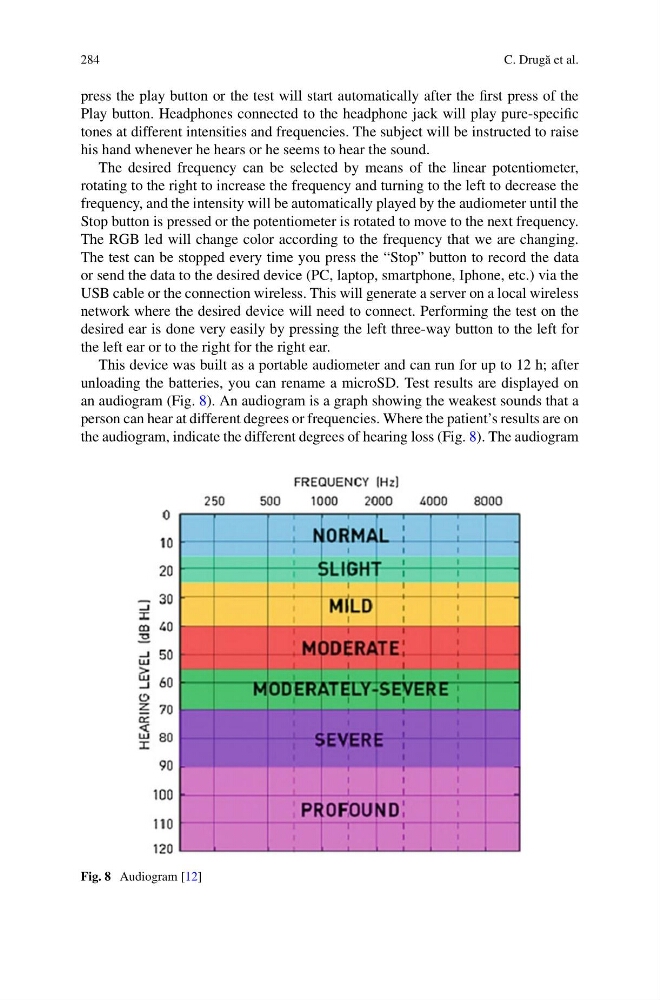
an audiogram (Fig. 8). An audiogram is a graph showing the weakest sounds that a
person can hear at different degrees or frequencies. Where the patient’s results are on
the audiogram, indicate the different degrees of hearing loss (Fig. 8). The audiogram
Fig. 8 Audiogram [12]
C. Drug˘ a et al.
press the play button or the test will start automatically after the first press of the
Play button. Headphones connected to the headphone jack will play pure-specific
tones at different intensities and frequencies. The subject will be instructed to raise
his hand whenever he hears or he seems to hear the sound.
The desired frequency can be selected by means of the linear potentiometer,
rotating to the right to increase the frequency and turning to the left to decrease the
frequency, and the intensity will be automatically played by the audiometer until the
Stop button is pressed or the potentiometer is rotated to move to the next frequency.
The RGB led will change color according to the frequency that we are changing.
The test can be stopped every time you press the “Stop” button to record the data
or send the data to the desired device (PC, laptop, smartphone, Iphone, etc.) via the
USB cable or the connection wireless. This will generate a server on a local wireless
network where the desired device will need to connect. Performing the test on the
desired ear is done very easily by pressing the left three-way button to the left for
the left ear or to the right for the right ear.
This device was built as a portable audiometer and can run for up to 12 h; after
unloading the batteries, you can rename a microSD. Test results are displayed on
an audiogram (Fig. 8). An audiogram is a graph showing the weakest sounds that a
person can hear at different degrees or frequencies. Where the patient’s results are on
the audiogram, indicate the different degrees of hearing loss (Fig. 8). The audiogram
Fig. 8 Audiogram [12]