

51
Image Filtering, Enhancement, and Restoration
Intuitively, when median filters are applied to an image, pixels whose values
are very different from their neighboring pixels will be eliminated. By eliminating the effect of such odd pixels, values are assigned to the pixels that are more
representative of the values of the typical neighboring pixels in the original image.
The main advantage of median filter is reducing the random noise without
eliminating the useful high-frequency components such as edges. This means that
while median filter provides smoothing effects similar to linear low-pass filter, it
avoids blurring effects that are associated with linear smoothing filters.
Example 3.6
In this example, we discuss the simulation of median filter in MATLAB. In order
to explore the performance of median filters, we select a non-noisy image and
intentionally add some noise to it. Then, we apply median filter to remove the
added noise. In order to do so, we use “imnoise” command to add some noise to
the image. The command “medfilt2”, which is the 2-D median filter, is then used
to filter the noise. Finally, both the noisy image and the filtered image are graphed.
I=imread(‘no_noisy_image.jpg’);
I=rgb2gray(I);
J=imnoise(I,‘salt&pepper’,.2);
k=medfilt2(J);
imshow(J);
figure,
imshow(k);
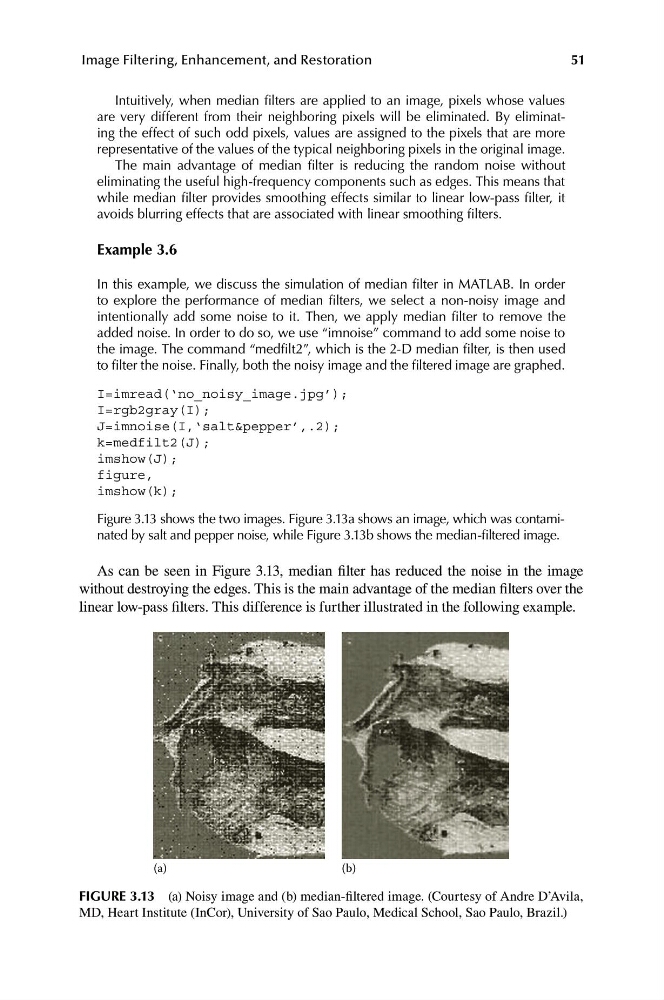
Figure 3.13 shows the two images. Figure 3.13a shows an image, which was contaminated by salt and pepper noise, while Figure 3.13b shows the median-filtered image.
As can be seen in Figure 3.13, median filter has reduced the noise in the image
without destroying the edges. This is the main advantage of the median filters over the
linear low-pass filters. This difference is further illustrated in the following example.
(a)
(b)
FIGURE 3.13 (a) Noisy image and (b) median-filtered image. (Courtesy of Andre D’Avila,
MD, Heart Institute (InCor), University of Sao Paulo, Medical School, Sao Paulo, Brazil.)
Image Filtering, Enhancement, and Restoration
Intuitively, when median filters are applied to an image, pixels whose values
are very different from their neighboring pixels will be eliminated. By eliminating the effect of such odd pixels, values are assigned to the pixels that are more
representative of the values of the typical neighboring pixels in the original image.
The main advantage of median filter is reducing the random noise without
eliminating the useful high-frequency components such as edges. This means that
while median filter provides smoothing effects similar to linear low-pass filter, it
avoids blurring effects that are associated with linear smoothing filters.
Example 3.6
In this example, we discuss the simulation of median filter in MATLAB. In order
to explore the performance of median filters, we select a non-noisy image and
intentionally add some noise to it. Then, we apply median filter to remove the
added noise. In order to do so, we use “imnoise” command to add some noise to
the image. The command “medfilt2”, which is the 2-D median filter, is then used
to filter the noise. Finally, both the noisy image and the filtered image are graphed.
I=imread(‘no_noisy_image.jpg’);
I=rgb2gray(I);
J=imnoise(I,‘salt&pepper’,.2);
k=medfilt2(J);
imshow(J);
figure,
imshow(k);
Figure 3.13 shows the two images. Figure 3.13a shows an image, which was contaminated by salt and pepper noise, while Figure 3.13b shows the median-filtered image.
As can be seen in Figure 3.13, median filter has reduced the noise in the image
without destroying the edges. This is the main advantage of the median filters over the
linear low-pass filters. This difference is further illustrated in the following example.
(a)
(b)
FIGURE 3.13 (a) Noisy image and (b) median-filtered image. (Courtesy of Andre D’Avila,
MD, Heart Institute (InCor), University of Sao Paulo, Medical School, Sao Paulo, Brazil.)